
Shopify or WooCommerce. It is the most searched eCommerce comparison query on the internet — and for good reason. Both platforms power millions of online stores, both have passionate advocates, and both can be the right choice. The question is which is right for your specific business, at your specific stage, with your specific requirements.
The problem with most Shopify vs WooCommerce guides is that they are written by agencies who prefer one platform — and their “objective comparison” inevitably leads to a recommendation for the platform they build on. This guide is different. Neel Networks builds on both platforms for clients across the USA, UK, Canada, Australia, and India. We have seen both succeed brilliantly and both struggle when the wrong platform is chosen for the wrong context.
This guide uses real platform data, real cost calculations, and real performance benchmarks to give you a decision framework that works for your business — not for ours.
Understanding the scale of each platform establishes why this comparison matters and what each platform has invested in.
Shopify powers approximately 4.6 million live stores worldwide as of 2026 — making it the world’s largest dedicated eCommerce platform by store count. It processes over $235 billion in gross merchandise volume annually and has become the default recommendation for straightforward direct-to-consumer eCommerce. Its growth has been driven by an obsessive focus on making selling online simple, reliable, and scalable without requiring technical expertise.
WooCommerce, as a WordPress plugin, powers an estimated 6.6 million active stores — though this larger number reflects WordPress’s ubiquity rather than necessarily a more capable eCommerce product. WooCommerce’s strength is its flexibility: because it is built on WordPress, it can be combined with any WordPress capability, customised at any level, and owned completely by the merchant without monthly platform fees.
Both platforms are mature, actively developed, and capable of powering serious eCommerce businesses. The meaningful differences are in the experience of operating them, the true cost of ownership, and the specific capabilities each does or does not provide out of the box.
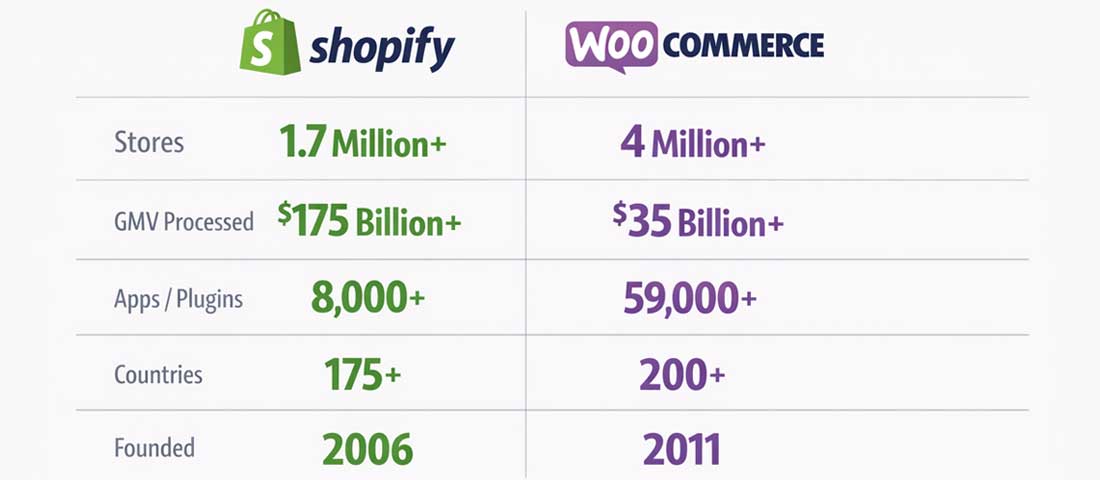
Both platforms operate at massive scale — the market position difference is less about size and more about the type of merchant each serves best.
Cost is consistently the first question in every Shopify vs WooCommerce conversation — and consistently the most misleadingly simple to answer. The headline numbers do not tell the real story. Here is the complete cost picture.
| Cost Item | Shopify Basic | Shopify Standard | Shopify Advanced |
|---|---|---|---|
| Monthly platform fee | $39/month | $105/month | $399/month |
| Transaction fee (non-Shopify Payments) | 2.0% | 1.0% | 0.5% |
| Transaction fee (Shopify Payments) | 0% | 0% | 0% |
| Premium theme (one-time) | $150–$380 | $150–$380 | $150–$380 |
| Essential paid apps (avg) | $50–$150/month | $50–$150/month | $50–$150/month |
| Custom domain | ~$15/year | ~$15/year | ~$15/year |
| Hosting | Included | Included | Included |
| Realistic Year 1 total | ~$1,600–$2,500 | ~$2,800–$3,700 | ~$6,500–$7,500 |
The transaction fee trap: If you are doing $200,000/year in sales and using a third-party payment gateway on Shopify Basic, the 2% transaction fee alone is $4,000/year — nearly double the platform subscription cost. Using Shopify Payments eliminates this entirely, but Shopify Payments is not available in all countries. For Indian merchants, this is a significant consideration.
| Cost Item | Budget Setup | Professional Setup | Managed Setup |
|---|---|---|---|
| WooCommerce plugin | Free | Free | Free |
| WordPress hosting | $5–15/month (shared) | $30–80/month (VPS/managed) | $35–100/month (managed WP) |
| Premium theme | $50–100 (one-time) | $50–200 (one-time) | $50–200 (one-time) |
| Essential premium extensions | $100–300/year | $300–800/year | $300–800/year |
| Payment gateway fees | Stripe/PayPal: 2.9% + $0.30 | Stripe/PayPal: 2.9% + $0.30 | Stripe/PayPal: 2.9% + $0.30 |
| Security (SSL, WAF, backups) | $50–100/year | Often included in hosting | Included in managed hosting |
| Maintenance/updates | DIY or $50–200/month | $50–200/month | Often included |
| Realistic Year 1 total | ~$500–$1,000 | ~$1,200–$2,500 | ~$1,800–$3,200 |
The honest cost verdict: WooCommerce has a lower total cost of ownership when self-managed, but the “free” aspect is misleading — someone needs to manage hosting, security, and updates. When the cost of professional management is included, WooCommerce and Shopify are much closer in price. Shopify’s advantage is that the management overhead is included in the platform fee. WooCommerce’s advantage is that you have full control over where that money goes.
This is where Shopify and WooCommerce diverge most dramatically — and where the right answer depends almost entirely on your technical confidence and available team resources.
Shopify’s entire product philosophy is built around the premise that merchants should spend their time selling, not managing technology. The result is a platform that a non-technical business owner can genuinely operate independently — adding products, processing orders, running discount campaigns, managing inventory, and reading sales reports — without needing a developer for routine operations.
Setup is genuinely fast: a functional Shopify store with a paid theme, configured payment gateway, and initial product catalogue can be operational in 3 to 5 days for a motivated non-technical operator. The Shopify admin is consistently cited as one of the most intuitive commerce back-end interfaces available.
The trade-off: Shopify’s simplicity comes from opinionation. When you want to do something outside Shopify’s defined workflow — a highly custom checkout experience, a non-standard product type, a deeply specific pricing logic — you run into Shopify’s constraints quickly. Those constraints can only be removed with custom development, which can be expensive and technically complex.
WooCommerce provides significantly more flexibility than Shopify — but extracts a corresponding tax in complexity. A WooCommerce store requires: choosing and configuring hosting, installing and configuring WordPress, installing WooCommerce and configuring its settings, choosing and installing a theme, choosing and configuring payment gateways, setting up shipping, and establishing a backup and security routine. Each step is manageable individually; together they form a steeper learning curve than Shopify’s guided setup.
Day-to-day operation of a WooCommerce store also requires more technical attention: applying WordPress and plugin updates (and dealing with occasional update-related issues), monitoring server performance, managing database health, and responding to security alerts. For merchants with a technical team or a reliable development agency, this overhead is manageable. For solo operators without technical support, it can be exhausting.
Platform performance directly affects SEO rankings and conversion rates — and the two platforms have genuinely different performance profiles.
Shopify’s infrastructure is globally distributed and highly reliable — 99.98% uptime guarantee, global CDN, and servers optimised specifically for eCommerce workloads. However, Shopify’s theme system and app ecosystem are sources of performance problems that many merchants do not anticipate. App developers inject JavaScript into the storefront for their functionality — and a store with 20 to 30 apps installed (common for growing Shopify stores) can accumulate significant JavaScript payload that dramatically slows page load times.
Independent performance data from tools like BuiltWith and Chrome User Experience Report shows that while Shopify’s infrastructure is fast, the average Shopify storefront performs worse on Core Web Vitals than a well-optimised WooCommerce store on managed hosting — precisely because of app-accumulated JavaScript.
WooCommerce performance is entirely determined by your hosting and optimisation choices. On cheap shared hosting without caching, a WooCommerce store can be painfully slow — worse than almost any Shopify store. On quality managed WordPress hosting (Kinsta, WP Engine, Cloudways) with server-level caching and a performance-optimised theme, WooCommerce consistently produces excellent Core Web Vitals scores that match or exceed Shopify’s best performers.
The practical implication: WooCommerce performance ceiling is higher than Shopify’s, but WooCommerce performance floor is lower. Your performance outcome depends on the investment and decisions you make — it is not guaranteed by the platform.
Both platforms provide adequate SEO foundations for most businesses. The differences are at the margins — but those margins matter for competitive keywords.
| SEO Factor | Shopify | WooCommerce | Advantage |
|---|---|---|---|
| URL structure control | Limited — /products/ and /collections/ forced | Full control — any URL structure | ✅ WooCommerce |
| Blog / content capability | Basic built-in blog — limited | Full WordPress CMS — excellent | ✅ WooCommerce |
| Meta tags and schema | Handled by theme + apps | Full control via Rank Math / Yoast | ✅ WooCommerce (slightly) |
| Page speed (default) | Fast infrastructure, but app bloat | Hosting-dependent but optimisable | 🟡 Tie (context-dependent) |
| Technical SEO control | Limited — Shopify controls many technical decisions | Full control — every technical detail accessible | ✅ WooCommerce |
| Duplicate content handling | Known issues with /collections/ and pagination | Manageable with good plugin configuration | ✅ WooCommerce (slightly) |
| Structured data / schema | Product schema included; limited customisation | Full schema control via plugins or code | ✅ WooCommerce |
| Ease of SEO management | Simple — less to configure | More capable but more complex | ✅ Shopify (for non-technical) |
The overall SEO verdict: WooCommerce provides more SEO flexibility and control for merchants with technical capability or a skilled agency. For merchants without SEO technical expertise, Shopify’s simpler SEO setup reduces the risk of technical mistakes that harm rankings.
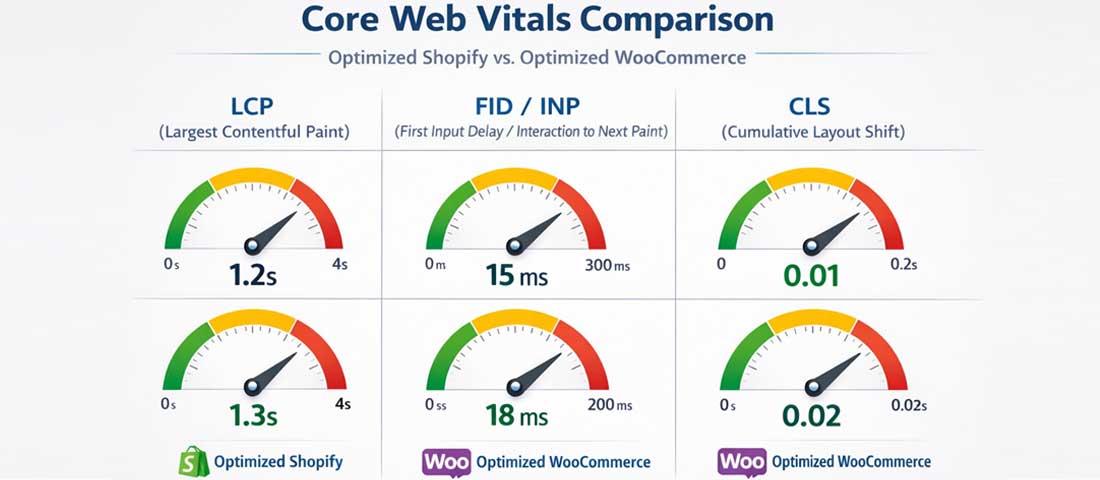
Performance on both platforms is determined as much by implementation quality as by the platform itself — a well-optimised WooCommerce store consistently matches or exceeds Shopify’s performance metrics.
Shopify’s Theme Store contains over 100 professional themes ranging from free to $380. The themes are reviewed and approved by Shopify, ensuring minimum quality standards. The Shopify theme editor (particularly in Online Store 2.0) provides extensive customisation through sections and blocks — allowing significant design flexibility without coding.
Beyond the official Theme Store, thousands of third-party Shopify themes are available through marketplaces like Themeforest. The constraint is that Shopify themes use Shopify’s proprietary Liquid template language — customisation beyond the theme editor’s built-in options requires Liquid knowledge, which is Shopify-specific and therefore less widely available than standard web development skills.
WooCommerce’s design ecosystem is larger than Shopify’s by orders of magnitude. Any WordPress theme — of which there are tens of thousands — can be used with WooCommerce. The WordPress Customizer and full CSS access provide design flexibility that Shopify’s theme system cannot match. Page builders like Elementor and Divi provide visual drag-and-drop design that produces highly customised layouts without code.
The trade-off: WooCommerce’s larger design ecosystem means more options and more risk. Choosing a poorly maintained theme or a theme with slow performance characteristics can significantly harm your store’s performance and user experience. Quality curation requires knowledge that Shopify’s curated Theme Store provides by default.
| Category | Shopify | WooCommerce |
|---|---|---|
| Total apps/plugins available | 8,000+ Shopify apps | 50,000+ WordPress plugins (WC-compatible) |
| Quality control | Reviewed by Shopify — minimum standard enforced | Variable — community-reviewed, no vetting |
| Average app cost | $10–50/month per app (subscription) | Free to $300/year (one-time or annual) |
| Subscription accumulation risk | High — 10 apps = $100–500/month additional | Lower — one-time purchases more common |
| Integration reliability | High — apps built to Shopify’s API standards | Variable — plugin conflicts are common |
| Key missing features needing apps | Reviews, subscriptions, advanced discounts, loyalty | Most features available as free plugins |
Scalability needs to be evaluated across three dimensions: transaction volume, product catalogue size, and international selling requirements.
Shopify handles transaction volume scaling automatically — their infrastructure scales with demand, and merchants never need to think about server capacity. A flash sale or viral product moment that sends 10x normal traffic simply works on Shopify without any merchant action.
WooCommerce scalability at high transaction volumes requires proactive infrastructure investment: managed hosting with auto-scaling, database optimisation, object caching (Redis), and content delivery network configuration. This is manageable but requires technical oversight.
Shopify Markets is a genuinely powerful international selling feature that handles multi-currency, multi-language, local payment methods, and market-specific pricing from within the Shopify admin. For businesses targeting multiple international markets, Shopify Markets significantly reduces the complexity of international eCommerce.
WooCommerce international selling requires assembling multiple plugins: WPML or Polylang for multi-language, a currency switching plugin, and potentially market-specific payment gateway plugins. The result can be equally functional but requires more configuration and ongoing management.
The honest answer: There is no universally correct choice. Both platforms power highly successful stores. The right choice is the one that fits your specific situation — not the platform that wins the most feature comparisons on paper.
| Which is better for SEO — Shopify or WooCommerce? | WooCommerce has a technical SEO advantage for merchants with the expertise or agency support to leverage it. WordPress’s content management system is significantly more powerful than Shopify’s basic blog, enabling the kind of comprehensive content marketing strategy that drives long-term organic rankings. WooCommerce also provides complete URL structure control, full schema markup customisation, and unrestricted technical SEO access — Shopify forces the /products/ and /collections/ URL structure and limits some technical SEO decisions. That said, Shopify’s SEO foundation is entirely adequate for most businesses, and Shopify’s faster setup and simpler SEO configuration reduces the risk of technical mistakes that harm rankings. For non-technical merchants, Shopify’s SEO simplicity often produces better real-world outcomes than WooCommerce’s more powerful-but-complex capabilities. |
| Is WooCommerce really free? | WooCommerce the plugin is free, but running a serious WooCommerce store is not. The realistic costs of a professional WooCommerce setup include: WordPress hosting ($30 to $100/month for quality managed hosting), premium theme ($50 to $200 one-time), essential premium extensions for features like advanced shipping, subscriptions, or bookings ($300 to $800/year), payment gateway transaction fees (typically 2.9% + $0.30 per transaction with Stripe or PayPal), and ongoing maintenance either as your own time or paid support. The total cost of a professionally managed WooCommerce store is often comparable to a Shopify Basic or Standard subscription once all costs are properly accounted for. The WooCommerce cost advantage is most significant when self-managed by a technically capable merchant, or when the flexibility of WooCommerce enables revenue opportunities that Shopify’s constraints would prevent. |
| Can I migrate from Shopify to WooCommerce or vice versa? | Yes — migration between both platforms is technically possible and done regularly. Moving from Shopify to WooCommerce involves: exporting your Shopify product catalogue, customer data, and order history; importing into WooCommerce using migration tools like Cart2Cart or LitExtension; recreating your store’s design in a WooCommerce theme; configuring your payment gateways and shipping settings; implementing 301 redirects from all Shopify URLs to WooCommerce URLs; and reconfiguring your apps and extensions. The reverse process follows similar steps. The practical considerations are: migration takes 4 to 8 weeks minimum for a store of any meaningful size, it carries SEO risk during the transition period if redirects are not implemented correctly, and it incurs significant development cost. Migration should be driven by genuine business requirements that the current platform cannot meet — not by general dissatisfaction that could be addressed more cheaply by optimising the current platform. |
| Which platform is better for dropshipping? | Shopify is generally the better dropshipping platform due to its superior integration with dropshipping supplier networks. The Shopify App Store has mature, well-supported integrations with major dropshipping platforms including DSers (AliExpress’s official app), Spocket, Zendrop, and AutoDS — providing automated product import, order fulfilment, and inventory synchronisation with minimal setup. WooCommerce also has dropshipping plugin options including AliDropship and Spocket’s WooCommerce integration, and these work well for many dropshippers. Shopify’s advantage in dropshipping is its reliability and the maturity of its supplier integrations — the Shopify dropshipping ecosystem is more developed because the platform attracted dropshipping merchants earlier and in greater numbers, driving supplier integrations to prioritise Shopify compatibility. |
| Does Shopify or WooCommerce handle more traffic better? | Shopify handles traffic scaling automatically and invisibly — merchants never need to think about server capacity regardless of traffic spikes. This is one of Shopify’s strongest advantages: a viral product moment or flash sale that sends 50x normal traffic simply works without any action from the merchant. WooCommerce traffic handling is determined by your hosting infrastructure — on quality managed hosting with proper caching and auto-scaling, WooCommerce handles high traffic volumes excellently. On cheap shared hosting, even moderate traffic can cause slowdowns or outages. For non-technical merchants who cannot proactively manage hosting infrastructure, Shopify’s automatic scaling is a meaningful reliability advantage. For merchants with technical resources who can invest in quality hosting infrastructure, WooCommerce on managed hosting scales just as reliably as Shopify. |
| Which platform is better for selling in India? | WooCommerce is generally the better choice for India-based eCommerce businesses, for several specific reasons. Shopify Payments — which eliminates transaction fees on Shopify — is not available in India, meaning Indian merchants on Shopify pay transaction fees of 0.5% to 2% on every sale in addition to their monthly subscription. WooCommerce integrates natively with Razorpay, Paytm, PayU, CCAvenue, and other Indian payment gateways through well-maintained plugins at no additional transaction fee. WooCommerce’s lower base cost is also more commercially rational for India’s pricing environment. WooCommerce’s flexibility is better suited to India’s diverse eCommerce requirements — regional language support, GST invoice generation, India-specific shipping integrations with Delhivery, BlueDart, and Shiprocket all have mature WooCommerce plugins. Indian businesses targeting international markets may find Shopify’s international selling features valuable enough to justify the platform despite the payment gateway limitation. |
| How long does it take to build a store on Shopify vs WooCommerce? | A basic functional store can be launched on Shopify in 3 to 7 days for a motivated non-technical operator using a pre-built theme, compared to 1 to 3 weeks for an equivalent WooCommerce setup that requires hosting configuration, WordPress installation, and more complex initial setup. For professionally custom-designed stores built by an agency, both platforms take roughly similar timelines: 6 to 10 weeks for a quality custom Shopify store and 8 to 12 weeks for a quality custom WooCommerce store — the additional WooCommerce time reflecting WordPress’s more complex environment. The time difference is most significant at the entry level, where Shopify’s guided setup and hosted infrastructure genuinely accelerates launch for non-technical merchants. For agency-built custom stores, the timeline difference between platforms is less significant than the design and development scope. |
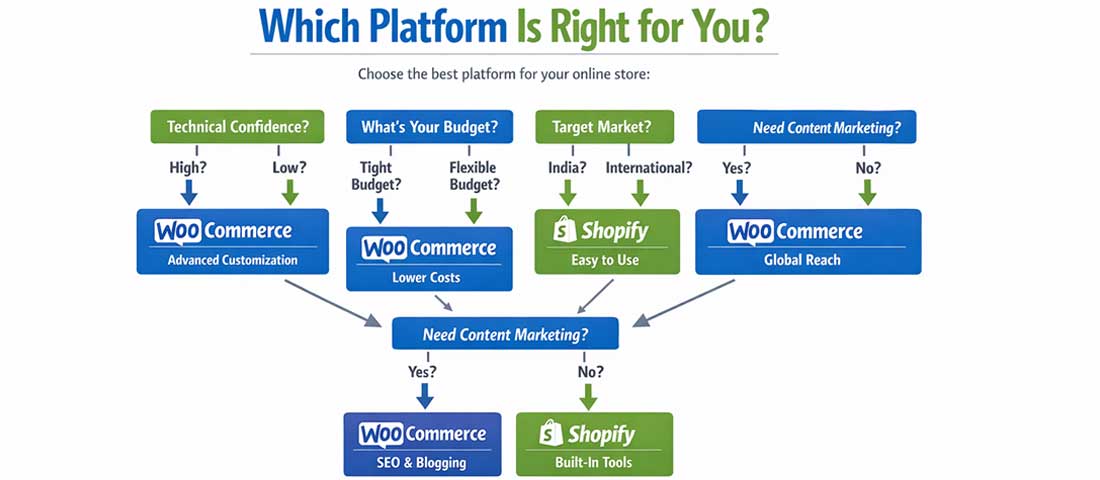
Use this decision framework to find your platform match — the right answer depends on your specific situation, not on which platform wins the most feature comparisons.
Not Sure Which Platform is Right for Your Business?
Neel Networks builds professional eCommerce stores on both Shopify and WooCommerce for businesses across the USA, UK, Canada, Australia, and India. We give you an honest recommendation based on your specific business — not on which platform we prefer to build on. Talk to our eCommerce team.
Whether you have a new idea, a business challenge, or something you would like to improve, we are here to help. From building websites, online stores, CRM systems, and custom applications to exploring AI solutions, improving SEO, or growing your sales, simply tell us what you have in mind, and we will help you find the best way forward.
A member of our team will review your enquiry and respond to you shortly.
Some cookies are necessary for this website to work. With your permission we would also like to measure how our articles are read, and whether an advertisement led to an enquiry. You are free to decline, and to change your choice at any time. Our Cookie Policy explains each category in full.