Sustainable Web Design: How to Reduce Your Website’s Carbon Footprint
Every website you visit uses electricity. The data centre storing the files, the network transmitting them, the device rendering them — all consuming power, all producing carbon emissions. The internet now accounts for approximately 4% of global CO2 emissions — more than the aviation industry. And that figure is growing as the web becomes more media-heavy, more JavaScript-dependent, and more ubiquitous across every aspect of daily life.
Sustainable web design is the practice of building websites that consume less energy, produce fewer emissions, and deliver better performance — all simultaneously. The reason all three happen together is not coincidence: the same decisions that reduce a website’s environmental impact (smaller files, simpler code, efficient caching, lighter hosting) are precisely the decisions that make websites faster, improve Core Web Vitals, and boost organic search rankings.
Sustainable web design is not a compromise between ethics and performance. It is a design philosophy that produces better websites by removing everything that does not serve the user.

How Websites Produce Carbon Emissions — The Full Picture
Understanding where website carbon emissions come from is the foundation for reducing them. The energy consumption happens across four distinct stages every time a page loads:
Data Centres
The servers storing your website files consume electricity continuously — whether anyone is visiting or not. Data centre energy efficiency varies enormously: the best operators use renewable energy and achieve PUE (Power Usage Effectiveness) ratios near 1.1. The worst use fossil fuel energy and PUE ratios above 2.0, meaning they use as much energy on cooling as on computing.
Data Transmission
Every byte of data transferred from server to visitor uses energy in the network infrastructure — cables, routers, switches, mobile towers. The larger the page weight (total file size), the more data transmitted, the more energy consumed per page load. A 4MB page uses roughly 4x the transmission energy of a 1MB equivalent page.
End User Devices
Rendering a web page uses CPU and GPU power on the visitor’s device. Complex JavaScript-heavy pages with animations, heavy frameworks, and large DOM trees require significantly more processing power than simple, well-structured pages — draining phone batteries faster and consuming more energy on desktop devices.
CDN Infrastructure
Content Delivery Networks that cache and distribute website content globally consume their own energy footprint. The best CDN providers (Cloudflare, Fastly) are moving toward 100% renewable energy for their edge nodes. The carbon intensity of CDN delivery varies significantly by provider and geography.
The average web page in 2026 produces approximately 0.5 grams of CO2 per page view. Multiply by your monthly pageviews — a site with 50,000 monthly pageviews produces approximately 25kg of CO2 per month, or 300kg per year. A high-traffic site with 1 million monthly views produces 6,000kg of CO2 annually. These numbers are comparable to significant real-world activities — and they are reducible with the right design decisions.
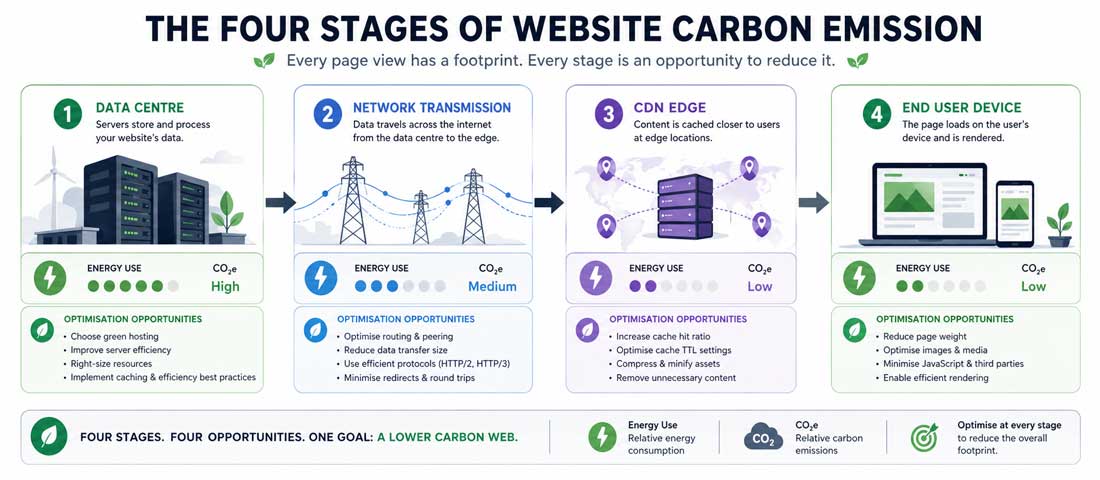
Carbon emissions occur at every stage of the website delivery chain — from the data centre storing your files to the device rendering them. Sustainable web design reduces energy consumption at each stage simultaneously.
How to Measure Your Website’s Carbon Footprint
Before optimising, measure. Several free tools calculate your website’s estimated carbon footprint per page view:
- Website Carbon Calculator (websitecarbon.com) — The most widely used tool. Enter any URL and receive an estimated CO2 per page view, a comparison against the average web page, and a rating from A+ (cleanest) to F (most polluting). Uses page weight and hosting carbon intensity as primary inputs.
- Ecograder (ecograder.com) — Scores your website on sustainability across multiple dimensions: page weight, green hosting, UX efficiency, and performance. Provides specific actionable recommendations alongside the score.
- Google PageSpeed Insights (pagespeed.web.dev) — Not a carbon tool but the performance metrics it measures (page weight, render-blocking resources, image optimisation) are direct proxies for carbon efficiency.
Test your homepage, your highest-traffic blog posts, and your primary service pages — these are where the majority of your site’s emissions occur and where optimisation has the greatest impact.
Image Optimisation — The Biggest Single Carbon Reduction
Images account for 50 to 70% of the total weight of most web pages — making image optimisation the highest-impact single action in sustainable web design. Reducing image file sizes reduces data transmission, reduces server storage requirements, and reduces rendering energy on end-user devices.
Convert All Images to WebP or AVIF
WebP images are 25 to 35% smaller than equivalent JPEG or PNG files with no visible quality difference at standard screen viewing sizes. AVIF — a newer format supported by all major browsers in 2026 — achieves 50% or greater size reduction over JPEG at equivalent quality. Every image on your website should be in WebP at minimum, with AVIF for your highest-impact hero images.
/* Serve AVIF to browsers that support it, WebP as fallback */
<picture>
  <source srcset="hero-image.avif" type="image/avif">
  <source srcset="hero-image.webp" type="image/webp">
  <img src="hero-image.jpg" alt="Description" width="860" height="480" loading="lazy">
</picture>
Serve Correctly Sized Images
The most common image waste on websites is serving a 2000px wide image in a container that displays at 400px on mobile. The browser downloads the full 2000px image, uses 20% of its pixels, and discards the rest. Use the srcset attribute to serve different image sizes to different screen widths:
<img
  src="product-800.webp"
  srcset="product-400.webp 400w,
          product-800.webp 800w,
          product-1200.webp 1200w"
  sizes="(max-width: 480px) 400px,
         (max-width: 960px) 800px,
         1200px"
  alt="Product name"
  loading="lazy"
  width="1200"
  height="800"
>
Lazy Loading
Images below the fold — not visible without scrolling — should not be loaded until the visitor scrolls toward them. The loading="lazy" attribute on all non-hero images defers their loading until needed, reducing the data transferred for visitors who do not scroll through the entire page. This is already set on all images in Neel Networks blog posts via the nn-post template.
Appropriate Quality Compression
JPEG quality of 85% is visually indistinguishable from 100% in most web contexts but produces files 40 to 60% smaller. WebP quality of 80 to 85% produces excellent results. Tools like Squoosh, TinyPNG, or ImageOptim apply optimal compression. For WordPress sites, the ShortPixel or EWWW Image Optimizer plugins handle compression automatically on upload.
JavaScript and CSS Efficiency — Removing the Bloat
JavaScript is the fastest-growing contributor to page weight on modern websites. The average web page now transfers approximately 500KB of JavaScript — and a significant proportion of that JavaScript is never executed for any given page view. Each kilobyte of unused JavaScript wastes data transmission, consumes CPU time parsing and compiling it, and delays page rendering.
Audit and Remove Unused JavaScript
Open Chrome DevTools → Coverage tab (Ctrl+Shift+P → “Coverage”) on any page of your website. The Coverage tool shows what percentage of each JavaScript and CSS file is actually used for that page. Files showing 70 to 90% unused are candidates for removal, lazy loading, or replacement with lighter alternatives.
Replace Heavy Libraries With Vanilla Code
jQuery — still running on millions of WordPress sites — adds approximately 87KB to page weight. In 2026, every function jQuery provides is available in native JavaScript without any library. Most sites that still include jQuery use it for 3 to 5 specific functions that take 10 to 15 lines of vanilla JavaScript to replicate.
Similarly, many WordPress themes include full Bootstrap (148KB) for a grid system and a few utility classes. Replacing Bootstrap with a lightweight custom grid saves 100KB+ per page load across every page on the site.
Minify and Compress Everything
Minification removes whitespace, comments, and verbose variable names from JavaScript and CSS files, reducing their size by 20 to 40%. Gzip or Brotli compression on the server further reduces transfer size by 60 to 80% for text-based files. Both should be configured as standard on any web server in 2026 — they require no code changes and have zero visual impact.
Green Hosting — What It Means and Which Providers Qualify
Hosting provider choice is the second-highest-impact sustainability decision after page weight optimisation. Data centres are the largest energy consumers in the website chain, and the carbon intensity of that energy varies enormously depending on whether the provider uses renewable energy sources.
What Green Hosting Actually Means
Green hosting claims fall into three categories of increasing credibility:
-
Renewable Energy Certificates (RECs) / Carbon Offsets
The lowest tier — the hosting company purchases certificates that represent renewable energy generation elsewhere, or pays to offset its carbon emissions. The data centre may still run on fossil fuel electricity; the certificates are an accounting mechanism. Better than nothing, but the weakest form of green hosting. -
Direct Renewable Energy Purchasing (PPAs)
The hosting company purchases renewable energy directly through Power Purchase Agreements — contracting with wind, solar, or hydro energy producers for their actual electricity supply. This is genuine renewable energy powering the servers, not offset accounting. Google Cloud, AWS (with renewable energy regions), and Microsoft Azure all offer this in specific regions. -
Carbon Neutral or Net Zero Certified Operations
The highest tier — third-party verified carbon neutrality across the entire operation, including scope 3 emissions (supply chain and hardware manufacturing). Few providers have achieved this, but the number is growing. The Green Web Foundation’s database (thegreenwebfoundation.org) provides a free lookup to check whether a specific hosting provider is verified green.
Green Hosting Providers Worth Considering in 2026
| Provider | Green Credentials | Best For |
|---|---|---|
| Kinsta | Google Cloud infrastructure — Google’s data centres match 100% with renewable energy | Managed WordPress — premium performance |
| Cloudways (Google Cloud) | Google Cloud regions with renewable energy matching | Managed cloud VPS — flexible and developer-friendly |
| GreenGeeks | 3x wind energy credits — exceeds energy consumption by 300% | Shared and WordPress hosting — sustainability focus |
| SiteGround | Matches energy usage with RECs; increasingly direct renewable | WordPress and business hosting — strong performance |
| Infomaniak | Swiss hydro-powered data centres — genuinely renewable energy source | European businesses — GDPR-native and renewable |
Fonts, Videos, and Third-Party Scripts — The Hidden Emitters
Web Fonts
Google Fonts, Adobe Fonts, and other web font services add HTTP requests, JavaScript, and CSS that delay page rendering. Each font weight and style is a separate file — a site loading Regular, Italic, Bold, and Bold Italic across two typefaces is loading 8 separate font files. Sustainability-conscious font loading uses: font-display: swap to prevent render blocking, unicode-range subsetting to load only characters used on the page, and preconnect hints to the font CDN to reduce DNS lookup time.
The most sustainable option is using system fonts — the fonts already installed on the visitor’s device. A system font stack requires zero additional downloads and produces zero additional emissions for font delivery. It sacrifices brand differentiation but eliminates an entire category of page weight.
Videos and Autoplay
A 30-second background video autoloading on a homepage is one of the most carbon-intensive single design decisions a website can make — downloading multiple megabytes of video data for every visitor, including those on mobile connections who receive no commercial benefit from it. Background videos should: never autoload on mobile devices (use the prefers-reduced-motion media query as a proxy), use lazy loading so they only download when the visitor reaches them, and be compressed to the smallest file size consistent with acceptable quality.
Third-Party Scripts
Every third-party script — chat widgets, analytics platforms, advertising pixels, social media embeds, A/B testing tools — adds page weight, introduces additional HTTP connections to external servers, and consumes rendering resources. Audit your third-party scripts using the Chrome DevTools Coverage tool and Network tab. For each script ask: is this providing commercial value that justifies its performance and carbon cost? Many businesses run 12 to 20 third-party scripts on their websites, of which 4 to 6 are actively monitored and providing value, and the rest are forgotten integrations from past campaigns.
Sustainable UX Design Principles for Lower Energy Consumption
Beyond technical optimisation, sustainable web design applies at the UX and interface level — designing experiences that help users complete their goals efficiently, consuming fewer device resources and causing fewer unnecessary page loads in the process.
- Clear navigation and information architecture — users who find what they need quickly load fewer pages and consume less energy than users who explore repeatedly trying to find content that is poorly signposted
- Effective search — a site search that surfaces relevant results quickly reduces exploratory browsing that generates unnecessary page loads
- Dark mode support — on OLED screens, dark pixels consume significantly less power than bright pixels. A dark mode option for evening readers reduces device energy consumption directly
- Efficient form design — forms that users complete successfully on first attempt consume less energy than forms they abandon and re-submit. Clear labels, appropriate validation, and minimal required fields all serve sustainability as well as conversion rate
- Avoid infinite scroll — infinite scroll patterns continuously load new content as users scroll, consuming data and CPU resources continuously. Pagination with clear endpoints allows users to stop when they have found what they need
How Sustainable Web Design Improves SEO and Core Web Vitals
Every sustainable web design practice produces a direct or indirect SEO benefit — because Google’s Core Web Vitals performance signals measure exactly the same things that sustainability measures:
| Sustainable Design Action | Carbon Benefit | SEO / CWV Benefit |
|---|---|---|
| Convert images to WebP/AVIF | 40–60% less data transmitted | Improves LCP (Largest Contentful Paint) |
| Lazy load below-fold images | Reduces unnecessary data transfer | Improves initial page load time |
| Remove unused JavaScript | Less CPU energy on user devices | Improves INP (Interaction to Next Paint) and TBT |
| Minify CSS and JS | Smaller files = less transmission energy | Faster resource loading across all pages |
| Enable Gzip/Brotli compression | 60–80% less transmission for text files | Faster TTFB (Time to First Byte) |
| Use green hosting CDN (Cloudflare) | Renewable energy edge delivery | Faster global response times |
| Set correct image dimensions | Prevents loading oversized images | Improves CLS (Cumulative Layout Shift) |
| Reduce third-party scripts | Fewer external connections and their energy | Improves TBT and overall page load |
The alignment is not accidental — Google’s Core Web Vitals measure the user experience of page performance, and performance is determined by the same efficiency principles that drive sustainability. A fast website is a lean website. A lean website is a sustainable website. The objectives are the same.
Displaying Your Carbon Credentials to Visitors
For businesses where environmental credentials are commercially meaningful — agencies, technology companies, B2B service providers, brands with sustainability commitments — displaying your website’s carbon performance is an increasingly relevant trust signal.
- Website Carbon Badge — websitecarbon.com provides a free embeddable badge showing your site’s carbon rating. A badge showing “This page is cleaner than 85% of websites tested” is a credible, third-party-verified sustainability claim.
- Green Web Foundation Verification — if your hosting is green-verified, the Green Web Foundation provides a free API and badge confirming your site runs on renewable energy.
- Sustainability page — a dedicated page explaining your hosting choices, the optimisation practices you apply, and your measured carbon per page view demonstrates the depth of commitment that a badge alone cannot.
Frequently Asked Questions About Sustainable Web Design
| What is sustainable web design? | Sustainable web design is the practice of building and maintaining websites in a way that minimises energy consumption and carbon emissions across the full delivery chain — from data centre to end user device. It encompasses decisions about page weight (smaller files use less energy to transfer), code efficiency (leaner JavaScript and CSS require less CPU energy to process), hosting choice (renewable energy data centres produce fewer carbon emissions), and UX design (clear navigation that helps users find information quickly reduces unnecessary page loads). The core principle is that the most efficient website — one that delivers exactly what the user needs, as quickly as possible, with no unnecessary data transfer — is both the best-performing website and the lowest-carbon website. Sustainable web design and performance optimisation are the same practice viewed from different perspectives. |
| How much CO2 does a website produce? | The average web page in 2026 produces approximately 0.5 grams of CO2 per page view, according to data from the Website Carbon Calculator. This varies enormously based on page weight, hosting energy source, and whether a CDN is used. A lightweight page on green-hosted infrastructure can produce under 0.1g CO2 per view — earning an A+ carbon rating. A heavy, media-rich page on fossil fuel powered hosting can produce over 2g CO2 per view. Multiply by monthly page views to understand annual impact: a site with 100,000 monthly page views at average emissions produces approximately 600kg of CO2 per year — roughly equivalent to driving 2,400km in a typical car. You can measure your specific website’s carbon output using the free Website Carbon Calculator at websitecarbon.com. |
| Does sustainable web design affect SEO? | Yes — sustainable web design improves SEO through its direct impact on Core Web Vitals, Google’s performance-based ranking signals. The practices that reduce a website’s carbon footprint — smaller, better-compressed images, reduced JavaScript payload, efficient CSS, faster server response through green CDN infrastructure — are precisely the practices that improve Largest Contentful Paint (LCP), Interaction to Next Paint (INP), and Cumulative Layout Shift (CLS). Faster pages rank better in Google search results. Sustainable pages are faster pages. The alignment is fundamental: both SEO and sustainability are optimised by removing everything from a website that does not serve the user directly. Green hosting through providers like Google Cloud or Cloudflare also delivers faster global response times via modern infrastructure — a performance and sustainability benefit simultaneously. |
| What is green web hosting? | Green web hosting refers to hosting providers that power their data centres with renewable energy — wind, solar, hydro, or geothermal — rather than fossil fuel electricity. The credibility of green hosting claims varies: at the lowest tier, providers purchase Renewable Energy Certificates (RECs) that represent renewable energy generated elsewhere while their actual data centre may still run on fossil fuel power. At a higher tier, providers purchase renewable energy directly through Power Purchase Agreements, ensuring their servers genuinely run on clean energy. At the highest tier, providers operate in purpose-built facilities powered directly by renewable sources with third-party verified carbon neutrality. The Green Web Foundation (thegreenwebfoundation.org) maintains a free database of verified green hosting providers — checking your current host against this database is the first step in understanding your hosting carbon footprint. |
| Which image format is best for sustainable web design? | AVIF is the most efficient image format for sustainable web design in 2026 — it achieves 50% or greater file size reduction compared to JPEG at equivalent visual quality, and is supported by all major browsers including Chrome, Firefox, Safari, and Edge. WebP is the recommended fallback for browsers without AVIF support, offering 25 to 35% size reduction over JPEG. JPEG remains appropriate for complex photographs where AVIF and WebP are not supported, but should always be compressed to quality 80 to 85 rather than the 100 default. PNG should only be used where true transparency is required — for other use cases, WebP with transparency support is significantly smaller. The HTML picture element with multiple source formats (AVIF, WebP, JPEG fallback) is the most sustainable approach, serving the smallest appropriate format to each visitor’s browser. |
| How do I measure my website’s carbon footprint? | The Website Carbon Calculator at websitecarbon.com is the most widely used free tool for measuring website carbon per page view — enter any URL and receive an estimated CO2 output, a comparison against the average web page, and an A+ to F carbon rating. Ecograder at ecograder.com provides a more detailed analysis scoring your website across sustainability dimensions including page weight, green hosting status, and UX efficiency, with specific actionable recommendations. For technical detail, Google PageSpeed Insights at pagespeed.web.dev identifies the specific assets (images, JavaScript, CSS) contributing most to page weight — these are directly the largest contributors to carbon emissions and the most impactful optimisation targets. Running all three tools on your homepage and your highest-traffic pages gives a complete picture of your website’s current sustainability performance and the specific actions that will have the greatest impact. |
| Is sustainable web design expensive to implement? | Most sustainable web design practices have zero or minimal cost and are genuinely straightforward to implement for any developer. Image conversion to WebP and AVIF can be done free with tools like Squoosh or automated through free WordPress plugins like ShortPixel or EWWW Image Optimizer. Enabling Gzip or Brotli compression is a server configuration change that costs nothing and takes minutes. Adding loading=”lazy” to below-fold images requires a one-line HTML change per image. Switching to green hosting costs the same as equivalent conventional hosting — Kinsta, SiteGround, and Cloudways on Google Cloud all offer green-hosted infrastructure at prices competitive with conventional alternatives. The more significant investments — removing unused JavaScript, replacing heavy frameworks, restructuring page architecture — require developer time but produce performance and SEO benefits that typically justify the investment commercially, separate from the sustainability benefit. |
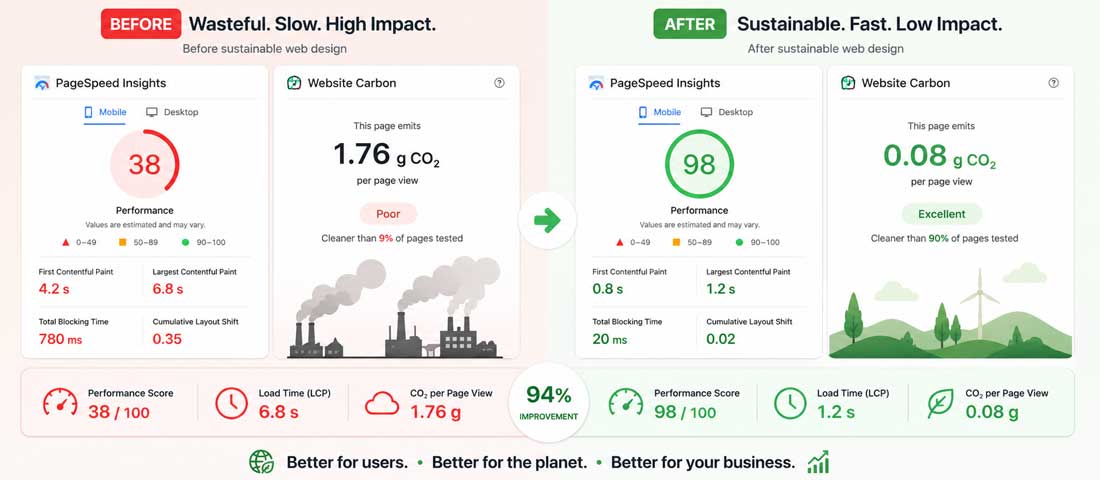
The measurable impact of sustainable web design: a properly optimised website moves from a D or E carbon rating to an A or A+ — reducing emissions by 80% or more while simultaneously improving page load speed and Core Web Vitals scores.
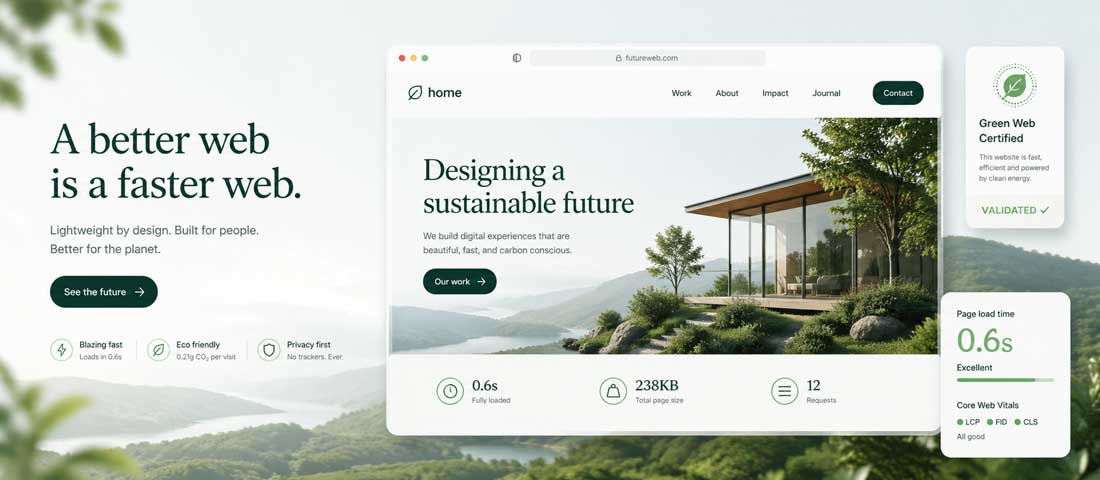
The sustainable website of 2026 is not a compromise — it is a cleaner, faster, better-ranking version of a conventional website, with a carbon footprint that matches the values of the businesses and users it serves.
Want a Website that is Fast, Sustainable, and Built to Perform in Search?
Neel Networks builds websites with performance and sustainability built in from the first line of code — WebP images, minified assets, green hosting recommendations, and Core Web Vitals-optimised architecture as standard. Talk to our team about your next project.
Custom Web Design Services Website Maintenance & OptimisationWhatsApp Us