How to Choose Between WordPress, Webflow, and a Custom Build
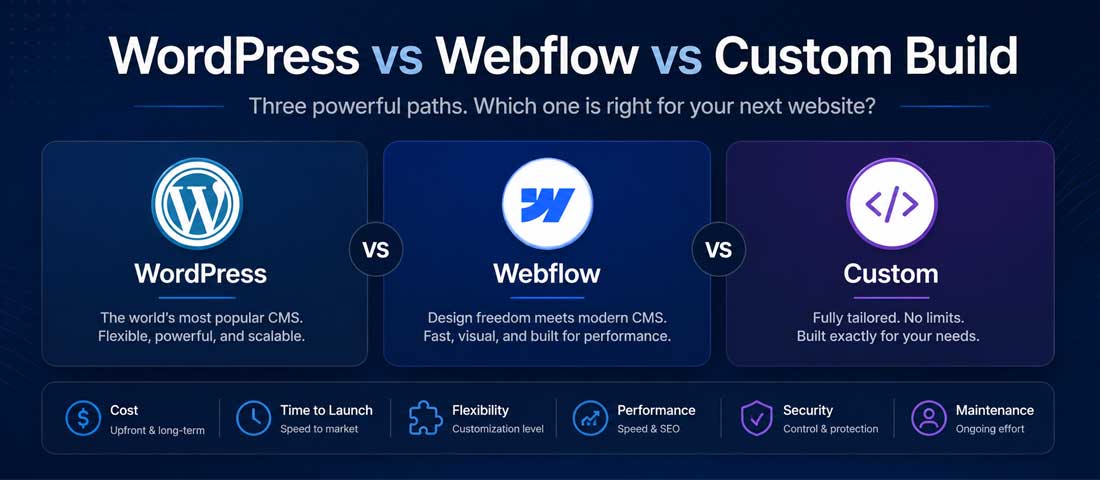
The platform decision is one of the highest-impact choices in any website project, and the honest answer to “which one should I pick” is more nuanced than most agency websites are willing to admit. The three options that dominate the modern conversation — WordPress, Webflow, and a custom build — each have genuine strengths, genuine weaknesses, and genuine contexts where they are the right answer. They are not equivalent products competing for the same use case. They are different tools for different problems, and picking the wrong one often becomes apparent only two years in, when migration is significantly more expensive than the original choice ever was.
This guide is the version of the platform comparison we wish more agencies would publish. We build websites on all three platforms regularly, so we have no incentive to push you toward any one of them — and we have seen enough projects where the wrong platform was chosen for the right-sounding reasons to know what the patterns look like. If you want the broader context of what makes a website work regardless of platform, our 10 elements of a successful business website sets the foundation. This article focuses tightly on the platform choice — what each option actually is, where each one wins, where each one quietly fails, and how to decide between them for your specific situation.
Why the platform decision matters more than people realise
Before getting into the comparison, it is worth being explicit about why this choice deserves real attention. The platform you build on becomes the foundation for everything that follows — your design flexibility, your SEO ceiling, your hosting costs, your security obligations, your maintenance burden, your scaling path, and the cost and pain of every future change. Switching platforms once a site is established is rarely cheap and almost never quick. The choice you make at the start typically defines the next five years of how the site behaves and what it costs you to operate.
The mistake businesses make most often is treating this as primarily a build-cost decision. What does WordPress cost to build? What does Webflow cost monthly? What does a custom build cost up front? These are reasonable questions, but they describe a tiny fraction of the total cost picture. The build cost is roughly 20 to 30 percent of the three-year total cost of ownership for a serious business website. The rest is hosting, maintenance, security, plugin or platform fees, occasional development work, and the opportunity cost of either fast iteration or slow iteration depending on the platform you chose. A decision optimised purely for build cost frequently produces the highest total cost over the longer term, because cheap platforms with high ongoing demands cost more in year three than expensive builds with minimal ongoing demands.
The other reason this choice matters is that each platform has a personality. WordPress rewards businesses that want flexibility and content depth and can manage a maintenance discipline. Webflow rewards businesses that want design polish and operational simplicity. Custom builds reward businesses with specific functional needs and the resources to support a dedicated technical investment. Matching the personality of your business to the personality of the platform is what produces a website that genuinely works year after year. Mismatching them produces a site that fights against its own foundation.
WordPress: what it is and who it suits
WordPress is the dominant player by a significant margin — it powers roughly 43 percent of all websites on the internet according to the most recent W3Techs data, including a meaningful share of the largest content sites globally. It started as a blogging platform, evolved into a full content management system, and now supports everything from small business brochure sites through to large eCommerce stores and complex enterprise applications. It is open source, free at its core, and supported by the largest plugin and theme ecosystem in the web platform space.
What WordPress is good at. Content management is genuinely excellent — the editing experience for non-technical users is mature and well-documented. The ecosystem is vast, with plugins available for almost any functionality you can imagine and many you wouldn’t. SEO capability is strong out of the box and significantly stronger with plugins like Yoast SEO or RankMath. The hosting ecosystem is mature, with options ranging from $5 per month shared hosting to managed WordPress hosts charging $30 to $300 per month for premium environments. The platform is extensible in almost any direction through custom themes, custom plugins, or developer code.
What WordPress is not good at. The maintenance burden is real and ongoing. Plugins need updating, the WordPress core needs updating, themes need updating, and security vulnerabilities in any of these can compromise the site if updates lag. The performance ceiling is limited compared with newer architectures — even a well-optimised WordPress site rarely matches the speed of a static or custom-built equivalent. Visual design freedom is high in principle but often constrained in practice by theme structure, which tends to produce sites that look broadly similar to other WordPress sites. The plugin ecosystem creates a “plugin sprawl” problem where well-meaning additions accumulate over time and quietly slow the site, multiply security exposure, and complicate maintenance.
Who WordPress suits. Content-heavy businesses — blogs, publishers, content marketers, businesses where regular publishing is core. Businesses where SEO is a primary investment and the plugin ecosystem’s SEO depth is valued. Businesses with limited budget that need real functionality at low cost. Businesses with internal teams comfortable managing the platform or with an ongoing relationship with a maintenance partner. eCommerce businesses for whom WooCommerce is a fit. The proper approach to building WordPress websites involves treating the platform as a serious technical decision rather than a default, with deliberate choices about themes, plugins, and ongoing care that prevent the common failure modes.
Webflow: what it is and who it suits
Webflow is a visual web design and hosting platform that emerged in 2013 and has grown rapidly in the last five years, particularly in the design-conscious end of the market. It sits in a category sometimes called “no-code” or “low-code” — the platform provides a visual designer that produces clean, professional code without requiring the user to write it. Hosting is included in the subscription, security is managed by Webflow, and the platform handles much of the operational complexity that WordPress site owners have to manage themselves.
What Webflow is good at. Design quality is the standout strength — the platform was built by designers and the visual control it provides matches or exceeds what most designers would achieve hand-coding. The hosting is managed, fast, secure, and performant out of the box. The maintenance burden is minimal — there are no plugins to update, no security patches to apply, no compatibility issues to debug. The CMS is well-designed for marketing teams who need to manage content without involving developers for every change. SEO capability is solid, with all the structural and technical SEO controls you would expect, and consistently fast Core Web Vitals out of the box. The platform integrates cleanly with marketing tools and analytics, and the development-to-launch workflow is significantly faster than equivalent WordPress projects for sites of comparable design complexity.
What Webflow is not good at. Backend complexity is genuinely limited — anything beyond standard CMS functionality usually requires external services, integrations, or workarounds. Vendor lock-in is real; migrating away from Webflow to another platform requires rebuilding, not transferring. Pricing scales aggressively as you add CMS items, hosting tiers, and additional features — what looks like a cheap monthly fee at the entry tier can become $200 to $400 per month for a serious business site. The CMS has limits on the number of items per site that can become constraints for content-heavy operations. Enterprise-grade access controls, advanced workflows, and complex permissions are weaker than WordPress equivalents. The platform is mature but evolving fast, which sometimes means features are not yet at parity with WordPress equivalents.
Who Webflow suits. Design-led brands where visual polish is a primary differentiator. Marketing-led businesses where speed of design iteration matters more than backend complexity. Startups and agencies launching sites quickly without ongoing maintenance overhead. Businesses with a modest content footprint that prize operational simplicity. Sites where the marketing team wants control without dependence on developers for routine changes. The broader category of no-code platforms that Webflow leads is covered in our piece on building a website without code, which explores when these platforms are the right answer and when they hit their natural limits.
Custom build: what it is and who it suits
A custom build is a website constructed from the ground up using a development framework — typically Laravel, Django, Next.js, React, MERN stack, or similar — rather than a pre-built CMS. The platform underneath is whatever the developer team chooses, the database structure is designed specifically for the business need, and the entire codebase is written for the project rather than configured from existing parts. This is what most large web applications, SaaS products, marketplaces, and bespoke business platforms run on.
What a custom build is good at. Complete control — every detail of behaviour, design, performance, and functionality can be exactly what the business needs. Performance is typically excellent because the codebase is optimised for the specific use case rather than carrying the overhead of a general-purpose platform. Scalability is high because the architecture can be designed for the expected growth trajectory rather than constrained by platform limits. Security exposure is lower because there is no plugin ecosystem to monitor and no widely-known platform to be targeted by automated attacks. Vendor independence is genuine — the codebase belongs to the business and can be moved, modified, or maintained by any competent developer.
What a custom build is not good at. Build cost is meaningfully higher than equivalent platform builds — typically two to four times the cost of a comparable Webflow or WordPress project. Build time is longer, often by months. The dependence on developer availability is structural — even small changes typically require code, which means an ongoing developer relationship or in-house team. Time to launch is rarely fast. The risk of building something the business does not actually need is real, because the freedom to do anything can produce solutions to problems that did not need solving. Knowledge transfer risk is genuine — if the original developers leave, picking up an undocumented custom codebase is significantly harder than picking up a standard WordPress or Webflow site.
Who a custom build suits. SaaS products and platforms where the website is also the product. Marketplaces with multi-sided functionality. Sites with unique business logic that no off-the-shelf platform handles cleanly. Large enterprise applications where the cost of constraint is higher than the cost of investment. Businesses with in-house development teams. Businesses where performance, security, or scalability requirements exceed what standard platforms can deliver. The proper approach to custom website development involves matching the technical decision to a genuine business need rather than treating it as a default for any project that wants to feel premium.
The honest comparison: how the three options compare
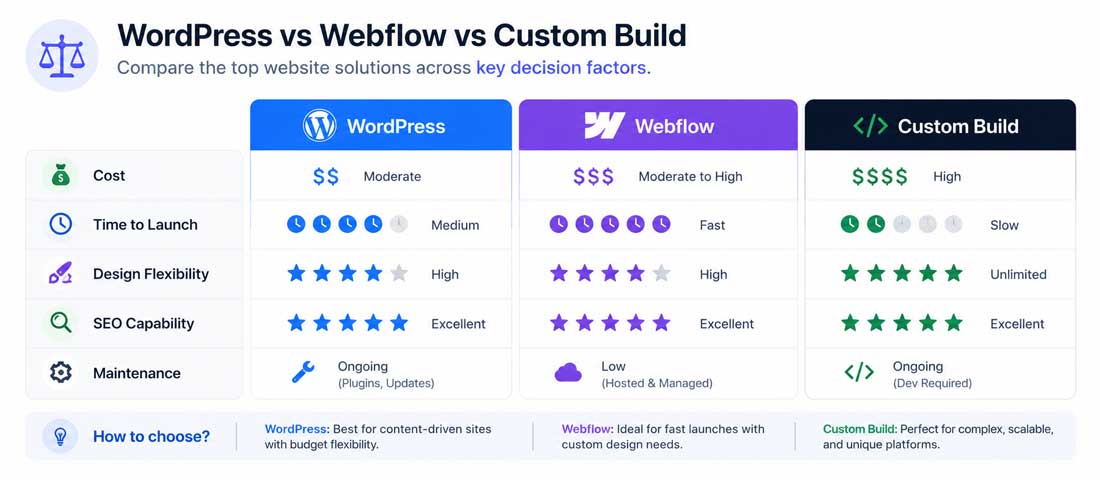
The table below summarises the three options across the dimensions that genuinely matter for the platform decision. The values are realistic ranges, not marketing claims, and they reflect what we see in client work rather than vendor positioning.
| Factor | WordPress | Webflow | Custom Build |
|---|---|---|---|
| Build cost (typical business site) | $500 – $5,000 | $2,000 – $8,000 | $5,000 – $50,000+ |
| Ongoing monthly cost | $10 – $100 (hosting + plugins) | $14 – $400+ (subscription) | $20 – $500+ (hosting + dev) |
| Time to launch | 2 – 8 weeks | 2 – 6 weeks | 8 – 24+ weeks |
| Design flexibility | High (with custom theme) | Very high | Complete |
| SEO capability | Very strong (with plugins) | Strong (built in) | As strong as built |
| Maintenance burden | High (ongoing updates) | Low (managed by platform) | Moderate to high (dev work) |
| Security responsibility | Owner | Webflow | Owner (dev team) |
| Vendor lock-in | Low (open source) | High | None (own codebase) |
| Scaling ceiling | Very high (with engineering) | Moderate | Very high (designed in) |
| Best for | Content sites, blogs, eCommerce | Design-led brands, marketing sites | SaaS, marketplaces, custom apps |
Notice that no single platform wins across every dimension. WordPress is the cheapest to build and run but carries the highest maintenance burden. Webflow has the lowest ongoing operational cost but the highest vendor dependency. Custom is the most expensive to build but the most independent and scalable. The right answer for your specific situation depends on which of these dimensions matter most for what you are building.
The decision framework: seven questions to ask yourself
The cleanest way to decide between the three options is to answer a small set of specific questions about your business and your project, then map the answers to the platform that best fits the resulting profile. The seven questions below cover the dimensions that decide most projects.
-
What is your realistic three-year total budget?
Add build cost plus three years of expected hosting, maintenance, platform fees and likely development work. A WordPress site might be $5,000 over three years; a Webflow site $15,000; a custom build $30,000 to $100,000. If your honest three-year budget is under $10,000, WordPress is likely the only fit. If it is $10,000 to $25,000, WordPress or Webflow both work. Above $25,000, all three become viable depending on what you need. -
How often does the content change?
Sites that publish weekly or daily benefit from WordPress’s mature editorial workflow and the depth of its content management capabilities. Sites that update content occasionally and value design polish suit Webflow well. Sites where content is secondary to functional capability suit custom builds. The content rhythm of the business is one of the strongest signals about platform fit. -
Do you need functionality beyond standard CMS?
If the answer is no — your site is essentially a brochure with content, contact forms, perhaps a blog — any of the three platforms will work and the choice comes down to other factors. If the answer is yes — multi-tier user accounts, custom workflows, real-time interaction, complex permission systems, integrations with internal business systems — the answer increasingly moves toward custom. Webflow handles modest custom functionality through integrations; deep functional complexity requires either WordPress with substantial custom development or a genuinely custom build. -
Who will maintain the site after launch?
WordPress maintenance is real and continuous, and a business that does not have a plan for it (internal capacity or an agency relationship) will see the site decay within twelve months. Webflow maintenance is largely automated by the platform, suiting businesses without dedicated technical capacity. Custom builds require ongoing developer access for any meaningful change. Match the platform to the maintenance arrangement you can credibly sustain over years. -
What is the scaling trajectory you are planning for?
A site expected to stay roughly the same size suits all three options. A site expected to grow significantly — into thousands of pages, complex content relationships, large user bases, high traffic — benefits from the structural scaling capabilities of WordPress or custom builds. Webflow is excellent at the small-to-mid scale but hits real constraints in CMS item limits and pricing tiers at the upper end. -
How important is design quality versus operational simplicity?
Webflow’s design ceiling is the highest of the three for pure visual polish, and the platform makes pixel-level design control achievable without engineering work. WordPress design quality depends entirely on theme choice and execution — it can be excellent but it requires effort. Custom builds can achieve any visual design at the cost of build time and development resources. The trade-off between design ambition and operational simplicity often decides between Webflow and the other two. -
Do you have in-house technical resources?
A team with WordPress experience makes WordPress significantly more attractive because the internal expertise lowers ongoing dependency. A team with design but not development capability suits Webflow well. A team with engineering capability is the only context where a custom build is genuinely advantageous, because custom builds without ongoing engineering attention are difficult to maintain. Match the platform to the team that will actually work with it day to day.
Want Help Choosing the Right Platform for Your Specific Project?
If you would rather talk through the decision with an experienced team — one that builds on all three platforms and has no incentive to push you toward any specific one — we are happy to walk through your project and give you a straight recommendation. No pressure, no hard sell.
Where WordPress wins (and where it doesn’t)
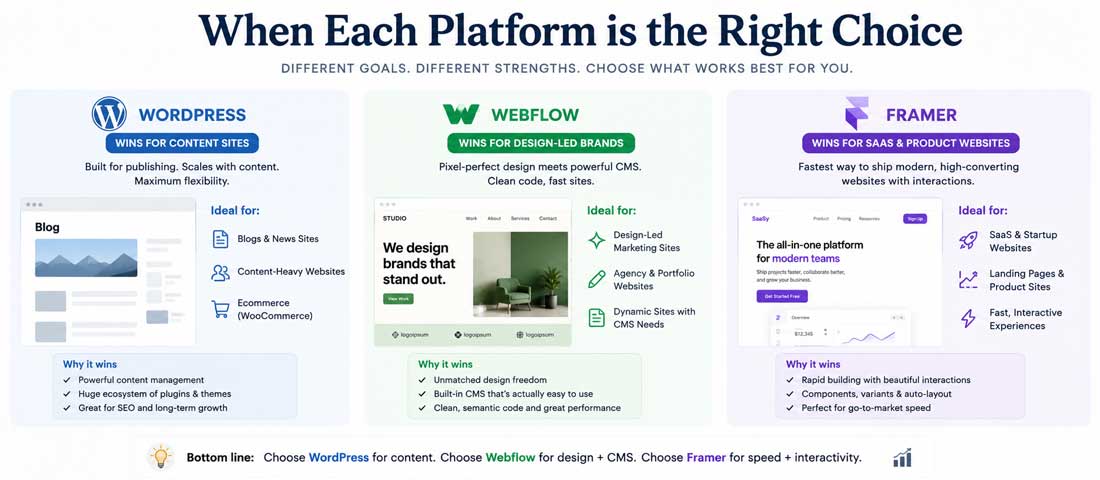
WordPress wins decisively in five contexts. Content-heavy businesses where editorial workflow and publishing cadence matter — the editorial experience is mature in ways the other platforms are not. SEO-first businesses where the depth of the plugin ecosystem and the maturity of integrations like Yoast or RankMath are genuine advantages. Budget-conscious projects where the platform’s free core and inexpensive hosting produce the lowest total cost of entry. Businesses with WordPress expertise on the team, where internal familiarity makes ongoing maintenance and customisation straightforward. eCommerce businesses where WooCommerce is a fit, particularly those wanting more design freedom than Shopify allows.
WordPress does not win where the trade-offs hurt most. Design-led brands that prioritise visual polish over operational depth often find WordPress harder to push to a genuinely distinctive aesthetic without significant custom theme work. Businesses without ongoing maintenance capacity — internal or contracted — discover within a year that WordPress neglected becomes WordPress compromised. Businesses needing deep custom functionality eventually run up against the limits of the plugin ecosystem and find themselves writing custom code that gradually becomes a custom WordPress build with WordPress overhead they don’t need. The deeper context of how WordPress compares against other CMS options for businesses still weighing this layer is covered in our WordPress CMS platform comparison.
Where Webflow wins (and where it doesn’t)
Webflow wins where design quality, operational simplicity, and speed of iteration matter together. Design-led brands where the visual identity is a primary differentiator and the platform’s design capabilities allow distinctive work without engineering overhead. Marketing-led businesses where the speed of design changes — landing pages, campaign pages, A/B variants — produces compounding value. Agencies launching client sites where the maintenance burden of WordPress is a permanent operational cost they would rather avoid. Smaller content footprints — typically under a few hundred CMS items — where the platform’s CMS works well and the pricing tier stays manageable. Businesses where the marketing team owns the website and wants control without depending on developers for routine changes.
Webflow does not win where its constraints become real. Content-heavy operations with thousands of items run up against CMS item limits and pricing tiers that become uncomfortable. Businesses with complex backend needs find the platform’s functional ceiling lower than they expected. Enterprises with sophisticated user management, multi-team workflows, or complex permission requirements often find the platform’s enterprise features less mature than alternatives. Cost-sensitive operations discover that what looked affordable at the entry tier scales aggressively into $200 to $400 monthly as the site grows. Businesses with very long planning horizons sometimes find the vendor lock-in concerning, particularly as their content investment becomes substantial.
Where a custom build wins (and where it doesn’t)
A custom build wins where standard platforms cannot do what the business actually needs. SaaS products where the website is essentially the user-facing layer of a software product. Marketplaces with multi-sided functionality, complex matching algorithms, or unique business logic. Large enterprise applications where performance, security, or compliance requirements exceed what off-the-shelf platforms can credibly deliver. Sites with unique workflows — booking systems with complex availability logic, configuration tools, calculators, decision support tools — where the cost of forcing a CMS to do these things exceeds the cost of building them properly. Businesses with in-house engineering teams who will own and evolve the codebase over time.
A custom build does not win — and is actively the wrong choice — for standard business websites where existing platforms already cover 95 percent of what the business actually needs. Building custom what could be done in WordPress or Webflow in a quarter the time and a fraction of the cost is a common mistake. It tends to happen when businesses confuse “custom” with “premium” and assume that building from scratch automatically produces a better outcome. It rarely does. The right framing is that custom is a tool for specific functional needs, not a status symbol for the website project. The combination of strong UI/UX design with the right platform produces better outcomes than premium engineering applied to the wrong tool.
The hidden costs nobody discusses
Each platform has costs that are not visible at the buying decision and tend to surface in year two or three. Being aware of them changes the comparison in ways the typical platform-comparison article never addresses.
WordPress hidden costs: maintenance overhead is the obvious one — regular updates to core, plugins, themes; security monitoring; backup management; periodic plugin sprawl audits. Beyond maintenance, plugin sprawl is a real cost — sites accumulate plugins over time, each one slowing the site, multiplying security exposure, and complicating updates. A WordPress site three years in often runs slower than it did at launch because no one removed plugins that were no longer needed. Security incidents are a recurring cost when sites are not actively maintained — the average compromise costs $500 to $5,000 in recovery work, plus opportunity cost during downtime.
Webflow hidden costs: subscription pricing scales as the site grows — what starts at $14 to $29 per month can become $200 to $400 per month for a serious business site with multiple CMS collections, higher traffic, and additional features. Vendor lock-in becomes a real cost over time as the content investment grows; migrating to another platform requires rebuilding, not transferring, and the migration cost scales with how much content has accumulated. Functional ceiling costs appear when the business needs something the platform doesn’t do — workarounds through external services add monthly fees, complexity, and occasional friction. Custom code injection has limits that occasionally produce a “we can’t do that in Webflow” moment that requires either accepting the limit or migrating.
Custom build hidden costs: ongoing developer dependence is the structural one — every meaningful change requires code, which means an ongoing relationship with developers or an in-house team. If those developers become unavailable, the site becomes harder and more expensive to change. Knowledge transfer risk is real — an undocumented custom codebase that the original team has left is significantly harder for a new team to pick up than a standard WordPress or Webflow site. Slow iteration is a real cost when business circumstances require quick changes; what would be a five-minute edit in Webflow can become a half-day developer task in a custom build. Hosting and infrastructure are typically more expensive than equivalent WordPress hosting because custom builds often require more sophisticated server environments.
A practical methodology for making the choice
For businesses genuinely weighing this decision, the methodology below produces a reliable answer in most cases. It separates the analytical work from the gut-feel work, which is usually where bad platform decisions come from.
Step one: define your real requirements, not aspirational ones. List what the website actually needs to do for the business — not what you might want it to do someday. Be specific. “Publishing 4 blog posts per month, basic contact form, services pages, no eCommerce, no user accounts” is more useful than “a flexible platform we can grow into”. Aspirational requirements drive platform choices toward overcapacity, which is the most common source of overspend.
Step two: map requirements to platform strengths. For each requirement, identify which platforms handle it well, which handle it adequately, and which handle it poorly. Eliminate platforms that cannot meet your core requirements. Note the requirements that drive the decision — usually one or two specific needs that distinguish the platforms meaningfully for your business.
Step three: calculate three-year total cost of ownership. For each remaining platform, build a realistic three-year cost projection including build, hosting, maintenance, platform fees, expected development work, and the cost of likely changes. The cheapest build is rarely the cheapest three-year option. The platform with the lowest three-year cost given your specific situation is usually the strong financial choice.
Step four: consider team capacity. Match the platform to who will actually work with it. WordPress with no ongoing maintenance plan is the wrong answer; Webflow when your marketing team will not own it is the wrong answer; custom when you have no engineering relationship is the wrong answer. The team-fit dimension often eliminates one of the options entirely regardless of how attractive it looks technically.
Step five: talk to businesses who have made the same choice. Find businesses in adjacent categories who chose each platform and ask them honestly what worked and what didn’t. The pattern of regretted decisions surfaces quickly. The pattern of satisfied decisions does too. This research is genuinely useful because it surfaces the lived experience that platform marketing tends to obscure.
What if you make the wrong choice and need to migrate?
Migration is always more expensive than people expect, but it is rarely catastrophic if approached methodically. The honest expectation is that switching platforms typically costs 60 to 100 percent of the equivalent new build cost — you are essentially rebuilding the site on a different foundation. The content migrates more easily than the design and functionality, both of which usually require rebuilding to match the new platform’s capabilities.
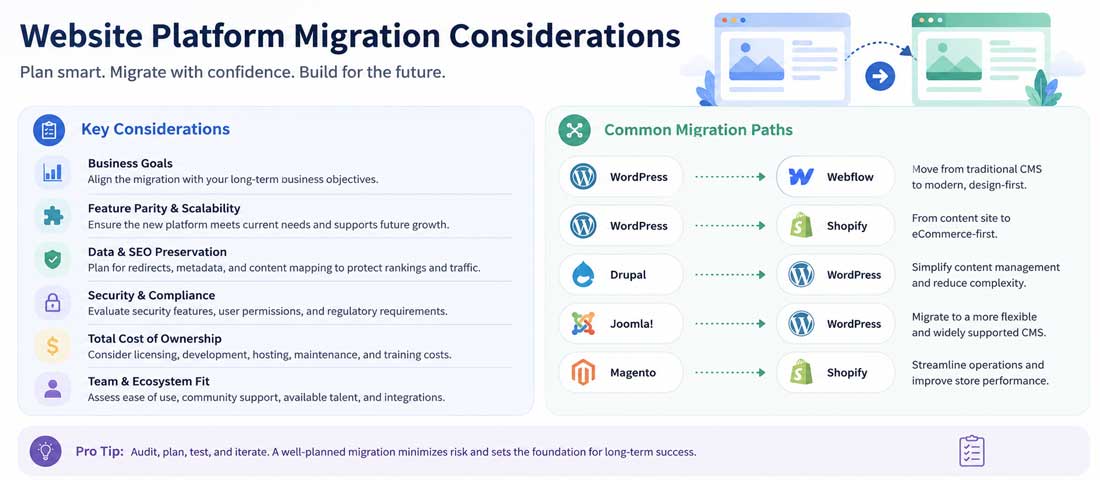
The patterns of migration we see most often: WordPress to Webflow when businesses want lower maintenance and cleaner design tools, with the trade-off being higher ongoing platform fees and vendor dependency. Webflow to WordPress when businesses hit functional ceilings or want lower ongoing costs at scale. Platforms to custom when functional requirements outgrow what platforms can cleanly provide. Custom to WordPress occasionally when businesses simplify and want to reduce engineering dependency. Each of these migrations is possible but should be approached as a deliberate project with full scope rather than a quick switch.
The right time to migrate is when the cost of staying on the wrong platform exceeds the cost of moving — when the maintenance burden has become unsustainable, when the functional ceiling is preventing important business changes, when the cost trajectory of the current platform is rising faster than the value it delivers. The wrong time to migrate is when the current platform is working fine but a competitor’s platform looks more attractive. Platform envy is a poor reason for a six-figure rebuild.
- Choosing custom when WordPress or Webflow would meet 95% of the need. Custom is the right tool for specific functional needs, not a default for premium projects.
- Choosing WordPress without a maintenance plan. WordPress neglected becomes WordPress compromised within twelve months. The maintenance commitment is part of the platform decision.
- Choosing Webflow without checking three-year pricing. Entry tier pricing scales aggressively into uncomfortable territory at higher tiers. Run the three-year math at the tier you will actually need.
- Optimising for build cost rather than total cost of ownership. Build is roughly 20-30% of three-year cost. The cheapest build often produces the highest total cost.
- Picking a platform because a competitor uses it. Their business context is not yours. Their constraints are not yours. Decide on your own requirements.
- Building aspirationally rather than realistically. Sites built for what the business might do in five years are usually overbuilt for what it actually does. Build for what is real.
- Confusing platform with quality. A bad custom build is worse than a good WordPress site. The platform is the foundation, not the outcome.
- Ignoring team capacity in the decision. The platform has to fit who will actually work with it. The right platform for someone else’s team is wrong for yours.
- Not budgeting for ongoing development on any platform. All three platforms benefit from ongoing investment; none of them is genuinely set-and-forget.
- Switching platforms because of trend rather than need. Platforms are tools. The visible trends in the agency world do not always reflect what works for individual businesses.
When to bring in professional help
This guide is detailed enough that a business owner with reasonable technical literacy can make the platform decision themselves. There are situations where professional help is worth the investment.
Bring in help when the requirements are genuinely ambiguous — when you are not sure what your real needs are, when the business is going through change, when the strategic direction will affect the technical decision and needs sorting first. Bring in help when the budget is significant and the consequences of a wrong choice are large — a poorly-chosen platform for a $100,000 project produces six-figure regret. Bring in help when the team capacity question is genuinely complex — multiple stakeholders, distributed ownership, mixed technical capability. Bring in help when you are weighing custom against the alternatives and the cost difference is substantial — this is the decision most often made wrong, and an honest second opinion is genuinely valuable.
For ongoing build work, agency relationships work differently depending on the platform — WordPress relationships often include ongoing maintenance, Webflow relationships often include design partnership, custom relationships involve continuous development. Choose the agency that builds on the platform you’re choosing, not an agency that builds on one platform and will try to push you toward it regardless of fit. Our work across all three — WordPress development, Webflow projects, and custom website development on Laravel and MERN stack — exists precisely so we can recommend the right answer rather than the only one we know how to deliver.
The honest summary of platform choice is that the right answer depends on your specific business situation, and there is no universally correct option. WordPress is the right answer for many businesses for genuine reasons. Webflow is the right answer for many other businesses for different genuine reasons. Custom is the right answer for a specific set of needs that the other platforms genuinely cannot meet. The work is matching your situation to the platform that fits it, and the consequences of getting that match right compound over years. There is also a related question about whether to commission a fully custom design on top of these platforms, which is covered in our piece on custom vs template website design — the platform and the design approach are related decisions but not identical, and businesses benefit from thinking about them deliberately together rather than collapsing them into a single choice.
Frequently asked questions
| What’s the cheapest of the three platforms? | WordPress has the lowest entry cost — the platform itself is free, basic hosting starts at $5 to $10 per month, and a simple business site can be launched for $500 to $2,000 including a theme and basic plugins. Webflow’s entry tier is $14 to $29 per month with no separate hosting cost, and a basic site costs $2,000 to $5,000 to build. Custom builds start at $5,000 and routinely run much higher. However, the three-year total cost picture often looks different — WordPress requires ongoing maintenance that adds cost, Webflow pricing scales as you grow, and custom builds have lower ongoing platform costs but require ongoing developer access. The cheapest build is rarely the cheapest three-year option. |
| Which platform is best for SEO? | All three platforms can achieve strong SEO results when implemented well, and none of them is automatically better. WordPress has the deepest SEO plugin ecosystem and the most mature integrations with tools like Yoast SEO and RankMath, which is an advantage for sites where SEO is the primary investment. Webflow has solid built-in SEO controls with consistently fast Core Web Vitals out of the box, which is an advantage for design-led sites that don’t want SEO complexity. Custom builds can achieve any SEO standard but the SEO has to be specifically engineered rather than provided. The honest answer is that strong SEO depends more on execution than platform choice, and a well-built site on any of the three can rank competitively. |
| Can I switch platforms later if I change my mind? | Yes, but migration costs typically run 60 to 100 percent of an equivalent new build, so it should be approached as a deliberate project rather than a quick switch. Content migrates more easily than design and functionality — most migrations involve rebuilding the design and functional layers on the new platform while moving the content across. The patterns we see most often are WordPress to Webflow for lower maintenance and design polish, Webflow to WordPress to escape vendor lock-in or pricing pressure at scale, and from either platform to custom when functional needs exceed what platforms can deliver. The right time to migrate is when the cost of staying exceeds the cost of moving, not when a different platform simply looks more attractive. |
| Is Webflow really better than WordPress for design quality? | For design polish and visual control without engineering work, yes — Webflow’s visual designer was built specifically for designers and gives pixel-level control that WordPress can match only with significant custom theme development. A Webflow site reaches a distinctive aesthetic faster than an equivalent WordPress site for most teams. However, the design ceiling on WordPress is unlimited if you commission a custom theme — many of the most visually distinctive sites on the web are WordPress builds. The honest framing is that Webflow makes excellent design more accessible to teams without engineering, while WordPress can match it with more investment. The choice depends on what level of engineering resource you have and how much design control you need. |
| When is a custom build worth the cost? | A custom build is worth the cost when the business genuinely needs functionality that existing platforms cannot provide cleanly. Examples include SaaS products where the website is the user-facing layer of a software platform, marketplaces with multi-sided functionality, complex booking or configuration tools, enterprise applications with specific compliance or security requirements, and sites where performance, scaling or integration needs exceed what off-the-shelf platforms can deliver. A custom build is not worth the cost for standard business websites where WordPress or Webflow would cover 95 percent of what the business actually needs. The decision comes down to whether the functional gap between platforms and your needs is large enough to justify the additional cost. |
| Which platform has the best AI search visibility? | AI search visibility depends primarily on content quality, structured data and technical foundations rather than the specific platform. All three platforms can achieve strong AI search citation rates if implemented well — proper schema markup, fast performance, accessible AI crawler permissions in robots.txt, and high-quality content that AI assistants find worth quoting. WordPress has mature schema plugins and the largest plugin ecosystem for AI search optimisation. Webflow has built-in performance and clean technical foundations that AI assistants tend to favour. Custom builds can be engineered for AI visibility from the ground up. The platform matters less than the work done on top of it, and a site with weak AI search foundations on any platform will underperform a site with strong foundations on any other. |
| Which platform should small businesses choose? | For most small businesses, the realistic choice is between WordPress and Webflow — custom builds are rarely the right fit at small business scale. The deciding factors are usually content cadence, maintenance capacity, design priorities and ongoing cost. Small businesses publishing regularly with limited budget often choose WordPress for its lower total cost and stronger content workflow. Small businesses prioritising design polish with limited internal maintenance capacity often choose Webflow for its operational simplicity. Both are reasonable answers, and many small businesses succeed equally well on either platform. The honest recommendation is to make the choice based on which constraints matter most for your specific business rather than which platform sounds more impressive. |
Ready to Make the Right Platform Choice for Your Business?
We build websites on WordPress, Webflow, and as fully custom applications — and we have no incentive to push you toward any specific one. With 12+ years of experience and over 2,500 websites delivered, we know what genuinely fits which kind of business. Send us a brief and we will respond within one business day with an honest read on the right platform for your project.