
The SSL certificate market is confusing by design. Certificate authorities and resellers have every commercial reason to make you believe you need premium certificates with authoritative-sounding names — “Extended Validation Enterprise Class Signed by Trusted Root”, or something similar — when for the vast majority of business websites, the free Let’s Encrypt certificate provides encryption that is genuinely identical to what the most expensive paid certificate delivers. This isn’t a fringe opinion; it’s how modern browser security actually works. But there are also legitimate contexts where paid certificates are the right call, and where wildcard certificates specifically solve real operational problems. Being able to tell the difference between the situations where you need to pay and the situations where you don’t is what this guide is about.
This is the honest version of the SSL certificate comparison — the one that acknowledges the massive shift the free SSL revolution produced and the specific cases where paid certificates still make genuine sense. If you want the wider context of how SSL fits into ongoing website care alongside backups, monitoring and maintenance, our complete website maintenance guide is the wider reference. If you want the practical step-by-step for actually installing whichever certificate you choose, our complete SSL installation guide is the companion piece. This article focuses tightly on the choice itself — free versus paid, single-domain versus wildcard versus multi-domain, and how to decide for your specific situation without overpaying or underprovisioning.
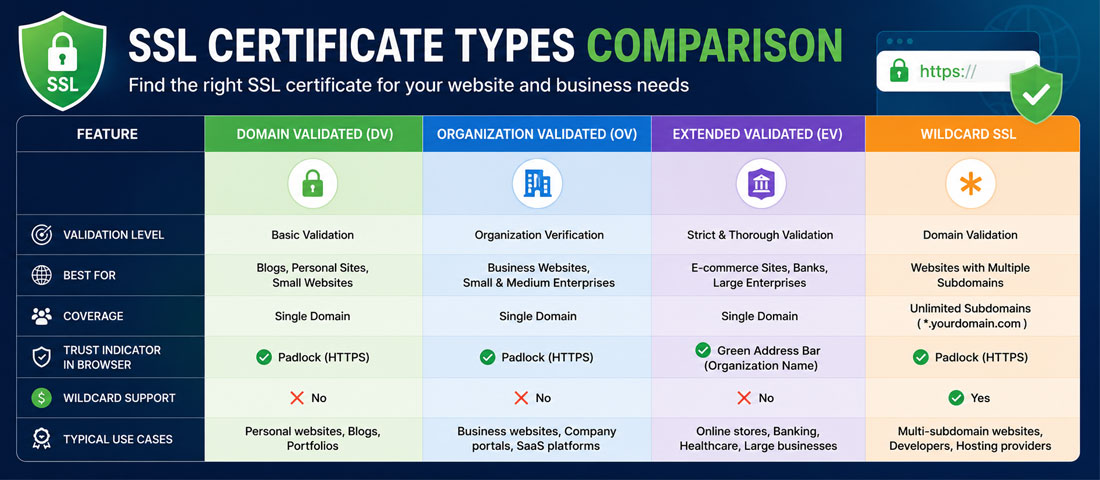
Before the comparison, it’s worth being explicit about what actually differs between certificate options — because if you assume they’re all essentially the same, you’ll either overpay for capability you don’t need or underprovision for capability you actually do need. Four dimensions genuinely differ across the options, and the right choice depends on which of them matter for your specific situation.
Validation level determines what the certificate authority verified before issuing the certificate — just that you control the domain (DV, Domain Validated), or your business identity (OV, Organisation Validated), or your full legal business status (EV, Extended Validation). The encryption strength is identical across these levels; what differs is the trust signal the certificate carries. For consumer-facing brands, developed markets have largely stopped caring about the visible difference. For enterprise B2B and regulated industries, the visible EV signal in security audits still matters.
Coverage determines what domains and subdomains the certificate protects. A single-domain certificate covers yoursite.com (and typically www.yoursite.com as a convention). A wildcard certificate covers yoursite.com plus every subdomain — shop.yoursite.com, blog.yoursite.com, app.yoursite.com, and any subdomain you create later. A multi-domain (SAN) certificate covers a specific list of named domains you specify.
Payment model determines both the price you pay and the operational model. Free certificates from Let’s Encrypt, Cloudflare, and similar providers are renewed automatically on 90-day cycles (Let’s Encrypt) or annually (Cloudflare). Paid certificates from traditional certificate authorities are typically annual and require manual renewal, though they can be automated with more effort.
Warranty and support determine what you get if something goes wrong. Free certificates come with essentially no warranty and community support only. Paid certificates come with warranties ranging from $10,000 to $1.75 million and vendor support relationships. For most business websites, the warranty is theatrical rather than practical, but for enterprises it can matter.
The free SSL revolution started in earnest around 2016 with Let’s Encrypt, a nonprofit certificate authority that issues genuinely free, browser-trusted SSL certificates through automated systems. Cloudflare, ZeroSSL, and a few others followed with their own free offerings. The result has been a fundamental restructuring of the SSL market — and most business owners still don’t fully understand what happened.
Let’s Encrypt is the largest free SSL provider by a significant margin. The certificates are Domain Validated (DV) only, issued through automated challenge-response verification of domain control. They are valid for 90 days rather than the traditional annual cycle, which sounds inconvenient but is actually a feature — 90-day renewal forces automation, and automated renewal is more reliable than annual manual renewal. The Let’s Encrypt certificate on your site is browser-trusted by every modern browser, encrypts with the same 256-bit AES cipher as any paid certificate, and produces the exact same padlock in the address bar. There is no visible difference to your visitors between a Let’s Encrypt certificate and a $500 DigiCert one.
Cloudflare’s free tier takes a different approach — you route your traffic through Cloudflare’s global network, and Cloudflare handles SSL between your visitors and Cloudflare’s edge servers. Your origin server can still have its own SSL configured (Full Strict mode, which is the correct setup) or not (Flexible mode, which is technically insecure but common on cheap hosting). Cloudflare’s SSL is automatically renewed indefinitely with no action required, and the CDN and DDoS protection benefits that come alongside are meaningful.
ZeroSSL offers free 90-day DV certificates similar to Let’s Encrypt, plus paid tiers for higher validation levels and longer validity. Their free tier is functionally equivalent to Let’s Encrypt with a slightly different interface for those who prefer it.
What free SSL genuinely delivers. Identical encryption strength to any paid certificate — 256-bit AES, TLS 1.3 protocol, forward secrecy. Identical browser trust — Chrome, Firefox, Safari, and Edge all treat the free certificate exactly the same as they treat a $2,000 EV certificate for encryption purposes. Identical padlock display to visitors. Automated renewal that eliminates the annual “did we remember to renew?” problem that has caused countless outages on paid certificate setups.
What free SSL doesn’t include. Higher validation levels (OV or EV) — free certificates are DV only, meaning they verify only that you control the domain, not who you are as a business. Warranties — the theatrical $10,000 to $1.75 million warranties on paid certificates don’t apply. Vendor support relationships — if something goes wrong, you’re troubleshooting through community forums rather than calling a support team. Extended validity periods — the 90-day cycle requires functioning automation, and if the automation breaks, the certificate expires.
The traditional paid SSL market — DigiCert, Sectigo (formerly Comodo), GlobalSign, Entrust, GoDaddy, Namecheap, and many others — continues to sell certificates that range from $10 per year at the low end to $2,000+ per year at the enterprise end. Given that free alternatives exist, understanding what the paid market is actually selling matters for deciding whether to buy.
Higher validation levels. If you need Organisation Validated (OV) or Extended Validation (EV) certificates, you need to buy them — the free providers don’t offer them. OV verifies your business identity through documentary evidence; EV goes further with detailed legal verification. Both produce certificates that are structurally identical to DV in terms of encryption but carry more information about verified identity in the certificate metadata. Whether this matters depends on your industry and audience.
Warranties. Paid certificates include warranties that pay out if the certificate authority incorrectly issues a certificate that then causes financial harm. Warranty amounts range from $10,000 on entry-tier paid certificates to $1.75 million on premium EV certificates. In practice, warranty claims are extraordinarily rare — the theatrical nature of these numbers is a hallmark of the paid SSL sales pitch — but for enterprises where risk management requires nominal coverage, the paid warranty exists.
Vendor support relationships. Paid certificate authorities provide actual support teams you can contact when things go wrong. For businesses that value support relationships and don’t want to troubleshoot through documentation, this has genuine value even if you never actually need to use it. Free providers rely on community documentation and forums.
Longer validity periods. This is changing rapidly. Historically, paid certificates could be issued for 2-5 year periods, versus the 90-day cycle for Let’s Encrypt. Browser policy changes over the past several years have reduced maximum certificate validity to 398 days (roughly 13 months), and further reductions to as short as 90 days across the industry are actively being planned by browser vendors. The “longer validity” advantage of paid certificates has largely disappeared and will continue to shrink.
Static certificate fingerprint. Paid certificates keep the same underlying key across renewals unless you specifically regenerate. Let’s Encrypt certificates get a new key on each 90-day renewal. For applications that pin certificates or verify specific fingerprints for security purposes, this stability can matter. For standard web hosting, it’s invisible.
Wildcard certificates are a coverage decision rather than a payment-model decision. Both free and paid providers offer wildcard certificates, but the mechanics differ in ways that affect which is the right choice for a specific situation.
What wildcard certificates cover. A wildcard certificate for *.yoursite.com covers every subdomain — shop.yoursite.com, blog.yoursite.com, app.yoursite.com, staging.yoursite.com, and any subdomain you create in the future, without needing to reissue the certificate. It typically also covers the root domain yoursite.com itself, though this depends on the specific implementation. The wildcard matches exactly one level of subdomain — *.yoursite.com covers shop.yoursite.com but not staging.shop.yoursite.com, which would need its own certificate or a second-level wildcard.
Free wildcard certificates. Let’s Encrypt supports wildcard certificates since 2018, but they require DNS-based domain validation (not the simpler HTTP-based validation used for single-domain Let’s Encrypt certificates). This means the automation to renew wildcards requires access to your DNS provider’s API, which is more complex to configure than standard Let’s Encrypt setup. Once configured, however, it renews automatically like any other Let’s Encrypt certificate. Cloudflare’s free tier also provides wildcard SSL automatically when your domain is on Cloudflare.
Paid wildcard certificates. Paid wildcards typically range from $50 to $300 per year at the low end and $200 to $500+ at the higher end. They can be DV, OV, or EV depending on your validation needs. The primary advantage over free wildcards is simpler setup (no DNS API integration required) and higher validation levels if you need OV or EV.
When wildcards genuinely make sense. When you have multiple subdomains hosting different services or applications — shop.yoursite.com, blog.yoursite.com, app.yoursite.com. When your subdomain structure changes frequently and reissuing certificates for each new subdomain would be operational overhead. When you’re running a SaaS platform where each customer gets their own subdomain (customer1.yourapp.com, customer2.yourapp.com). When you need consistent SSL coverage across development, staging and production environments distinguished by subdomain. For businesses with a single domain and no meaningful subdomain use, wildcards are unnecessary complexity.
When wildcards are overkill. When you have only one or two subdomains and they’re stable, individual certificates are simpler and just as effective. When your subdomain structure is small enough that a SAN (Subject Alternative Name) certificate covering specific named domains would be cleaner. When the security implications of one compromised private key covering all subdomains outweigh the convenience — enterprises with high-value subdomains sometimes prefer separate certificates specifically for compartmentalisation.
The table below summarises how the three main options compare across the dimensions that actually matter. The pricing reflects current market rates from typical vendors.
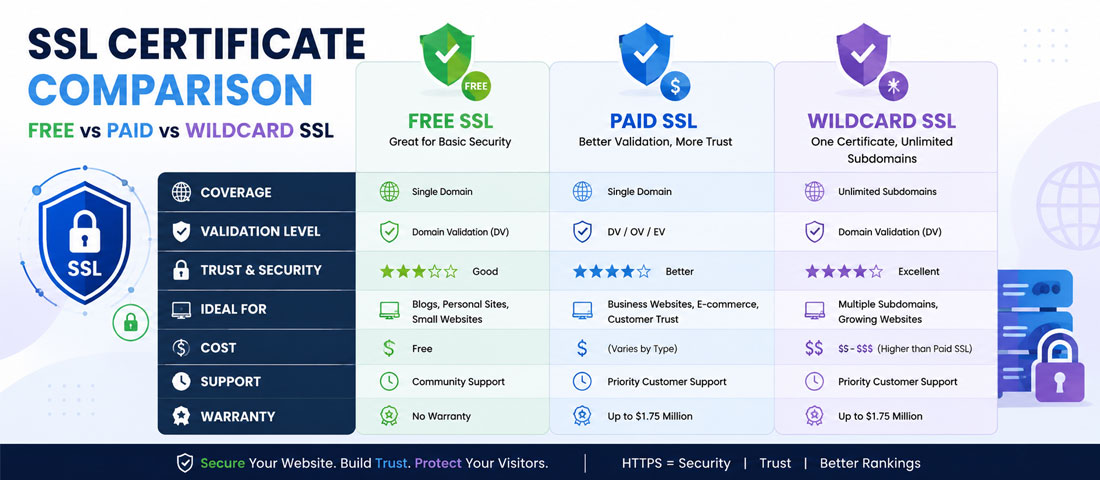
| Factor | Free (Let’s Encrypt) | Paid single-domain | Wildcard (free or paid) |
|---|---|---|---|
| Encryption strength | 256-bit AES, TLS 1.3 | 256-bit AES, TLS 1.3 | 256-bit AES, TLS 1.3 |
| Browser trust | Fully trusted | Fully trusted | Fully trusted |
| Validation levels | DV only | DV, OV, or EV | DV (free) or DV/OV (paid) |
| Coverage | Single domain (+ www) | Single domain (+ www) | Main domain + all subdomains |
| Validity period | 90 days (auto-renewed) | Up to 398 days (13 months) | 90 days free, up to 398 days paid |
| Renewal handling | Automated | Manual or automated | Automated (free) or manual (paid) |
| Warranty | None | $10,000 – $1.75M | Variable by provider |
| Vendor support | Community docs | Vendor support team | Depends on provider |
| Typical annual cost | $0 | $10 – $500+ | $0 – $500+ |
| Best for | Most business websites | Enterprises, regulated industries | Multi-subdomain sites, SaaS platforms |
The most important pattern in the table is that encryption strength and browser trust are identical across every option. A visitor to your site cannot tell whether you’re using a $0 Let’s Encrypt certificate or a $1,500 DigiCert EV certificate from what happens in their browser — both produce the same padlock, both encrypt identically, both are treated by browsers as fully trusted. The differences that justify paid pricing are all elsewhere: validation levels, warranties, support relationships, and specific enterprise features. Whether those matter for your business is the real question.
For businesses genuinely weighing this decision, the seven questions below produce a reliable recommendation. Work through them in order — the answer usually becomes clear within the first three or four.
Want Help Getting SSL Configured Properly on Your Site?
If you would rather have an experienced team handle certificate selection, setup, automation and ongoing monitoring — with the right choice matched to your specific business rather than a default recommendation — we handle this as part of every engagement. It is one of the highest-return technical improvements available for any business site.
The pro-free case is stronger than the paid SSL market wants you to realise. For most business websites, five contexts specifically make free the correct answer, and paying for what free provides is genuine waste.
Small business sites and blogs. Local businesses, service providers, content publishers, personal brands, professional portfolios — anywhere the site is not part of a regulated industry and the visitors don’t specifically scrutinise certificate validation levels. Free SSL delivers identical outcomes to what these businesses would get from paid certificates.
Standard eCommerce stores. Small and mid-sized online stores selling to consumers don’t need OV or EV certificates to process payments or build trust. Payment processors don’t require paid certificates. The padlock in the address bar is what buyers respond to, and free SSL produces the same padlock as paid. WooCommerce, Shopify, and other eCommerce platforms all work fine with free SSL.
Most WordPress sites. The WordPress hosting ecosystem has integrated Let’s Encrypt so thoroughly that free SSL is genuinely the default for the platform. Managed WordPress hosts (WP Engine, Kinsta, SiteGround) include automatic Let’s Encrypt provisioning. For proper WordPress development in 2026, free SSL is the standard setup, and requiring paid SSL for a WordPress site is unusual.
Anywhere DV validation is sufficient. If your business doesn’t specifically need OV or EV validation — and again, most don’t — the DV level that free certificates provide is genuinely the same standard that most paid entry-tier certificates deliver, at zero cost.
Development, staging, and internal sites. Environments that need SSL but aren’t public-facing production sites are ideal for free certificates. The overhead of paying for and managing paid certificates on non-production environments is genuine waste, and free SSL handles these environments perfectly.
The pro-paid case is narrower than the SSL sales pitch suggests but is genuinely real in specific contexts. Five situations warrant paid SSL despite the free alternative.
Enterprises needing OV or EV validation. When your business specifically benefits from the enhanced validation levels — because auditors check them, because procurement reviews reference them, because your industry expects them — paid certificates are required because free providers don’t offer these levels. This includes financial services, healthcare handling protected health information, government contractors, and some B2B enterprise contexts where certificate details enter security reviews.
Regulated industries with specific compliance frameworks. PCI DSS at higher merchant levels, some HIPAA contexts, certain government contracting frameworks, and specific financial regulations sometimes reference paid certificate providers or specific validation levels. When compliance dictates, compliance dictates — and free SSL is genuinely not appropriate for these contexts.
Businesses valuing vendor support relationships. If your operational model relies on being able to call vendors for support when things go wrong, paid certificates come with support teams you can escalate to. Free certificates rely on community documentation and forums. For businesses that have institutionalised the “call the vendor” model of technology management, the paid support relationship has genuine value even if you rarely use it.
Sites requiring specific enterprise features. Some paid certificates include features that free ones don’t — malware scanning, vulnerability reporting, dedicated IP addresses, priority certificate revocation handling. Whether these features matter for your specific situation depends on your operational requirements, but they exist and can justify the paid model for the businesses that need them.
Organisations preferring predictable annual cycles over 90-day automation. Some enterprises specifically want annual renewal cycles for auditing and change management purposes, and prefer the operational model of scheduled annual renewal to the continuous automation of 90-day cycles. The industry is moving toward shorter cycles regardless, but for the present, this preference is real for some organisations and paid certificates accommodate it.
Wildcards are a coverage question independent of the free-versus-paid decision. They make genuine sense in specific situations and are overkill in others.
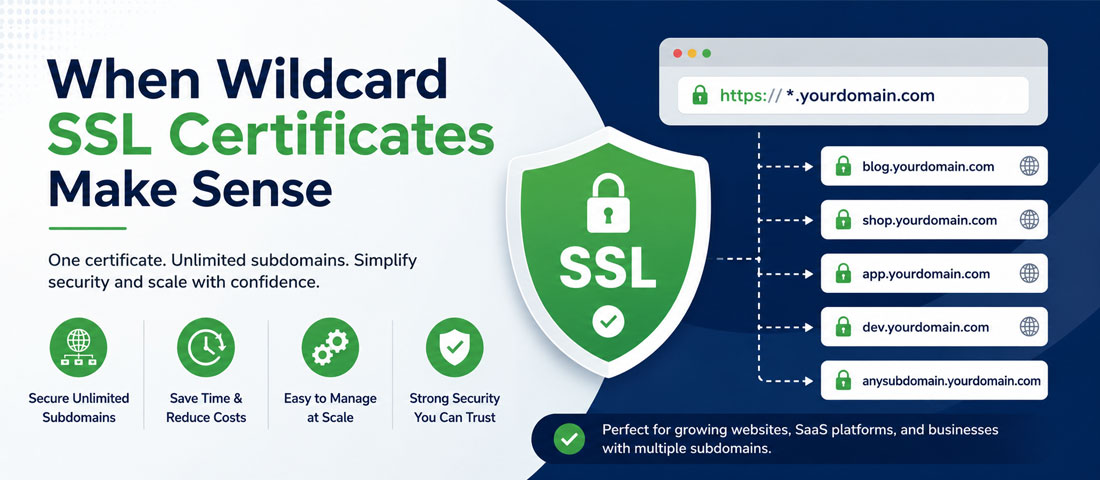
Sites with multiple functional subdomains. When you have shop.yoursite.com, blog.yoursite.com, app.yoursite.com, and support.yoursite.com all needing SSL, wildcard is meaningfully simpler than managing four separate certificates. The convenience compounds as the number of subdomains grows.
SaaS platforms with per-customer subdomains. When each customer of your platform gets their own subdomain (customer1.yourapp.com, customer2.yourapp.com), wildcards are essential — you can’t practically issue individual certificates for every new customer as they sign up. This is the highest-value use case for wildcards.
Multi-environment setups distinguished by subdomain. Development.yoursite.com, staging.yoursite.com, production.yoursite.com — wildcard covers all environments with one certificate and simplifies the environment-consistency question.
Businesses with frequently-changing subdomain structures. When you regularly create new subdomains for campaigns, features, or organisational needs, wildcards eliminate the “issue a new certificate every time” workflow. The reduction in operational overhead is real.
SAN certificates as an alternative for smaller multi-domain needs. When you have a small number of specific subdomains (typically 2-5) that are stable, a SAN certificate listing exactly those subdomains is often cleaner than a wildcard. SAN certificates cover specifically named domains, which some enterprises prefer for security compartmentalisation — one compromised key doesn’t cover subdomains you didn’t intend to include.
The 90-day validity period on Let’s Encrypt certificates is one of the most-questioned aspects of the service, and understanding why it exists explains why it’s actually a feature rather than a limitation.
The original reason for short validity was security — shorter-lived certificates limit the exposure window if a private key is compromised. A stolen certificate with 2-year validity is a security problem for 2 years; a stolen certificate with 90-day validity is a security problem for at most 90 days. This aligns with modern security best practices, which favour shorter credential lifetimes across the board.
The practical consequence is that Let’s Encrypt renewal must be automated — no operations team can reasonably renew certificates every 90 days manually across a portfolio of sites. Automated renewal is more reliable than manual annual renewal for most operations, because the failure mode “we forgot to renew” doesn’t apply when nobody is manually renewing anything. The 90-day cycle forces the automation that produces reliability.
The industry direction is toward shorter validity periods across all certificate providers, not longer. Browser vendors are actively planning reductions to 90-day and eventually 47-day maximum certificate lifetimes, applied to all certificates regardless of provider. The “longer validity is better” argument that supported traditional annual paid certificates is disappearing rapidly. Businesses that build their SSL operations around automation are aligned with the industry direction; businesses relying on manual annual renewal are increasingly out of step.
The one legitimate case where 90-day cycles create problems is environments where automation is genuinely difficult — some enterprise networks with heavy change control, some legacy systems, some contexts where any change to production requires approval processes that don’t fit 90-day cadences. In these cases, paid annual certificates buy you 12 months between change-control cycles rather than 90 days. But this is a narrow context, and most organisations are better served by improving their automation than by paying for longer validity to avoid it.
The SSL pricing landscape is genuinely all over the place, and understanding actual current prices from major vendors is useful for evaluating whether the paid option you’re considering is priced fairly.
Free options: Let’s Encrypt at $0 (direct or via any host that integrates it — most do). Cloudflare at $0 (with a free Cloudflare account and DNS pointed to their nameservers). ZeroSSL free tier at $0 (90-day DV certificates).
Entry-level paid DV certificates: Namecheap PositiveSSL at $8-12 per year. Sectigo DV at $10-25 per year through resellers. GoGetSSL at $10-20 per year. These are the paid market’s response to free — cheap enough to be affordable but providing minimal value over free alternatives.
Mid-tier paid certificates: Sectigo (Comodo) branded certificates at $50-150 per year for DV, $100-300 for OV. Namecheap higher tiers at $30-100 for DV, $80-200 for OV. GoDaddy standard SSL at $75-150 per year. These represent the mid-market — offering vendor support and slightly stronger branding for businesses that value them.
Premium paid certificates: DigiCert DV at $200-400 per year, OV at $400-800, EV at $800-1,500. GlobalSign at similar tiers. Entrust and other premium providers at the higher end. These are the enterprise tier — brand names auditors recognise, warranties in the $1-2 million range, and support relationships that enterprises pay for.
Wildcard certificates: Let’s Encrypt wildcards at $0. Namecheap wildcards at $75-150 per year. Sectigo wildcards at $80-300 per year. DigiCert wildcards at $500-1,500 per year. The pricing gap between free and paid wildcards is even larger than for single-domain certificates.
Notice the enormous range and the specific pattern within it. The bottom of the paid market is essentially “cheap paid to compete with free” — providing minimal value over free alternatives at a modest price. The middle offers real vendor support and OV validation at moderate prices. The premium tier provides brand recognition and EV validation at enterprise prices. Understanding which tier fits your actual need is what determines whether you’re paying fairly or overpaying substantially.
Beyond the visible price, each SSL option carries operational costs that don’t show up on any invoice but affect the total cost of running the certificate over time.
Free SSL hidden costs. Automation setup time — configuring Let’s Encrypt with Certbot or hosting-provided integrations requires initial time investment. Monitoring — you need to know if renewals fail, which requires monitoring tools or hosting that alerts you. No vendor support — troubleshooting is your problem, through community forums and documentation. Renewal automation maintenance — the automation itself occasionally needs attention as environments change. For most hosting, these costs are minor because good hosts handle most of it, but they exist.
Paid SSL hidden costs. Renewal management overhead — someone needs to remember to renew annually, get approvals, complete the validation process each time, and install the new certificate. Price increases at renewal — many paid certificate providers offer promotional first-year rates that increase substantially on renewal, and businesses that don’t shop around at renewal often pay 30-50% more in year two than year one. Vendor lock-in — moving certificates between providers is possible but produces effort at renewal time. Compliance verification each cycle — for OV and EV renewals, the validation process must be completed again, requiring documentation and time.
Wildcard hidden costs. DNS management complexity — free wildcards require DNS-based validation, which means the automation needs API access to your DNS provider. Security implications — if the wildcard private key is compromised, it covers all subdomains rather than just one, which some enterprises consider an unacceptable risk model. Scope creep — because wildcards cover any subdomain, there’s a temptation to spin up subdomains casually that would benefit from more deliberate certificate management.
The patterns of certificate decisions gone wrong are consistent, and most come from either overpaying for capability that’s not needed or underinvesting in operational reliability.
For businesses genuinely working through this decision, the methodology below produces a reliable answer without falling into either the “paid must be better” trap or the “free means cutting corners” trap.
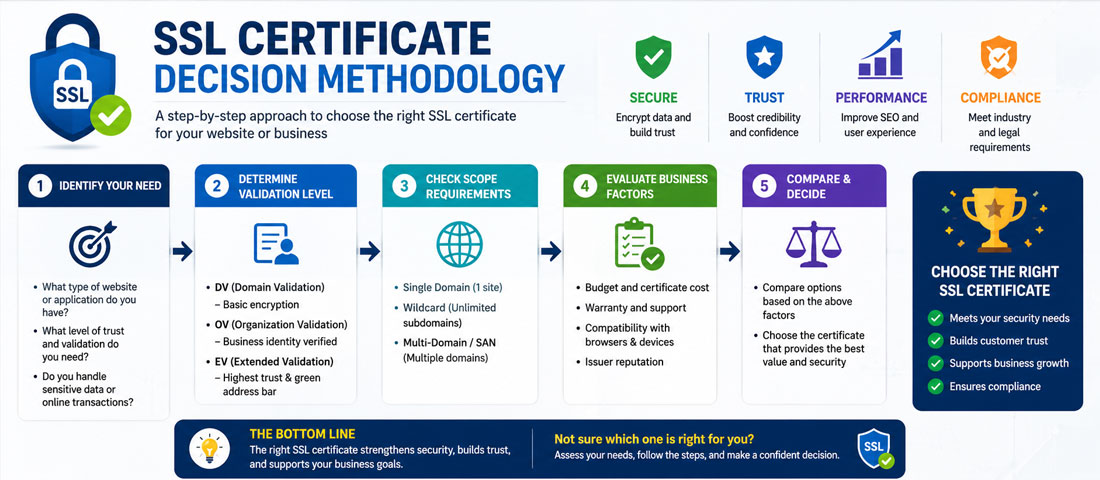
Step one: assess your actual needs, not vendor claims. What kind of site are you securing? What subdomains do you have or plan to have? Do you have specific compliance requirements? What validation level does your industry actually expect? Answering these honestly produces the right requirement; letting a certificate authority’s sales page drive the answer produces overprovisioning.
Step two: match the requirement to the appropriate tier. DV covers most business sites. OV and EV are for specific enterprise and regulated contexts. Single-domain works when you have one functional domain. Wildcards work when you have multiple. SAN certificates work for small numbers of specific named domains. Match the specific need to the specific tier, and don’t inflate the requirement to justify paying more.
Step three: consider operational overhead honestly. Free certificates require automation setup and monitoring. Paid certificates require renewal management and vendor relationship maintenance. Both have real costs — evaluate which fits your operational capacity. For most businesses using modern hosting, free plus automation is genuinely lower total cost. For enterprises with centralised paid vendor management, the paid model can be lower total cost.
Step four: choose your renewal path deliberately. Automated renewal is more reliable than manual regardless of certificate type. For free certificates, automation is essentially required. For paid certificates, automation is possible but often overlooked. Choose the setup that produces reliable renewal, and confirm the automation actually works before assuming it does.
Step five: set up monitoring regardless of choice. Certificate expiry monitoring alerts you before certificates lapse. Free tools like SSL Labs, Certbot’s own monitoring, or hosting-provided monitoring all work. Whatever your certificate choice, know when it’s due for renewal and have a fallback plan if automation fails.
For most business websites, the framework above is sufficient to make the certificate decision independently. There are situations where getting professional input on the decision itself is worth the investment.
Bring in help when you have compliance requirements you’re not confident about — regulated industries have specific requirements that vary by regulator, and getting them wrong can produce real audit findings. Bring in help when your infrastructure is complex — multiple domains, multiple subdomains, multiple environments, and multiple stakeholders can produce certificate management complexity that benefits from experienced eyes. Bring in help when the site is business-critical enough that certificate outages would produce meaningful revenue loss and you want to be certain the setup is right before you rely on it. And bring in help when you’re weighing enterprise-tier decisions where the pricing and features are complex and the total cost implications are significant enough to warrant proper evaluation.
For ongoing SSL management alongside broader website care, structured maintenance produces meaningfully better outcomes than reactive intervention. Certificate expiry, mixed content, HTTPS misconfigurations, and related security concerns catch business sites off-guard because nobody is watching for them until visitors report problems. Ongoing monitoring, expiry alerts and periodic security reviews are part of proper website maintenance services we run for clients, because the compound cost of missed certificate issues is significantly higher than the cost of the monitoring itself. For businesses running the underlying custom website development we deliver, SSL is set up correctly from day one and maintained systematically after.
The honest summary of the SSL certificate question is that the free SSL revolution changed the market fundamentally, and most business websites are genuinely better served by free Let’s Encrypt (directly or via Cloudflare) than by paid alternatives. The encryption is identical. The browser trust is identical. The automation is more reliable than manual annual renewal. The total cost is lower. Paid certificates make genuine sense in specific contexts — enterprises requiring OV or EV validation, regulated industries with compliance frameworks referencing paid providers, organisations that value vendor support relationships as part of their operational model. Wildcard certificates make sense when you have meaningful subdomain use, not as a “just in case” default. The pattern that produces the best outcomes is honest assessment of what your specific situation requires, appropriate matching to the certificate tier that fits, and solid automation regardless of which choice you make. Overpaying for capability you don’t use is genuine waste; underprovisioning for actual compliance or operational requirements is genuine risk. The certificate decision also sits within a broader security context — HTTPS, headers, backups, access controls and monitoring all working together — which our complete website security and SSL/HTTPS guide covers as the larger picture. The middle path — the right certificate for the specific need, well-automated, monitored, and reviewed periodically — is what proper website security actually looks like.
| Is free SSL really as secure as paid SSL? | Yes, genuinely and completely. The encryption strength on a free Let’s Encrypt certificate is identical to what a $1,500 DigiCert EV certificate provides — both use 256-bit AES encryption with modern TLS protocols, both are trusted by every current browser, both produce the same padlock in the address bar, and both are cryptographically indistinguishable at the encryption layer. The differences that justify paid pricing are elsewhere: validation levels (OV/EV verify your business identity beyond just domain control), warranties (paid certificates include theatrical $10K-$1.75M coverage), vendor support relationships, and specific enterprise features. None of these affect actual encryption security. For businesses focused specifically on “is my traffic encrypted safely”, free SSL provides the same answer as any paid alternative. |
| What’s the difference between DV, OV, and EV certificates? | Domain Validated (DV) certificates verify only that you control the domain — the certificate authority confirms this through automated challenge-response tests. Organisation Validated (OV) certificates additionally verify your business identity through documentary evidence like company registration and phone verification. Extended Validation (EV) certificates go further with detailed legal verification of business status, physical location, and operational legitimacy. The encryption they provide is identical; what differs is the amount of information about the certificate holder that’s been verified and embedded in the certificate. Browsers used to display visible differences (like the green business name in the address bar for EV) but have largely removed these distinctions in recent years. Where the distinction still matters is in enterprise security audits, regulated industry compliance frameworks, and B2B contexts where certificate details are reviewed during procurement. |
| When should I get a wildcard SSL certificate? | Wildcards make sense in five specific situations. When you have multiple functional subdomains (shop, blog, app, support) needing SSL coverage. When you run a SaaS platform where each customer gets their own subdomain (customer1.yourapp.com, customer2.yourapp.com). When your subdomain structure changes frequently and issuing individual certificates for each new subdomain would be operational overhead. When you have multiple environments (development, staging, production) distinguished by subdomain. When enterprise scale makes individual certificate management impractical. For businesses with a single domain plus www — the standard small business setup — wildcards are unnecessary complexity. For small numbers of stable specific subdomains, SAN certificates that list exactly those domains are often cleaner than wildcards. Match the certificate type to the actual subdomain structure rather than choosing wildcard as a default. |
| What happens if my SSL certificate expires? | When an SSL certificate expires, browsers immediately display prominent warnings — full-page “Your connection is not private” screens that visitors can’t easily bypass. Most visitors leave instantly rather than click through the warning. Search engines may temporarily de-rank the site, active eCommerce and payment processing typically fail, and the visible business impact is immediate and significant. The recovery is technically simple — renew or reinstall the certificate, which usually takes minutes once you start — but the damage to visitor trust and rankings during the outage is real. This is why automated renewal matters regardless of certificate type: preventing expiry is much cheaper than recovering from it. Set up monitoring that alerts you before expiry, verify the automation actually works with dry-run tests, and have a fallback plan if the automation fails. |
| Should I use Let’s Encrypt or Cloudflare for free SSL? | Both are excellent and the right choice depends on your setup. Let’s Encrypt is the standard when you’re managing SSL directly on your hosting — most quality hosts have Let’s Encrypt integration that handles certificate provisioning and renewal automatically. This gives you SSL directly on your origin server without routing traffic elsewhere. Cloudflare provides free SSL as part of using their CDN — you point your DNS to Cloudflare, they handle SSL at their edge, and you get free CDN and DDoS protection alongside SSL. If you’re already using or considering Cloudflare, its free SSL is essentially a bonus. If you’re not using a CDN and just want SSL, Let’s Encrypt directly is simpler. Both produce browser-trusted encryption identical to paid alternatives; the choice is about which operational model fits your setup better. |
| Are wildcard certificates less secure than individual certificates? | Not less secure in encryption strength, but they carry a specific security consideration worth understanding. A wildcard certificate uses a single private key that covers all subdomains. If that key is compromised, an attacker gains the ability to impersonate any subdomain covered by the wildcard, not just the specific subdomain they attacked. Individual certificates, by contrast, compartmentalise this risk — a compromised certificate for shop.yoursite.com doesn’t help attack blog.yoursite.com because they use different keys. For most businesses, this compartmentalisation risk is theoretical and the operational simplicity of wildcards outweighs it. For enterprises with high-value subdomains where compartmentalisation is a genuine security requirement, individual certificates or SAN certificates for specific named subdomains are sometimes preferred. Both approaches are valid; the choice depends on your specific security model. |
| How much does an SSL certificate really cost in 2026? | Free — that’s the real answer for most business websites, through Let’s Encrypt directly or via Cloudflare. Free SSL provides the same encryption, the same browser trust, and the same padlock as any paid certificate. For businesses that specifically need paid features, actual current pricing ranges widely. Entry-level paid DV certificates cost $8-25 per year through resellers like Namecheap. Mid-tier certificates with vendor support cost $50-150 per year. Premium branded certificates from DigiCert, GlobalSign or Entrust cost $200-1,500+ per year for DV through EV. Wildcards cost $75-500 per year for paid options, or $0 for Let’s Encrypt with DNS validation. The pricing gap between free and paid is enormous, and the value gap justifying paid pricing is narrower than the market implies. For most business websites, the correct 2026 answer is $0 through Let’s Encrypt with proper automation. For enterprises with specific validation or compliance requirements, the paid answer is genuine but should be evaluated deliberately rather than assumed. |
Ready to Get Your SSL Setup Right Without Overpaying or Underprovisioning?
We handle SSL certificate selection, configuration, automation and ongoing monitoring as part of our website services — matched to what your specific business actually needs rather than a default upsell. With 14+ years of experience and 550+ clients served, we know what genuine security looks like versus what’s just marketing. Send us your domain and we’ll respond within one business day with an honest read on the right SSL setup for your site.
Whether you have a new idea, a business challenge, or something you would like to improve, we are here to help. From building websites, online stores, CRM systems, and custom applications to exploring AI solutions, improving SEO, or growing your sales, simply tell us what you have in mind, and we will help you find the best way forward.
A member of our team will review your enquiry and respond to you shortly.