Schema Markup Explained: What It Is and Why Your Site Needs It
Schema markup is one of those SEO topics that gets mentioned in every audit, recommended by every consultant, and ignored by most website owners — partly because the name sounds intimidating, and partly because the typical explanation involves phrases like “structured data vocabularies” and “JSON-LD serialisation” within the first sentence. The reality is much simpler. Schema markup is a way of labelling the information on your web pages so that search engines and AI assistants understand not just what your content says, but what it means. And in 2026, with AI assistants citing specific sources, voice assistants reading specific answers, and search results dominated by rich snippets and featured panels, schema has shifted from a nice-to-have technical detail to a foundational part of being findable at all.
This guide is the practical, plain-English version of schema markup — what it is, why it matters more now than it ever has, the types that actually move the needle, how to implement it, and the mistakes that produce schema that hurts rather than helps. If you want the broader context of how schema fits into the wider technical foundations of search visibility, our complete technical SEO guide sets that context. This article focuses on schema specifically and the work to get it right.
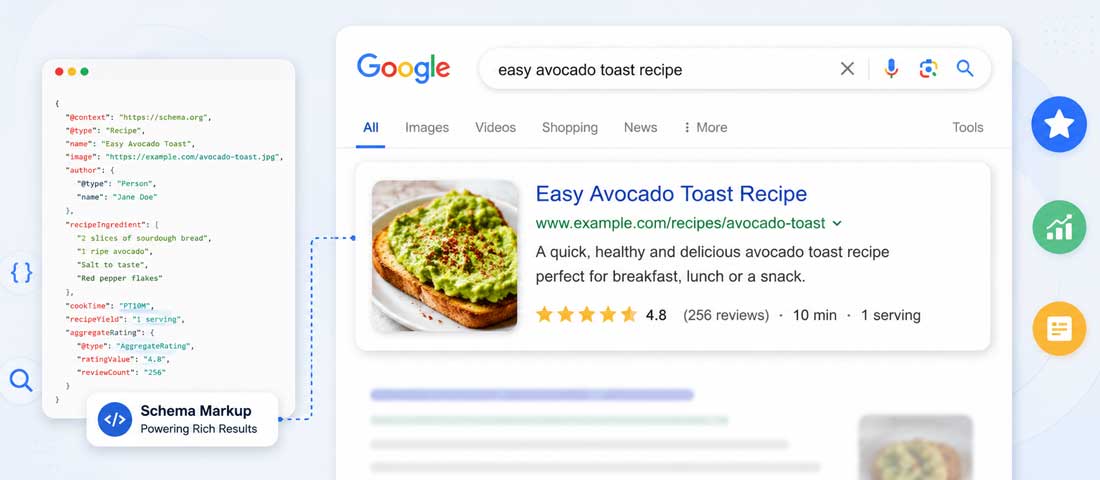
What schema markup actually is, in plain English
Search engines do not read your website the way you do. When a person reads a page about Tom Brady, they understand that Tom Brady is a quarterback who played in the NFL, that the article is about a sportsperson, and that any references to Super Bowls relate to American football. The search engine, by default, sees the letters T-o-m- -B-r-a-d-y and has to infer all of that meaning from context. It does so well most of the time, but it does so by guessing, and the guess can be wrong — Tom Brady might be interpreted as a local plumber, an obscure book character, or any number of other Toms with the surname Brady.
Schema markup is the language you use to tell the search engine exactly what your content is about, removing the guesswork. Behind the scenes of the article about Tom Brady, you add a few lines of code that say, in machine-readable form, “this page is about a Person, specifically an athlete, named Tom Brady, who plays American football, who has won the following championships, who was born on this date.” None of this code is visible to your human readers. All of it is read by search engines and AI assistants when they crawl the page, and it tells them with certainty what would otherwise have been inferred.
The vocabulary used for this labelling is called Schema.org — a shared vocabulary developed by Google, Microsoft, Yahoo and Yandex specifically for this purpose. It defines hundreds of standardised types and properties (Person, Organization, Product, Article, Event, Recipe, and so on, with detailed properties for each) so that any search engine reading your schema understands it the same way. The format that all of them now prefer is JSON-LD — a clean, separate block of code that sits in your page’s HTML head, doesn’t interfere with anything visible, and is easy to add and maintain.
Why schema matters more in 2026 than ever before
Schema has been around for over a decade, but the way it gets used by search engines has changed dramatically in the last two years. Four shifts have moved schema from “useful for rich snippets” to “essential for being findable at all”.
1. AI assistants depend on structured data to understand and cite content
ChatGPT, Gemini, Perplexity, Claude and the broader generation of AI assistants do not browse the web the way Google does. They synthesise answers from sources, and the sources they trust most are the ones whose content they can confidently understand. Structured data is the clearest possible signal of what a page contains — far more reliable than inferring meaning from prose alone. Pages with strong schema get cited more frequently in AI answers because the assistants can extract specific information cleanly and confidently. Pages without schema get passed over for sources where the meaning is more explicit. The full picture of how this works is covered in our complete AI search optimisation guide, and schema is one of the foundational technical layers it depends on.
2. Voice search reads schema-powered answers aloud
When you ask Siri, Alexa or Google Assistant a question, the spoken answer almost always comes from a page that explicitly marked up the relevant information with schema. The voice assistant cannot read a meandering paragraph aloud and decide which sentence answers the question; it needs the answer pre-identified in structured form. FAQPage schema, HowTo schema, and direct answer structures are what make voice answers possible at all. Sites without these structures are invisible to voice search regardless of how good their content is.
3. Search engine results pages are dominated by rich features
The Google search results page of 2026 looks almost nothing like the page of 2018. Featured snippets, knowledge panels, AI Overviews, People Also Ask sections, rich product cards, FAQ accordions, video carousels — all of these are powered by structured data. Sites without schema are eligible only for the basic blue-link result, while sites with proper schema can appear in the prominent rich features that capture the majority of clicks. The competitive landscape for organic visibility has shifted toward sites that have done the structured data work.
4. Local search relies heavily on LocalBusiness schema
For any business with a physical location or a defined service area, LocalBusiness schema has become the foundation of local discovery. Google uses it to populate map results, local panel cards and “near me” voice queries. Apple uses similar structured data for Siri’s local recommendations. A business without proper LocalBusiness schema is competing with one hand tied behind its back in every local search — and local search now represents the majority of commercial discovery for service businesses. The discipline of getting this right is covered in our complete local SEO guide, and schema is central to it.
The main schema types your business probably needs
Schema.org defines hundreds of types, but for most businesses, a handful of them do the great majority of the work. The table below summarises the schema types that produce the most visible results, what each one does, and which kinds of business benefit most.
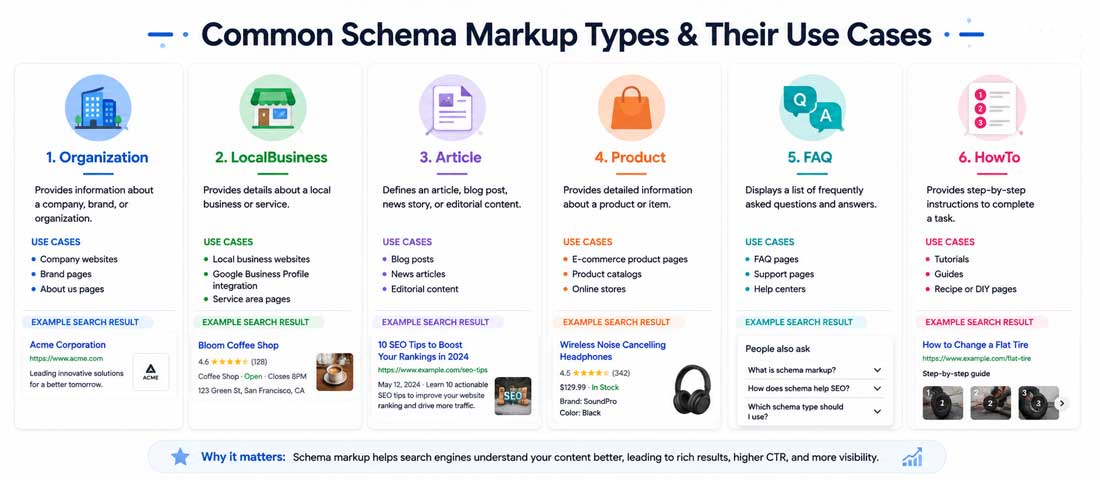
| Schema type | What it does | Who needs it most |
|---|---|---|
| Organization | Identifies your business as an organisation with name, logo, contact and social profiles | Every business website |
| LocalBusiness | Adds physical location, opening hours, service area and contact details | Service businesses, retail, restaurants, professional services |
| Article / BlogPosting | Marks up editorial content with author, date, and topic | Publishers, blogs, content businesses |
| Product | Identifies products with name, price, availability, reviews | eCommerce sites, anyone selling physical or digital products |
| FAQPage | Marks question-and-answer content for rich snippet display | Service businesses, support content, any page with FAQs |
| HowTo | Marks step-by-step instructions for rich result display | Tutorial content, guides, instructional businesses |
| Review / AggregateRating | Adds star ratings and review counts to search results | Products, services, anywhere genuine reviews exist |
| BreadcrumbList | Shows hierarchical page location in search results | Any site with a navigation hierarchy beyond the homepage |
| Person | Identifies an individual with role, credentials, social profiles | Authors, founders, consultants, personal brands |
| Event | Adds event details with date, location, ticket info | Venues, organisers, education, conferences |
Most small business websites benefit from a baseline of Organization schema on every page, LocalBusiness schema if they have a physical presence, BreadcrumbList on internal pages, and either Article schema on blog content or Product schema on product pages depending on what they sell. FAQPage and HowTo schema are added where the content naturally fits those structures. Larger sites layer additional types as the content depth justifies them.
How schema markup actually works (the technical bit, made simple)
Schema markup can be written in three different formats — Microdata, RDFa and JSON-LD. The technical differences are interesting if you are building search engines, but for the practical purpose of getting your site marked up, only one of them matters today.
JSON-LD is the format Google has recommended since around 2015, and it has steadily become the dominant standard. The other two are still valid but increasingly used only on older sites that haven’t been updated. JSON-LD has a major practical advantage — the schema lives in a self-contained block in your page’s HTML head, completely separate from your visible content. Adding, editing or removing schema doesn’t risk breaking your page’s display in any way. The Microdata and RDFa approaches mix the schema into the visible HTML, which works but is more fragile and harder to maintain.
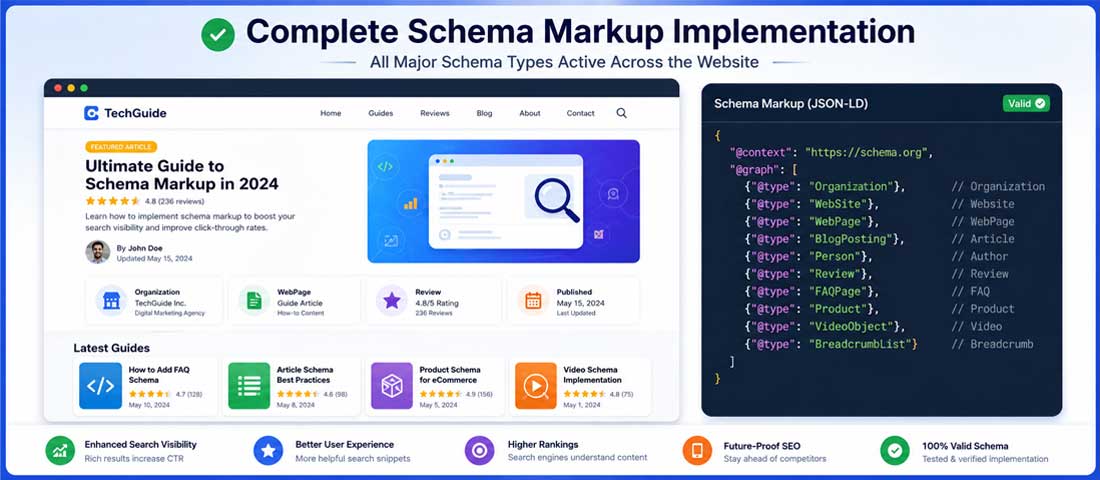
A typical JSON-LD block looks like a structured object with a type, properties, and values. For an Article, it might specify the headline, the author, the date published, the publisher, and the main image. For a LocalBusiness, it specifies name, address, phone, opening hours, and price range. For a Product, it specifies name, image, description, brand, offer details and aggregate rating. The structure follows the Schema.org vocabulary exactly, so a search engine reading your JSON-LD knows precisely what each property means.
The seven-step process to implement schema markup
Adding schema markup to a site is more methodical than mysterious. The seven steps below cover the practical work in the order to do it. None of them requires deep technical skill; most can be done by a site owner with basic comfort using their CMS.
-
Audit what schema you currently have
Before adding anything, find out what is already there. Run your homepage and a few key pages through Google’s Rich Results Test (free at search.google.com/test/rich-results). The tool tells you what schema is currently present, what types Google detected, and any errors or warnings. You may find your site already has some schema from your theme or plugins — knowing this prevents duplication and lets you build on what exists rather than starting from scratch. -
Identify which schema types apply to your content
Look at the table above and map your pages to the relevant schema types. Your homepage almost certainly needs Organization schema. If you have a physical location, LocalBusiness. If you sell products, Product. If you publish articles, Article. If you have FAQs, FAQPage. Make a list of what each page type needs. This becomes your implementation plan. -
Choose your implementation method
For WordPress sites, an SEO plugin like Yoast SEO, RankMath, or Schema Pro can generate most of the schema you need with minimal manual work. For Shopify, the platform includes Product and Organization schema by default, with additional schema available through apps. For custom builds, schema is typically added directly to the templates by a developer. Pick the method that fits your platform and skill level. -
Generate the schema (with tools or manually)
For simpler cases, free generators like Schema Markup Generator (technicalseo.com) and Merkle’s Schema Markup Generator let you fill in a form and get the JSON-LD output ready to copy. For more complex cases, plugins generate schema based on your content automatically. For custom builds, a developer writes the schema into the page templates. The goal is to produce clean JSON-LD that accurately reflects the content on each page. -
Add the schema to your pages
The JSON-LD code goes in the head section of your HTML, wrapped in a script tag with type=”application/ld+json”. For plugin-driven implementations, this happens automatically. For manual additions, the schema can go in your theme’s header template, in a custom HTML block, or in any plugin that lets you inject code into the head section. Make sure the schema appears on the actual rendered page — view the source of your live page to confirm the JSON-LD is there. -
Validate every schema implementation
Use Google’s Rich Results Test on each page where you have added schema. The tool shows whether the schema is valid, whether it qualifies for any rich result types, and any errors or warnings. Schema that is technically present but invalid (missing required fields, wrong format, mismatched types) produces no benefit and can occasionally produce penalties. Validate every implementation before moving on. The Schema.org validator (validator.schema.org) is also useful for checking compliance against the broader vocabulary. -
Monitor results in Google Search Console
Once schema is live, Search Console’s Rich Results report shows how Google sees it across your site, which pages qualify for which rich result types, and any errors detected during crawling. Watch this report regularly — it surfaces issues you would otherwise miss and tracks the growth in rich result eligibility as your implementation matures. The patterns in this report tell you which schema types are paying off and where to invest more effort.
Want Schema Markup Implemented Properly Across Your Site?
If you would rather have an experienced team identify which schema types apply, implement them across your pages, validate every page, and configure ongoing monitoring, we are happy to take it on. It is one of the highest-return technical optimisations available, and we run it as part of our SEO programmes.
How to add schema markup to a WordPress site
WordPress is the most common CMS, and the schema options for WordPress sites are mature and largely automated. Three paths cover most situations.
The first and easiest path is through an SEO plugin. Yoast SEO automatically generates Organization, WebSite and BreadcrumbList schema across the entire site as soon as it is installed and configured, and adds Article schema to your blog posts. RankMath does the same with additional support for LocalBusiness, FAQ and HowTo schema through its native blocks. The free versions of both plugins handle the majority of what most sites need; the premium versions add additional schema types and finer control.
The second path is through a dedicated schema plugin. Schema Pro by WPBrigade provides templates for over a dozen schema types and lets you map them to specific page types or individual pages. WP SEO Structured Data Schema gives finer manual control. These plugins are useful when you need schema beyond what your SEO plugin provides, particularly for product, event, recipe or course content.
The third path is manual implementation, either through a code snippet plugin like Code Snippets or by editing your theme’s header.php directly. This gives complete control but requires either developer skill or a comfort with copying generated JSON-LD into the right place. For a site with a custom theme and specific schema needs, the broader work of building schema into the templates from the start is part of every proper custom website build we deliver — retrofitting schema into a finished site is always slower than building it in from day one.
How to add schema markup to other platforms
The specifics differ across platforms, but the underlying principle — clean JSON-LD in the page head — is the same everywhere.
Shopify includes Organization, WebSite and Product schema by default on every store. The implementation is generally good but standard, and extending it requires either liquid template editing or schema-specific apps from the Shopify App Store. Apps like JSON-LD for SEO, SearchPie and Schema Plus add support for additional types — FAQ, HowTo, Article, Event — without requiring template work. For custom Shopify themes, schema is usually added directly to the relevant template files.
Wix and Squarespace have historically lagged in schema support, though both have improved meaningfully in the last two years. Wix’s automatic schema covers Organization, Article and Event reasonably well, with additional control through their SEO settings. Squarespace handles Organization, Product and Article schema natively. For more advanced schema on either platform, custom code injection (where available) or third-party apps are usually required.
Custom builds on frameworks like Laravel, Django, React or Next.js add schema directly in the page templates or layout components. For React and Next.js specifically, the Helmet or Head component is the standard place to inject JSON-LD. The advantage of custom builds is complete control over which schema appears on which pages and how it is generated; the trade-off is that the implementation requires developer time, which is why building schema into the architecture from day one is significantly more efficient than adding it later.
How AI assistants use schema markup
The AI search layer — ChatGPT with web browsing, Perplexity, Gemini, Claude, the broader generation of AI assistants — has changed what schema does for visibility, and the change is worth being specific about. AI assistants are particularly good at using structured data because their underlying models work well with explicit, labelled information.
When an AI assistant is constructing an answer to a query, it pulls from multiple sources and synthesises a response. The sources it favours are the ones whose content is clearly understood. A page with FAQPage schema marking up the relevant question and answer gets cited more frequently than a page where the same answer is buried in prose, because the assistant can lift the structured Q&A cleanly and confidently. A LocalBusiness schema with complete location data feeds local AI answers more reliably than a contact page that requires inference. A Product schema with structured price, availability and review data appears in shopping recommendations where unstructured product descriptions do not.
The practical implication is that schema has become one of the most reliable ways to improve AI citation rates. Pages without schema can still be cited, but they are competing with structured competitors for the same query, and structured tends to win. This is why AI search optimisation services in 2026 include schema implementation as a foundational element rather than an optional add-on — it is the technical layer that makes everything else possible.
Common schema mistakes that hurt rather than help
Bad schema is sometimes worse than no schema. Search engines treat schema implementation as a signal of site quality, and broken or misleading schema undermines the signal. The patterns we see most often in audits are predictable.
The wrong schema type. Marking up a blog post as a Product, a service page as an Article, a contact page as a LocalBusiness when there is no physical presence. The schema technically exists but does not match what the page is about, which produces confusion rather than clarity.
Incomplete required fields. Every schema type has fields that are required and fields that are recommended. Missing required fields means the schema is technically invalid and Google ignores it entirely. Missing recommended fields means it is valid but cannot generate rich results. Both are common, and both are easily fixed once identified.
Mismatched content. The schema says the page is about a product priced at $50 with five-star ratings; the page itself shows different pricing and no reviews. This contradiction is one of the clearest signals to search engines that something is wrong, and pages with mismatched schema can lose rich result eligibility entirely.
Marking up content that isn’t visible to users. Schema is meant to label content that exists on the page. Adding FAQ schema for questions that don’t appear on the page, or Review schema for reviews that aren’t displayed, is treated as deceptive by Google and can result in manual penalties. The schema should always describe what users actually see.
Spammy schema and rating manipulation. Self-applied five-star reviews, inflated rating counts, fake aggregate scores. This is the schema equivalent of buying links — it might work briefly, then triggers a manual action that can take months to recover from. The schema you mark up should reflect genuine, verifiable information about your business.
How to validate your schema markup
Validating schema is essential and free. Three tools cover the work, and using all three at different stages catches different types of issue.
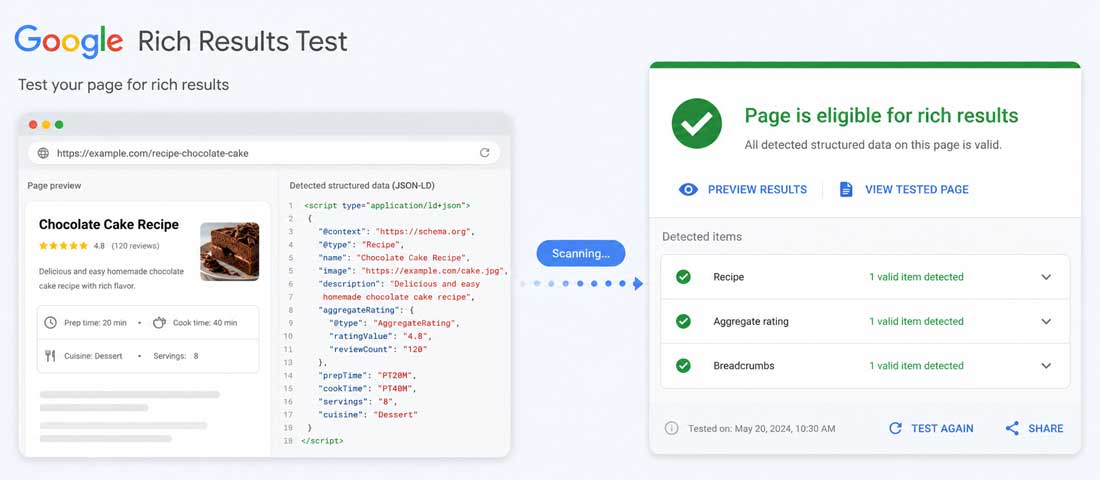
Google’s Rich Results Test (search.google.com/test/rich-results) is the primary tool. Enter any URL and it reports which schema types were detected, whether each one is valid, whether it qualifies for any rich result types in Google search, and lists every error and warning. Run this on every page where you have added or modified schema. The errors are specific — “missing required field ‘datePublished'” or “invalid value for ‘priceCurrency'” — and tell you exactly what to fix.
The Schema.org Validator (validator.schema.org) is the broader compliance check. It tests your schema against the full Schema.org vocabulary, not just the subset that Google uses for rich results. This is useful for catching issues that Google’s tool might miss but that other search engines or AI assistants could care about. Some properties matter for AI citation that don’t matter for Google rich results, and the Schema.org Validator catches them.
Google Search Console’s Rich Results report is the ongoing monitoring tool. Once schema is live, this report tracks how Google sees your site at scale — which pages qualify for rich results, which errors are appearing across the site, and which schema types are most heavily used. Watch this report weekly during initial implementation and monthly afterwards. The broader pattern of how technical fixes connect to visible improvements ties into the discipline covered in our piece on recent algorithm changes and zero-click search trends, where structured data is one of the levers that matter most.
- Marking up content that isn’t visible on the page. Google’s guidelines explicitly require structured data to describe content visible to users. Hidden FAQ schema, invisible review markup or content-only-in-schema produces manual penalties.
- Self-applied reviews and ratings. A business marking up its own five-star reviews of itself, with no actual review system in place, is the classic spam pattern. Rich result eligibility for reviews is lost when this is detected.
- Schema type mismatched to page content. A blog post marked as a Product, a contact page marked as a LocalBusiness, an opinion piece marked as a News Article. The mismatch is detected and the schema is ignored or penalised.
- Multiple conflicting schema types on the same page. Two Organization schemas with different names, multiple LocalBusiness entries with different addresses. The conflict makes the schema unreliable and Google ignores it.
- Schema generated by plugins but never validated. Plugins occasionally generate broken schema, especially when themes interact with them. The schema appears present but fails validation. Untested plugin output produces no benefit.
- Wrong currency, wrong date formats, wrong identifiers. Property values must match the format Schema.org specifies. ISO 8601 for dates, ISO 4217 for currency codes. Wrong formats invalidate the entire schema block.
- Marking up old or outdated content as if it were current. Event schema for events that have passed, sale prices that no longer apply, business hours that have changed. The schema must stay current with reality.
- Forgetting BreadcrumbList schema. One of the easiest wins, often missed entirely. Breadcrumb-enhanced search results consistently outperform plain results in click-through rate.
How to measure whether schema is working
Schema is one of the few SEO investments where you can measure results relatively directly. Four metrics, looked at together, give you the picture.
Rich result impressions in Search Console. The Rich Results report in Google Search Console shows how often your pages appeared in search results with rich features attached. Growth in this metric is the most direct indicator that your schema implementation is producing search visibility. The pattern usually shows clear growth within 30 to 60 days of implementation, then continues climbing as Google indexes more of the schema-enhanced content.
Click-through rate on rich-snippet-eligible queries. The same Rich Results report shows CTR for rich result appearances. Compare this to your average CTR for plain-result appearances on similar queries. The gap is typically meaningful — rich results often have CTRs 20 to 40 percent higher than equivalent plain results, sometimes more for specific result types like recipes or products.
Search Console “search appearance” filter. Use the search appearance filter to isolate impressions, clicks and CTR specifically from rich result types like FAQ, HowTo, Breadcrumbs and Reviews. This breakdown shows which schema types are driving the most visibility and where to invest more.
AI assistant citation tracking. Outside Search Console, periodically test the queries that matter most to your business in ChatGPT, Perplexity and Gemini. Note whether your site is cited and how. Sites with strong schema implementation tend to be cited more frequently and more accurately over time. This is qualitative testing rather than dashboard analytics, but the pattern it reveals is genuine and increasingly important.
When to bring in professional help
This guide is detailed enough that a capable site owner can implement schema themselves, particularly when working with WordPress and a good SEO plugin that automates most of the work. There are situations where professional help is worth the investment.
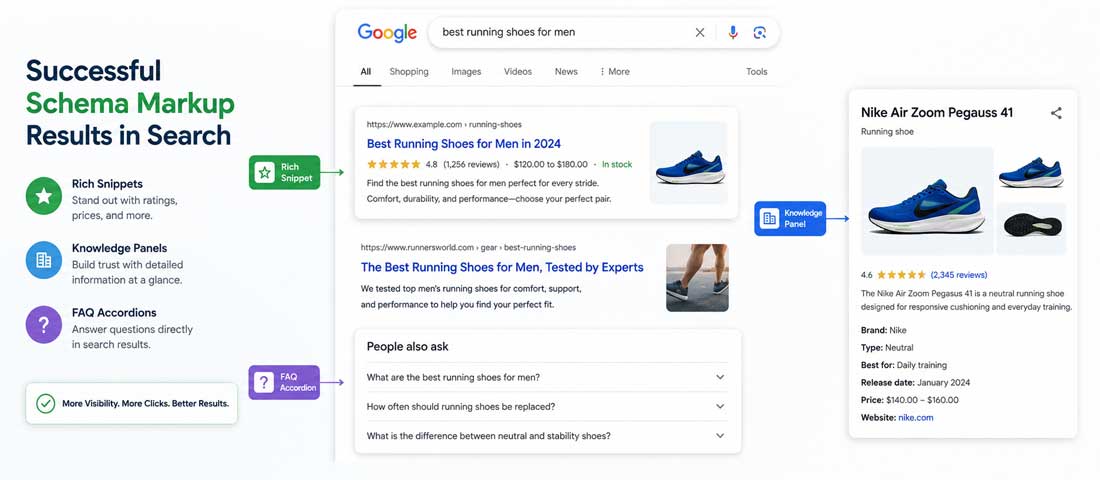
Bring in professional help when your site is complex — many page types, custom development, eCommerce with extensive product catalogues, multi-region or multi-language sites — where standard guidance doesn’t cleanly apply and the schema needs careful design rather than off-the-shelf plugins. Bring in help when your audit reveals existing schema problems that need cleanup before new schema can be added cleanly. Bring in help when you are running a serious AI search visibility programme where the schema layer is part of a broader coordinated effort. And bring in help when the patterns of schema across the industry you compete in require strategic thinking rather than just technical implementation — for example, in regulated industries where some schema types carry compliance implications.
For ongoing schema maintenance — keeping schema current as content changes, monitoring for errors, adapting to schema.org updates, and watching the rich results report — structured care is more reliable than ad-hoc attention. Our SEO services include schema implementation, validation and ongoing maintenance as part of every engagement, because schema is one of the genuinely high-return technical levers available and the discipline of keeping it clean over time is what produces the compounding benefit.
The broader truth about schema is that it is one of the few SEO investments where the work is finite and the return is durable. Once schema is implemented properly, it continues working for as long as the content exists, with only modest ongoing maintenance. The pages get cited more, the rich results compound, the AI assistants treat the site as a more reliable source, and the visibility improvements continue accruing month after month. The cost of getting it right is small. The cost of leaving it undone gets larger every quarter as more of search shifts toward AI assistants and rich results that depend on structured data to function. There is no longer a credible argument for waiting on this work, only an honest acknowledgement that it should have happened sooner and a decision to start now.
Frequently asked questions
| What is schema markup? | Schema markup is structured code added to a website’s HTML that tells search engines and AI assistants exactly what the content on each page means, not just what it says. It uses a standardised vocabulary called Schema.org, developed jointly by Google, Microsoft and Yahoo, and is most commonly written in a format called JSON-LD. The code is invisible to human visitors but read by search engines, allowing them to display rich snippets in search results, power voice assistant answers, and confidently cite the content in AI-generated responses. It is one of the most reliable technical SEO investments available in 2026. |
| Does schema markup affect SEO rankings? | Schema markup is not a direct ranking factor — Google has confirmed this repeatedly. However, it has substantial indirect effects on visibility and click-through rate that often translate into measurable ranking improvements over time. Pages with schema qualify for rich snippets, featured snippet appearances, knowledge panel features and AI Overview citations that plain pages do not. These enhanced search appearances drive higher click-through rates, more engagement, and better dwell time, all of which are signals that affect rankings. Schema is one of the highest-return technical SEO investments available, even though the effect is indirect rather than direct. |
| Do I need a developer to add schema markup? | For most situations, no. WordPress sites can get most of the schema they need through SEO plugins like Yoast, RankMath or Schema Pro, which generate and inject schema automatically based on your content. Shopify includes basic schema by default and supports additional types through apps. Wix and Squarespace handle basic schema through their built-in settings. Manual implementation through code is required only for custom builds, complex schema types not covered by automated tools, or specific optimisations that go beyond plugin defaults. For most small to mid-sized business websites, a capable site owner working with a good SEO plugin can implement effective schema without developer help. |
| Which schema types should I prioritise for my business? | The priority depends on what your site is, but a baseline applies to almost every business. Organization schema on every page is the universal starting point. LocalBusiness schema is essential if you have a physical location or defined service area. BreadcrumbList schema on internal pages produces immediate search result improvements. Beyond these, prioritise the schema that matches what you sell — Product schema for eCommerce, Article schema for content businesses, Event schema for venues, FAQPage and HowTo where your content naturally fits those structures. Don’t try to implement every possible schema type. Focus on the ones that match your actual content and your buyers’ actual searches. |
| Can schema markup help with AI search visibility? | Yes, significantly. ChatGPT, Gemini, Perplexity, Claude and the broader generation of AI assistants rely heavily on structured data to understand and cite content confidently. Pages with strong schema get cited more often in AI-generated answers because the structured information is easier to extract reliably than meaning inferred from prose alone. Organization schema with proper sameAs properties helps AI assistants identify and distinguish your brand. FAQPage schema makes your Q&A content directly quotable. Product schema feeds AI shopping recommendations. As AI search continues to grow, schema is shifting from a traditional SEO tactic to a foundation of AI-mediated discovery, and sites without it are increasingly invisible in that layer. |
| How long until schema markup shows results? | Initial results from schema implementation typically appear within 30 to 60 days as Google reindexes the affected pages and starts showing rich results. The Rich Results report in Google Search Console usually shows growth in qualifying impressions within the first month. The full benefit takes three to six months to materialise as more of the site is indexed, rich result eligibility expands, and the impact on click-through rate compounds across more queries. AI search citation effects can be faster (within days for retrieval-based assistants like Perplexity) or slower (for assistants relying on training data, the benefit only appears when models are next trained, which can take months). The investment is durable — once schema is in place, it continues working as long as the content exists. |
| What happens if I have errors in my schema markup? | The consequence depends on the type of error. Minor errors — missing recommended fields, slightly malformed values — usually mean the schema is recognised but cannot generate rich results. The penalty is missed opportunity rather than active harm. Major errors — invalid schema type, missing required fields, wrong format — mean Google ignores the schema entirely, producing no benefit. The most serious issues are schema that misrepresents content — fake reviews, marked-up content not visible on the page, type mismatched to content — which can produce manual penalties that remove rich result eligibility across the site and take significant work to recover from. Validating every schema implementation with Google’s Rich Results Test before going live catches most issues before they cause problems. |
Want Schema Markup Implemented Properly Across Your Site?
We design and implement schema strategies as part of our SEO programmes — identifying the right types for your business, implementing them across your pages, validating every implementation, and configuring ongoing monitoring. With 12+ years of experience and over 2,500 websites delivered, we know what a properly schema-enhanced site looks like. Send us your domain and we will respond within one business day.