Shared vs VPS vs Dedicated Hosting: An Honest Comparison
Hosting decisions are among the most under-thought choices in the entire web infrastructure conversation. Most businesses either default to the cheapest shared plan because “hosting is hosting”, or they get talked into enterprise dedicated hosting by someone selling something they don’t need. Neither is usually the right answer for a serious business website. The honest reality is that the correct hosting tier depends on your specific traffic patterns, application type, technical capacity and growth trajectory — and getting it wrong shows up as slow pages, unpredictable outages, security incidents, or bills significantly higher than they need to be.
This guide is the practical version of the shared-versus-VPS-versus-dedicated conversation, written from what we see in client hosting audits and migrations. We have moved dozens of sites between these tiers over the years, and the patterns of what fits which business are consistent. If you want the broader context of how hosting sits within ongoing website care, our complete website maintenance guide is the wider reference. This article focuses tightly on the hosting tier decision — what each option actually is, where each one wins, where each one quietly fails, and how to decide between them without overpaying or underprovisioning.
Why hosting choice matters more than most businesses think
Before the comparison, it is worth being explicit about why this decision deserves real attention. Hosting is the physical foundation that every other performance and reliability decision rests on. A brilliantly built site on the wrong hosting will underperform a poorly built site on the right hosting, because the ceiling of what any website can do is set by the infrastructure it runs on. This shows up in four specific ways that affect business outcomes.
Speed and Core Web Vitals. Page load times are directly affected by server response time, and server response time is directly affected by whether the server is starved for resources by neighbours, adequately provisioned, or dedicated. Sites on overloaded shared hosting rarely hit the sub-2.5-second Largest Contentful Paint that Google now expects, regardless of how well-optimised the code is. Better hosting is often the single biggest available improvement to Core Web Vitals.
Uptime and reliability. Every hosting tier has different uptime characteristics. Shared hosts typically publish 99.9% uptime targets but deliver 99.5% to 99.8% in practice. Quality VPS providers hit genuine 99.9%. Dedicated and enterprise cloud hosting reach 99.99% and above. The difference between 99.9% and 99.5% is about 40 minutes of downtime per month versus about 3.5 hours — meaningful for any revenue-generating site.
Security exposure. Shared hosting puts your site alongside dozens or hundreds of other sites on the same server, and a compromise on any of them can affect your site through shared resources and shared IP reputation. Isolated hosting removes this class of risk entirely. Sites that keep getting mysterious malware infections or blacklisted IPs often turn out to have a shared hosting neighbour problem, not a site problem.
SEO impact. Beyond Core Web Vitals, hosting affects SEO through IP reputation (shared IPs sometimes get associated with spam neighbours), server response times (a ranking signal), and reliability (frequent downtime hurts rankings over time). Good hosting is invisible in SEO reports; bad hosting is a persistent drag that most audits never explicitly identify as the cause.
Shared hosting: what it is and who it suits
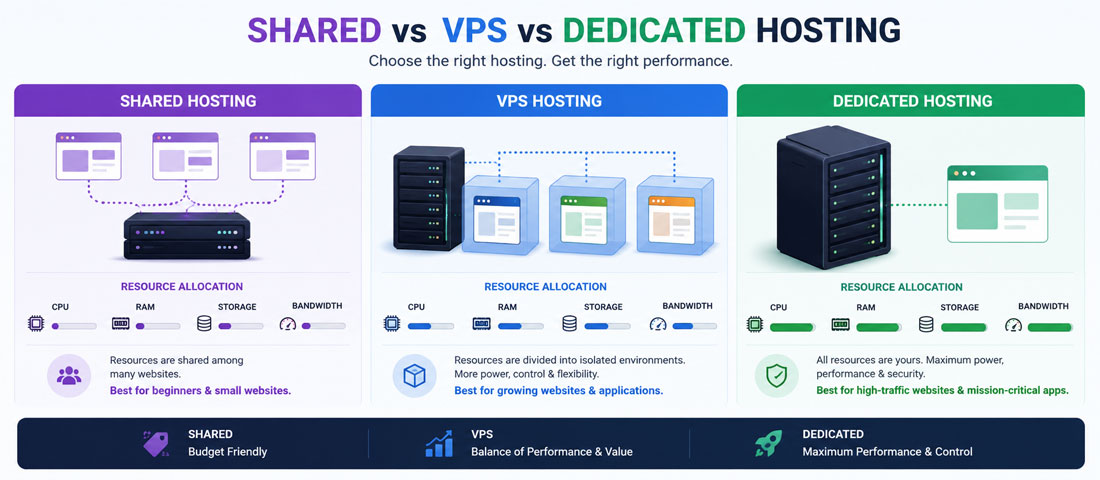
Shared hosting is the entry tier of the hosting market and the model that most first-time website owners start with. Multiple websites — sometimes dozens, sometimes hundreds — share the same physical server, splitting the CPU, RAM, disk and network resources between them. The hosting provider manages the server; the customer manages only their own site content. Prices typically range from $3 to $15 per month, and setup is close to zero effort.
What shared hosting is good at. Cost is the primary strength — genuinely affordable for anyone building a first site or running a small business without heavy traffic. Simplicity is the second — the host handles all server administration, backups (usually), security patching (usually), and infrastructure decisions. The customer just uploads files and manages their site through a control panel like cPanel or Plesk. For sites where the hosting is meant to be invisible operationally, shared hosting delivers that.
What shared hosting is not good at. Resource contention is the fundamental limitation — when your neighbour on the server has a traffic spike or runs a heavy script, your site slows down. The “noisy neighbour problem” is real and largely outside your control. Performance ceilings are relatively low; sites getting more than a few hundred visitors per day often start seeing intermittent slowness even without any neighbour problem. Security exposure is elevated because a compromise on any neighbour site can affect you through shared IP reputation, and some shared hosts have limited isolation between customer accounts. Customisation options are limited — you get what the host allows, not what your application might need.
Who shared hosting genuinely suits. Personal websites and blogs with modest traffic. Very small business brochure sites where the site is essentially a business card. Testing environments and learning projects. Sites in the earliest stages of a business where scaling hasn’t happened yet. Small-scope one-page landing pages. For any of these, shared hosting is the correct choice — not because it’s cheap, but because the specific characteristics of shared hosting match the specific needs of these projects. Businesses that build a serious commercial site on shared hosting because “it works for now” are usually the ones who end up migrating in a rush eighteen months later when the site can’t handle its own success.
VPS (Virtual Private Server) hosting: what it is and who it suits
VPS hosting sits in the middle of the market and is the tier most professionally-managed business websites belong on. A physical server is partitioned into multiple virtual servers, each with dedicated CPU cores, RAM, storage, and network resources. Unlike shared hosting, your VPS’s resources are reserved for you — when your neighbour has a traffic spike, your site is unaffected. Prices typically range from $10 to $100 per month for standard business use, with high-end VPS instances running $200 to $500 monthly.
What VPS hosting is good at. Dedicated resources are the fundamental strength — the CPU and RAM allocated to your VPS are genuinely yours, producing predictable performance regardless of what other VPS customers are doing on the same physical hardware. Scalability is significantly better than shared hosting because you can typically upgrade to more resources without migrating the site. Root access (on unmanaged VPS) means you can install any software your application needs. Security isolation is real — a compromise on another VPS on the same physical hardware doesn’t reach yours. For most business websites — WordPress sites with meaningful traffic, small eCommerce stores, sites where uptime matters — VPS is the right operational tier.
What VPS hosting is not good at. Management overhead is real — unmanaged VPS requires actual server administration skills, and even managed VPS involves more decisions than shared hosting. Cost is meaningfully higher than shared, though usually still modest for what you get. At the very high end of traffic, a single VPS reaches its limits and further scaling requires either upgrading to dedicated hosting or moving to a load-balanced cloud architecture. Some cheap VPS providers overcommit their physical hosts, producing performance closer to shared hosting despite the VPS labelling — the “VPS” market has more variation in actual quality than the shared or dedicated markets.
Who VPS hosting genuinely suits. WordPress sites with real traffic (a few thousand monthly visitors and up). Small to mid-sized eCommerce stores. Business websites where uptime and performance matter for revenue. Sites running behind proper professional WordPress development where the hosting needs to match the quality of the build. Custom applications with predictable resource requirements. Growing businesses that will outgrow shared hosting within twelve months and want to skip the migration by starting where they need to end up. For the majority of business websites we work with, VPS is the correct hosting tier — expensive enough to deliver real performance, cheap enough to not be wasteful.
Dedicated hosting: what it is and who it suits
Dedicated hosting means an entire physical server is allocated to one customer. No virtualisation, no shared resources, no neighbours. Every CPU cycle, byte of RAM, and network packet is yours. Prices range from $100 to $500 per month at the low end for basic dedicated servers, and $500 to $3,000+ per month for enterprise-grade dedicated infrastructure with high-spec hardware, managed services, and redundancy.
What dedicated hosting is good at. Maximum performance is the primary strength — no virtualisation overhead, no possible resource contention, full hardware acceleration where applicable. Complete control over the hardware and software stack means the environment can be tuned exactly for the application. Security exposure is the lowest possible — no shared physical resources at all. For applications where performance genuinely matters — high-traffic sites, resource-intensive applications like real-time data processing, sites with regulatory requirements around isolation — dedicated hosting is the right tier.
What dedicated hosting is not good at. Cost is the fundamental limitation — dedicated hosting is substantially more expensive than VPS for hardware you may not need to fully utilise. Overkill is genuinely common; businesses on dedicated hosting for “safety” often use less than 20% of the server’s capacity, paying for hardware that sits idle. Management complexity is real — even managed dedicated hosting involves more operational overhead than VPS. Scaling is discontinuous — when you outgrow a dedicated server, the next step is usually a bigger dedicated server or a migration to cloud, both of which are expensive and disruptive. Hardware refresh cycles are your problem to plan around.
Who dedicated hosting genuinely suits. Sites with genuinely high traffic — tens of thousands of concurrent users, hundreds of thousands of daily visitors. Resource-intensive applications where CPU or RAM demand is consistent and heavy. Regulated industries where physical isolation is a compliance requirement, not a preference. Large enterprise eCommerce where downtime cost dwarfs the hosting cost. Databases with performance requirements that virtualisation can’t match. For most small and mid-sized business websites, dedicated hosting is overprovisioning — expensive infrastructure for problems the business does not actually have.
The honest comparison across the dimensions that matter
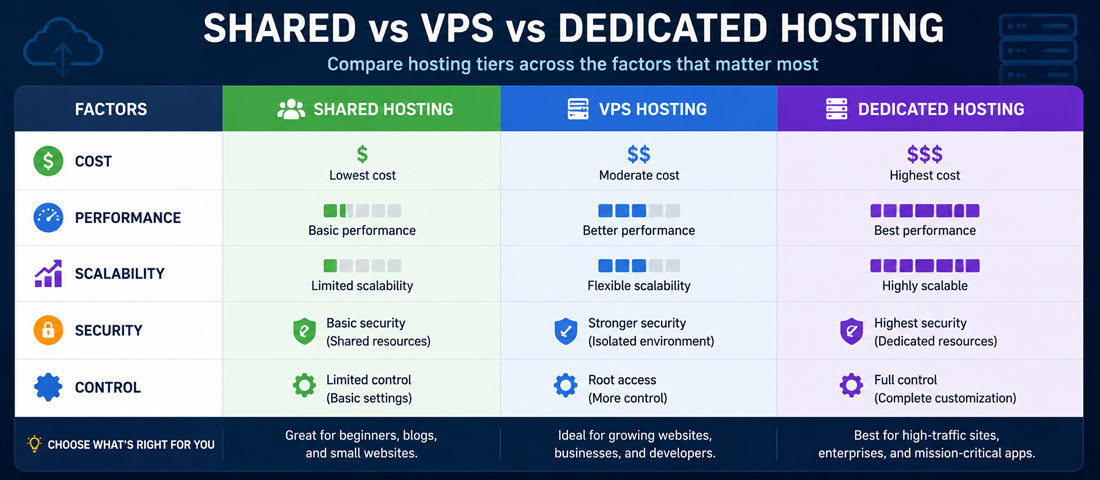
The table below summarises how the three hosting tiers compare across the dimensions that genuinely affect the decision. Ranges reflect what we see in real client hosting choices rather than vendor marketing claims.
| Factor | Shared Hosting | VPS Hosting | Dedicated Hosting |
|---|---|---|---|
| Typical monthly cost | $3 – $15 | $10 – $100 (up to $500 high-end) | $100 – $3,000+ |
| Resource allocation | Shared with neighbours | Reserved for your VPS | Entire server, all yours |
| Performance ceiling | Low (variable, affected by neighbours) | Medium to high (predictable) | Very high (limited only by hardware) |
| Uptime (realistic) | 99.5 – 99.8% | 99.9%+ | 99.99%+ |
| Scalability | Low (usually requires migration) | Good (upgrade in place) | Limited (upgrade to bigger server) |
| Security isolation | Weak | Strong (virtual isolation) | Complete (physical isolation) |
| Control and customisation | Minimal (what host allows) | Broad (root access on unmanaged) | Complete |
| Technical skill required | None (host manages everything) | Moderate (or managed) | High (or managed at cost) |
| Best for | Personal, small brochure, testing | Business sites, WordPress, small eCommerce | High-traffic, compliance, enterprise |
| Worst for | Growing businesses, revenue sites | Rarely — the wrong tier for either extreme | Small business sites (overprovisioning) |
Notice that no single tier wins across every dimension. Shared is cheapest but limits everything else. VPS balances cost and capability better than either alternative for most business use cases. Dedicated is highest performance but overprovisions for the majority of business sites. The right tier depends on which dimensions matter most for what you are running, not on which tier sounds most impressive.
The seven-question hosting decision framework
For businesses genuinely weighing this decision, the seven questions below produce a reliable recommendation. Work through them in order — the answer usually becomes clear within the first three or four.
-
What is your current traffic, and what is your realistic 24-month projection?
Traffic is the single biggest determinant of hosting tier. Sites under a few hundred visitors per day are comfortable on shared hosting. Sites between a few hundred and a few thousand daily visitors belong on VPS. Sites with tens of thousands of daily visitors or more warrant serious dedicated or cloud hosting. Project forward realistically — building for current traffic when your growth trajectory clearly exceeds it means migrating in twelve months instead of building right the first time. -
What kind of application are you running?
Static brochure sites and simple content sites are lightweight and comfortable on lower tiers. WordPress sites with real functionality, WooCommerce stores, custom PHP or Node applications, and anything with a database doing real work need VPS at minimum. Resource-intensive applications like video streaming, real-time collaboration, or heavy data processing often warrant dedicated. The application drives the requirement more than the visible page load might suggest. -
How mission-critical is uptime for your business?
If downtime directly costs money — eCommerce, lead generation, booking systems — the reliability difference between hosting tiers is a business argument, not a technical one. Shared hosting’s realistic 99.5-99.8% uptime translates to roughly 40 to 200 minutes of downtime per month. VPS at genuine 99.9% is roughly 40 minutes per month. Dedicated at 99.99% is roughly 4 minutes per month. For a site producing $10,000 monthly revenue, the cost of downtime is meaningful and often justifies the hosting upgrade on economic grounds alone. -
What is your technical capacity to manage the hosting?
Shared hosting requires essentially no technical skill — the host manages everything. VPS requires either managed VPS (higher cost, less work) or actual server administration ability. Dedicated hosting requires substantial technical capacity or managed services at significant cost. Match the tier to who will actually manage it, or pay for the management layer that closes the gap. Businesses that pick unmanaged VPS or dedicated without the skills to run them properly frequently end up with worse performance than they would have had on shared hosting. -
What compliance requirements apply to your site?
Some industries have specific requirements around data isolation, physical location, security certifications, and audit trails. Healthcare (HIPAA in the US, various equivalents elsewhere), financial services, government contractors, and businesses handling large volumes of personal data often have compliance obligations that shared hosting cannot meet. When these apply, they usually dictate at least VPS and sometimes dedicated hosting regardless of other factors. -
What is your realistic three-year hosting budget?
Shared hosting costs roughly $150-500 over three years. VPS costs $400-3,000 typically. Dedicated costs $3,000-30,000+. These are meaningful differences but rarely decisive on their own — the cost of downtime, slow pages, or migration usually dwarfs the hosting cost difference. What matters is picking the tier that fits the requirement, then confirming the budget can sustain it, not picking the cheapest tier and hoping it works. -
How predictable and consistent is your traffic pattern?
Predictable steady traffic suits fixed-capacity hosting (shared, VPS, dedicated) well. Traffic with significant spikes — seasonal eCommerce, viral content potential, promotional peaks — benefits from cloud hosting or auto-scaling VPS setups where capacity flexes with demand. Businesses on fixed hosting that then experience unexpected traffic spikes often have exactly the outage they didn’t want at the moment they most needed to be up.
Want Help Picking and Setting up The Right Hosting for Your Site?
If you would rather have an experienced team assess your requirements, recommend the right hosting tier, and handle the migration if needed — with performance testing, backup verification and SEO preservation — we are happy to take it on. It is one of the highest-leverage infrastructure decisions available for a business website.
Where shared hosting genuinely wins
Shared hosting has a real place, and the anti-shared consensus in agency circles goes too far. Four contexts fit it well and using anything more expensive is overprovisioning.
Personal websites and hobby projects. If the site exists for personal reasons rather than commercial ones, shared hosting delivers what’s needed. Portfolio sites for professionals whose main business is elsewhere, personal blogs, community group pages, family sites — all of these run comfortably on shared hosting and don’t warrant more.
Very small business brochure sites. Sites where the business is essentially operational through other channels (phone, in-person, referrals) and the website exists so people can look up contact information. A local plumber whose real marketing is word of mouth doesn’t need enterprise hosting. Shared works fine.
Testing environments and learning projects. Development sites, staging environments where the production site is elsewhere, learning environments where you’re figuring out how WordPress works. Shared hosting’s low cost and simplicity fit these use cases directly.
Very early stage businesses validating an idea. Before you know whether the business will work, over-investing in hosting is putting the cart before the horse. Shared hosting lets you launch cheaply, and if the business succeeds, migrating to VPS is straightforward. The failure mode is different — you launch on VPS, the business doesn’t work out, and you’ve spent more than necessary. Shared enables cheap validation.
Where VPS is the right answer for most business websites
VPS is genuinely the sweet spot for most businesses with a commercial website, and the businesses that pick shared instead usually regret it within a year. Five contexts specifically warrant VPS.
WordPress sites with real traffic. WordPress runs a database on every page load, and shared hosting’s constrained resources tend to make WordPress sites slow well before you’d expect based on traffic alone. Even a few hundred daily visitors is enough to expose shared hosting’s limits. VPS gives WordPress the consistent CPU and RAM it needs to perform predictably.
Small to mid-sized eCommerce stores. eCommerce sites need reliability at the checkout, consistent product page performance, and often specific integrations with payment processors and inventory systems. VPS provides the resources, control and reliability these need. A dropped checkout during a promotional spike on shared hosting is exactly the kind of failure that VPS prevents.
Business sites where uptime affects revenue. Lead generation sites, service businesses whose customers book online, any site where the business genuinely notices when it’s down. The uptime difference between shared and VPS is worth the cost difference for any site producing meaningful revenue.
Growing businesses with SEO ambitions. Sites competing seriously for organic traffic need Core Web Vitals scores that shared hosting struggles to deliver consistently. Server response time, one of the fundamental inputs to page speed, is much more consistent on VPS. The technical SEO foundations that produce genuine ranking outcomes depend heavily on infrastructure that isn’t fighting for resources.
Sites with specific technical requirements. Custom PHP versions, specific server software, particular Node.js versions, integrations that require server-level access — anything that goes beyond what shared hosts allow. VPS gives you the control to run the software your application actually needs.
When dedicated hosting is actually justified
Dedicated hosting is genuinely warranted less often than the market for it would suggest. Three specific contexts justify the cost and complexity.
Genuinely high-traffic sites. Tens of thousands of concurrent users. Hundreds of thousands of daily visitors. Sites where the traffic itself is meaningful enough that VPS resources aren’t sufficient. The vast majority of business websites never reach this threshold; the ones that do are usually funded startups, established enterprises, or high-profile publishers.
Resource-intensive applications with consistent heavy load. Real-time data processing, video encoding, machine learning workloads running as part of the web application, large database operations. When the CPU and RAM requirements are heavy and consistent, the overhead of virtualisation on VPS starts to matter. Dedicated eliminates that overhead.
Compliance-driven physical isolation requirements. Some regulated industries — specific financial services contexts, healthcare handling large volumes of protected health information, government contractors with security clearance requirements — have compliance obligations that require dedicated physical infrastructure. When these apply, they aren’t optional; dedicated hosting becomes a compliance requirement independent of other factors.
Cloud hosting: where does it fit?
Cloud hosting — AWS, Azure, Google Cloud, DigitalOcean’s newer offerings, and similar — sits alongside the traditional shared-VPS-dedicated conversation as an increasingly important fourth category. It is worth being specific about where cloud fits because the “cloud vs VPS” conversation often confuses two overlapping options.
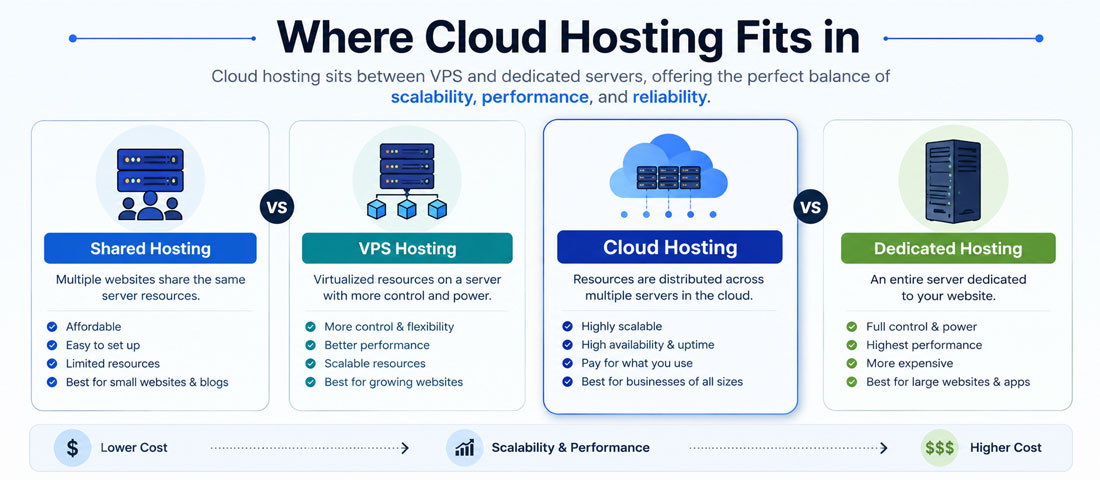
Cloud hosting can be thought of as a highly-flexible form of VPS or dedicated hosting with usage-based pricing and auto-scaling capabilities. A cloud VPS from DigitalOcean is very similar to a traditional VPS from a hosting provider — dedicated resources, monthly pricing, standard setup. Cloud infrastructure from AWS or Azure is fundamentally different — resources scale up and down based on demand, pricing is granular (paying for what you use rather than fixed monthly), and the architecture supports load balancing across multiple servers automatically.
For most business sites, the cloud advantage over traditional VPS is real but not always necessary. If your traffic is predictable and consistent, traditional VPS is simpler and often cheaper. If your traffic has significant variability — seasonal peaks, promotional spikes, viral potential — cloud’s ability to scale automatically prevents the outages that fixed-capacity VPS would produce during peaks. For most WordPress sites and small eCommerce, the cloud complexity isn’t justified by the flexibility gain. For businesses that genuinely need elastic capacity, cloud is the right architecture.
The cost picture is more nuanced than “cloud is cheap” or “cloud is expensive”. Both are true in different situations. Cloud is cheap when your demand is variable — you pay for peak capacity only during peaks. Cloud is expensive when demand is steady and high — you’re paying premium prices for flexibility you don’t need. The right choice depends on your traffic pattern, not on the reputation of cloud infrastructure in the abstract.
Managed vs unmanaged hosting: the second decision layer
Whichever hosting tier you choose, there is a second decision layer that matters — whether the hosting is managed or unmanaged. This distinction is often more decisive for the actual customer experience than the tier itself.
Unmanaged hosting gives you the server and lets you configure and manage everything else. Cheaper up front, more flexibility, but requires you to handle server administration, security patching, backup configuration, performance tuning, and incident response. This works well when you have technical staff or an agency handling it as part of a broader relationship. It works poorly when the assumption is that “hosting” means “someone else handles it” and nobody actually does.
Managed hosting means the hosting provider handles the operating system, security patching, server-level backups, and often application-level support (particularly for WordPress-specific hosts like WP Engine, Kinsta, or SiteGround’s higher tiers). Cost is meaningfully higher — often 2-3x the unmanaged equivalent for the same underlying hardware — but the operational load on your team is dramatically lower. For businesses without dedicated technical capacity, managed hosting is often the right answer even at the higher price point.
The pattern we recommend most consistently: pick the tier that fits your requirement (usually VPS for business sites), then choose managed if you don’t have in-house technical capacity, or unmanaged if you have someone who will genuinely manage it. The failure mode we see most often is unmanaged VPS or dedicated hosting where nobody actually manages it — you end up paying for capability without receiving the reliability that proper management provides. The ongoing care that turns capable hosting into reliable hosting is what our website maintenance services are built around.
The hidden costs of each hosting tier
Beyond the visible monthly price, each hosting tier carries hidden costs that show up in ways businesses don’t always anticipate. Being aware of them changes the honest comparison.
Shared hosting hidden costs. Lost revenue from slow pages and intermittent downtime. Migration cost when you outgrow it ($500-3,000 depending on complexity). Security incident cost when a neighbour compromise reaches you. Time cost of dealing with performance problems that better hosting would prevent. Opportunity cost of a site that can’t handle its own traffic spikes. These aren’t hypothetical — they show up on almost every site that starts on shared hosting for a commercial project.
VPS hidden costs. Management time (unmanaged) or management fees (managed). Backup solution costs, since VPS backups are often more DIY than shared hosting equivalents (a proper 3-2-1 backup strategy becomes your responsibility to configure). Monitoring and alerting tools, which shared hosts typically provide but VPS providers often don’t. Occasional performance tuning as the site grows. The visible VPS cost is usually meaningfully lower than the total operational cost of running a VPS well.
Dedicated hosting hidden costs. Hardware refresh cycles — dedicated servers typically need replacement every 3-5 years, with either a lift-and-shift migration or accepting hardware that’s falling behind current standards. Underutilisation cost — most businesses use 20-40% of dedicated server capacity but pay for 100%. IT capacity requirements — properly running dedicated hosting requires more technical skill than most in-house teams have, pushing you toward managed dedicated at significantly higher prices. Overprovisioning tax — hosting way more capacity than you need is a recurring cost that VPS with proper scaling would avoid.
Common hosting mistakes to avoid
The patterns of hosting decisions gone wrong are consistent across audits. Most of them come from picking based on price rather than fit, or picking based on marketing rather than requirement.
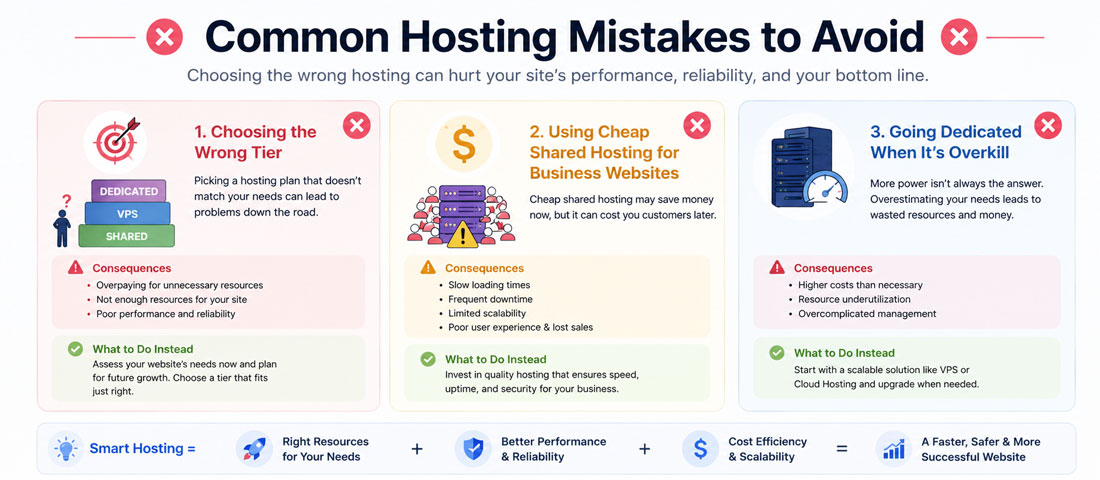
- Choosing shared hosting for a serious business website. The savings are small, the performance ceiling is real, and the migration when you outgrow it costs more than the “savings” ever produced.
- Overprovisioning with dedicated when VPS would fit. Most businesses on dedicated hosting are using 20-40% of the capacity they’re paying for. The excess is a recurring waste that VPS with scaling would eliminate.
- Picking unmanaged hosting without the capacity to manage it. An unmanaged VPS with no one actually managing it performs worse than a managed shared plan. The capability without the management is a false economy.
- Choosing on price alone rather than requirement. Hosting is infrastructure. The right tier for the requirement is almost always worth the money; the wrong tier at any price is a compromise the business pays for in other ways.
- Ignoring the 3-year total cost of hosting decisions. Cheap shared for a growing business becomes expensive migration in year 2. Dedicated for a small business is expensive from day one. The three-year math often changes which tier is genuinely cheapest.
- Not understanding what “unlimited” means. “Unlimited bandwidth” and “unlimited storage” claims from shared hosts almost always mean “unlimited until we decide you’re using too much and throttle you”. Real capacity is what matters.
- Choosing hosting based on the sales page rather than the actual specs. The specs matter — CPU allocation, RAM, storage type (SSD vs NVMe), location, uptime guarantees. Sales pages sometimes obscure or overpromise these.
- Ignoring server location relative to your audience. A server in India serving primarily US users has meaningful latency. Server location should match audience concentration, or the hosting should include a CDN that solves the distance problem.
- Not planning for migration before you need it. The right time to plan the next hosting migration is a year before you need it, not two weeks before. Reactive migrations under pressure produce worse outcomes than planned ones.
- Treating hosting as a set-and-forget decision. Hosting needs change as the business grows. What was right two years ago may be wrong today. Reviewing hosting fit annually catches drift before it becomes a problem.
How to actually choose: the practical methodology
For businesses genuinely weighing this decision, the methodology below produces a reliable answer in most cases. It separates the analytical work from the marketing noise, which is where bad hosting decisions come from.
Step one: assess your current requirements honestly. Traffic level, application type, uptime requirement, technical capacity, budget, compliance obligations. Write these down before looking at any hosting sales pages. The requirement drives the tier; letting the sales page drive the requirement produces the wrong answer.
Step two: project 24 months forward. Where is the business likely to be in two years? Traffic growth, functional expansion, geographic expansion, team growth. Build for reasonable projected growth rather than exact current state — the migration cost of upgrading in twelve months usually exceeds the incremental hosting cost of building right the first time.
Step three: apply the seven-question framework. The framework above eliminates most edge cases quickly. In most business contexts, VPS is the answer, and the specifics within VPS (managed vs unmanaged, cloud vs traditional, specific provider) are the remaining decisions.
Step four: calculate three-year total cost of ownership. Include the visible hosting cost, the management cost (either paid or DIY time), the likely upgrade path, the cost of your specific requirements (backup, monitoring, security tools), and any migration cost from your current setup. The tier with the lowest three-year TCO given your specific needs is usually the right answer.
Step five: verify with specific hosting research. Not all shared hosts, VPS providers, or dedicated hosts are equal. Once you know the tier, research specific providers for reputation, actual performance benchmarks (independent reviews, not sales page claims), support quality, and specific features you need. The provider choice within the tier can matter as much as the tier choice itself.
When to bring in professional help
This guide is detailed enough that a technically-comfortable site owner can make the hosting decision themselves. There are situations where professional help is worth the investment.
Bring in help when the requirements are complex — regulatory compliance, unusual traffic patterns, specific technical dependencies, integration with business systems that constrain the hosting choice. Bring in help when you are migrating an established site — proper migration with SEO preservation, DNS management, backup verification, and downtime minimisation is more involved than most self-migrations account for, and the mistakes are visible in search rankings for months. Bring in help when the site is business-critical and you don’t have in-house technical capacity — the right hosting badly configured produces worse outcomes than adequate hosting well managed. And bring in help when hosting cost is significant enough that getting the decision right matters — a wrong hosting choice for a $500/month engagement costs more than a right choice for a $100/month one.
For sites that need ongoing care around the hosting layer — performance monitoring, backup verification, security patching, occasional upgrades — this work is more reliably done as part of structured maintenance than as ad-hoc attention. Hosting configuration decays quietly without attention; a properly managed hosting environment stays performing over years rather than degrading. The broader picture of getting the whole website infrastructure right ties into how performance optimisation works in practice, where hosting is often the biggest available lever even when the visible symptom is elsewhere.

The honest summary of the shared-versus-VPS-versus-dedicated question is that for most business websites, VPS is the right answer, and the businesses that pick anything else usually pick based on price (shared) or fear (dedicated) rather than requirement. Shared hosting is genuinely fine for personal projects, business-card sites, and very early stage validation — anything more commercial than that tends to outgrow it within a year. Dedicated hosting is genuinely warranted for high-traffic sites, resource-intensive applications, and specific compliance requirements — the majority of business sites never justify the cost. VPS is the middle answer that fits the middle of the market, which is where most business websites live. Pick the tier that matches the requirement, choose managed or unmanaged based on who will actually manage it, and confirm the specific provider has the reputation and actual performance to deliver what the sales page claims. The hosting layer is invisible when it works and painfully visible when it doesn’t, and getting it right is one of the highest-return infrastructure decisions available.
Frequently asked questions
| What’s the cheapest hosting option? | Shared hosting is the cheapest, typically starting at $3 to $5 per month for basic plans and going up to $15 for higher-tier shared options. Free hosting exists but almost always comes with limitations that make it unsuitable for business use — ads on your site, restricted bandwidth, limited storage, or third-party subdomains rather than your own domain. For personal projects, shared hosting’s low cost is a genuine advantage. For business websites, “cheapest” is rarely the right criterion — the lost revenue and migration costs from starting on inadequate hosting usually dwarf the visible savings, and paying $10 to $20 per month for VPS often produces the lowest three-year total cost for any serious business site. |
| Is shared hosting good enough for a business website? | It depends what you mean by business website. For very small businesses where the site is essentially a business card supplementing revenue generated through other channels, shared hosting is genuinely adequate. For businesses where the website is revenue-generating infrastructure — eCommerce, lead generation, service booking, anything with traffic ambitions — shared hosting typically hits limits within a year. The performance ceiling, resource contention with neighbours, and security exposure become problems even when traffic is modest. For most commercial websites, VPS is the correct starting point, and the small additional cost pays back through better performance, higher uptime, and avoided migration in year two. |
| Do I need VPS hosting for WordPress? | For WordPress sites with any real traffic, yes. WordPress runs a database query on every page load, and shared hosting’s constrained CPU and RAM tend to make WordPress sites slow well before you’d expect based on visitor numbers alone. Even a few hundred daily visitors can expose shared hosting’s limits with WordPress. VPS gives WordPress consistent resources for predictable performance. The exceptions are very low-traffic WordPress sites (under 100 daily visitors) where shared hosting’s resources are usually sufficient, and managed WordPress hosts (WP Engine, Kinsta, Flywheel) which technically use shared infrastructure but with WordPress-specific optimisation that produces performance closer to VPS. For most WordPress business sites, VPS or specialised managed WordPress hosting is the correct tier. |
| How much traffic can a shared hosting plan handle? | Shared hosting can typically handle a few hundred daily visitors without visible performance problems, though the exact number varies enormously by host quality, the resource intensity of your site, and what your neighbours on the server are doing. Some shared plans handle a few thousand daily visitors on lightweight static sites; others struggle at a few hundred on database-heavy sites. The honest signal that you have outgrown shared hosting is not raw visitor numbers but noticeable performance variability — pages that load quickly at some times and slowly at others, occasional 500 errors under normal traffic, or Core Web Vitals scores that won’t improve regardless of site-level optimisation. When these appear, the site has usually already outgrown the tier. |
| Is dedicated hosting worth it for a small business? | Almost never. Dedicated hosting costs $100 to $500 per month at the low end and $500 to $3,000+ for enterprise configurations, and provides capacity that small business websites almost never fully utilise. The vast majority of businesses on dedicated hosting are using 20-40% of what they’re paying for. VPS delivers essentially equivalent performance for small business needs at a fraction of the cost, with the added benefit of easier scaling as the business grows. Dedicated is worth the cost for genuinely high-traffic sites (tens of thousands of concurrent users), resource-intensive applications, or specific compliance requirements that require physical isolation. For a standard small business website, dedicated hosting is overprovisioning that wastes money without producing proportional benefit. |
| What’s the difference between VPS and cloud hosting? | A VPS is a virtual server with fixed resources — a specific amount of CPU, RAM and storage allocated to you, typically for a fixed monthly price. Cloud hosting can be similar (many “cloud VPS” providers offer essentially the same product with a different label) or fundamentally different (major cloud platforms like AWS and Azure offer elastic resources that scale automatically with demand). For predictable, steady traffic patterns, traditional VPS and cloud VPS deliver similar outcomes. For traffic with significant variability — seasonal peaks, promotional spikes, viral potential — cloud infrastructure with auto-scaling can handle peaks that fixed VPS cannot. The trade-off is complexity — cloud infrastructure has a steeper learning curve and pricing that varies with usage, which is either an advantage or a complication depending on the situation. |
| Can I upgrade my hosting later if I outgrow it? | Yes, and hosting migrations are relatively common as businesses grow — but they carry real cost and disruption that businesses often underestimate. Migrating between tiers within the same host is usually the smoothest path (many hosts allow shared-to-VPS upgrades with minimal downtime). Migrating between hosts is more involved — typically $500 to $3,000 depending on site complexity, with 30 minutes to several hours of downtime, potential temporary SEO impact from DNS propagation, and real risk of things breaking during transition. The right approach is to build for reasonable projected growth from the start rather than migrating repeatedly. Migrating once at the right moment is fine; migrating three times in three years because each tier was chosen too small usually costs more in total than starting at the right tier initially. |
Ready to Get Your Hosting Right Without Overthinking or Overpaying?
We help businesses assess, choose, migrate to and manage the right hosting for what they’re actually running — with performance testing, backup verification, SEO preservation on migration, and ongoing care as part of every plan. With 12+ years of experience and over 2,500 websites delivered, we know what infrastructure actually delivers what businesses actually need. Send us your site URL and we will respond within one business day with an honest read on your hosting fit.