Responsive Design vs PWA vs Site Builders: Which Is Right for Your Business?

If you are building or rebuilding a website in 2026, you will encounter three distinct approaches to how that website gets delivered to your visitors: responsive web design, progressive web apps (PWAs), and DIY site builders. Each has its place, its strengths, its limitations, and its ideal use cases — and choosing between them is one of the most consequential early decisions in any website project.
What this guide covers
- 1. Responsive Web Design: The Foundation That Everything Else Builds On
- 2. Progressive Web Apps (PWAs): The Rise of App-Like Web Experiences
- 3. Site Builders: An Honest Assessment for Business Use
- 4. DIY Websites: The Pros and Cons for Businesses That Build Their Own
- 5. Comparing the Options: A Decision Framework for 2026
- 6. The Right Choice for Your Business: A Practical Decision Guide
- 7. How Neel Networks Approaches Web Delivery in 2026
- 8. Frequently Asked Questions About Responsive Design, PWAs and Site Builders
- 9. Conclusion: Choose the Right Foundation for Where Your Business Is Going
Get it right, and your website delivers a fast, seamless experience across every device, ranks well in search, and serves your business objectives reliably for years. Get it wrong, and you find yourself either overpaying for capabilities you do not need, or underdelivering an experience that frustrates visitors and limits your ability to compete effectively online.
This guide gives you a clear, practical framework for understanding all three approaches — what each one is, when it makes sense, what it cannot do, and how to choose between them for your specific business situation.
Responsive Web Design: The Foundation That Everything Else Builds On
Responsive web design is not a feature or a style — it is a fundamental approach to building websites where the layout, content, and visual presentation adapt fluidly to the screen size and device of the visitor. A responsively designed website does not have a separate “mobile version” and a “desktop version” — it has one codebase and one set of content that intelligently reflows and restructures itself based on the available screen space.
Responsive design became the industry standard approach around 2012 to 2014 and has remained the foundation of professional web development ever since. Google’s shift to mobile-first indexing in 2018 — where Google primarily uses the mobile version of a website for search ranking purposes — made responsive design not just a best practice but a competitive necessity. In 2026, a non-responsive website is not just inconvenient for mobile users — it is a ranking liability.
How Responsive Design Works
Responsive design is achieved primarily through CSS — specifically, through a combination of fluid layouts (using percentages and relative units rather than fixed pixel dimensions), flexible images (that scale within their containers rather than overflowing them), and media queries (CSS rules that apply different styling based on the screen width of the viewing device).
A typical responsive website has defined “breakpoints” — specific screen widths at which the layout adjusts. At desktop widths (typically 1024px and above), a page might display content in a three-column layout. At tablet widths (768px to 1023px), it might shift to two columns. At mobile widths (below 767px), it might display a single-column stacked layout with larger touch targets and simplified navigation.
The key principle — and the distinction between truly responsive design and merely “mobile-friendly” design — is that the adjustment is not just cosmetic. The content hierarchy, the information priority, the navigation structure, and the interaction patterns should all be reconsidered for each screen context, not simply reflowed from a desktop-first design.
Why Responsive Web Design Remains the Smartest Digital Investment in 2026
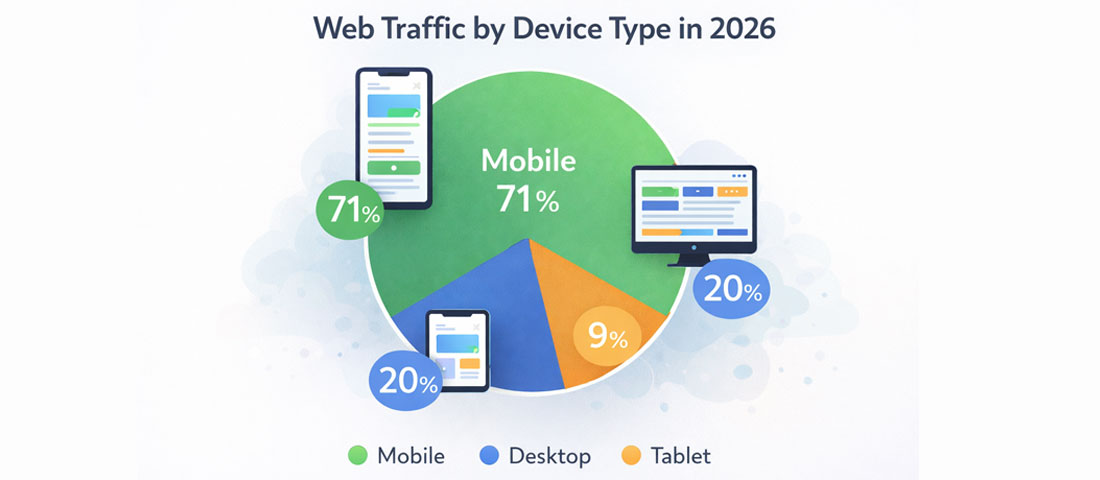
Over 70% of global web traffic now comes from mobile devices — making mobile-first responsive design not a preference but a business necessity.
Despite the emergence of PWAs, site builders, and various other web delivery approaches, responsive web design built on a professional, well-structured codebase (typically WordPress for content-driven sites, or a modern JavaScript framework for more application-like experiences) remains the right choice for the overwhelming majority of business websites in 2026. Here is why:
- One codebase, all devices. A responsive website requires only one codebase to maintain, one set of content to update, and one set of SEO signals to build. This simplicity is a significant long-term operational advantage over approaches that require separate maintenance of different versions or deployments.
- Full SEO capability. Responsive websites support the full range of modern SEO techniques — structured data, meta optimisation, internal linking, content depth, page speed optimisation — without the limitations of site builders or the crawlability challenges sometimes associated with early SPAs.
- Performance within your control. A professionally built responsive website can achieve excellent Core Web Vitals scores and fast load times when built correctly. The performance ceiling is determined by the skill of your development team, not by the platform’s constraints.
- Design freedom. Responsive websites can be designed to any visual specification — any layout, any animation approach, any typographic system, any custom interaction pattern — without the template and design constraints of site builders or the performance trade-offs sometimes associated with PWA architectures.
- Future-proof architecture. A well-built responsive website can evolve indefinitely — adding features, changing designs, integrating new tools — without requiring a platform change or a complete rebuild. The investment compounds over time rather than depreciating as platform limitations are hit.
Progressive Web Apps (PWAs): The Rise of App-Like Web Experiences

PWAs can be installed directly to a device’s home screen, launch like native apps, and work offline — delivering app-like experiences without the distribution overhead of the app stores.
Progressive Web Apps represent one of the most significant architectural evolutions in web development over the past five years. A PWA is a website built using modern web technologies that has been enhanced with a set of specific capabilities that give it characteristics previously associated only with native mobile apps: it can be installed on a device’s home screen, it can work offline (or in limited connectivity environments), it can receive push notifications, and it loads almost instantaneously on repeat visits because of sophisticated caching strategies.
The term “progressive” in PWA refers to the approach of building the web experience first and progressively enhancing it with app-like capabilities where supported. This means a PWA works as a normal website in browsers that do not support PWA features, and unlocks additional capabilities in browsers and devices that do.
The Core Technical Capabilities That Define a PWA
Service Workers are the technical foundation of PWAs — background JavaScript processes that run independently of the main page and enable the offline capability, background synchronisation, and push notification features. A service worker intercepts network requests, serves cached content when the network is unavailable, and can intelligently manage what is cached to balance storage use against offline capability.
Web App Manifest is a JSON file that provides the browser with information about the application — its name, icons, start URL, display mode (whether it launches in a full-screen app-like mode or a standard browser window), and theme colours. The manifest is what enables the “Add to Home Screen” prompt and the app-like launch experience.
HTTPS is a prerequisite for PWA functionality — service workers will only register on secure origins. Since HTTPS is also a Google ranking factor and a user trust signal, this requirement aligns PWA technical architecture with broader web best practices.
When a PWA Is the Right Choice
PWAs are not a universal upgrade — they are the right solution for specific types of web experiences and specific business contexts. The use cases where PWAs consistently deliver strong value include:
- Content-heavy media and news publications where repeat visitors benefit significantly from instant load times and offline reading capability
- eCommerce stores in markets with unreliable internet connectivity where the offline capability and lightning-fast load times measurably improve conversion rates
- Customer-facing portals and dashboards that users access frequently and benefit from installing on their home screen for instant access
- Field service and operations tools used by teams in environments with intermittent connectivity — the offline capability is a genuine operational requirement, not a nice-to-have
- Businesses that want app-like engagement without the distribution cost of native apps — PWAs bypass the App Store and Google Play, eliminating the 15-30% commission and the review and approval friction of native app distribution
When a PWA Is NOT the Right Choice
PWAs are not the right choice for every business website — and applying PWA architecture to a straightforward business website adds complexity without proportional benefit. PWAs are likely unnecessary when:
- Your website is primarily informational and visitors typically arrive, read one to three pages, and leave — offline capability and home screen installation provide no meaningful value for this pattern
- Your audience is primarily desktop-based and the PWA’s mobile-specific advantages are largely irrelevant
- Your development team does not have PWA-specific expertise — poorly implemented service workers can cause caching bugs that are genuinely difficult to diagnose and fix
- Your content changes frequently — aggressive caching strategies can cause users to see outdated content if the cache invalidation strategy is not carefully designed
Site Builders: An Honest Assessment for Business Use
Site builders — platforms like Wix, Squarespace, Webflow, Weebly, and GoDaddy Website Builder — have improved dramatically over the past five years. They are no longer the frustrating, limitation-ridden tools they were in 2015. In 2026, leading site builders produce visually respectable output, have reasonable mobile responsiveness, and allow non-technical users to publish a website without any coding knowledge.
With that context established: here is an honest assessment of what site builders can and cannot do for business use in 2026.
What Site Builders Do Well
- Speed to launch. A basic website can be live in hours or days rather than weeks. For businesses that need an online presence immediately — for a launch event, a trade show, a new product line — this speed advantage is real and valuable.
- No technical prerequisites. Site builders require no coding knowledge, no hosting configuration, no database management, and no software updates. For non-technical business owners who want complete independence, this is a genuine advantage.
- Predictable monthly cost. All-in-one subscriptions covering hosting, security, and the builder itself make budgeting straightforward. There are no unexpected hosting bills or developer fees for routine maintenance.
- Reasonable design templates. Template quality has improved significantly. Starting from a good template, a site builder can produce a website that is visually adequate for basic business purposes.
The Significant Limitations of Site Builders for Business Use
- Performance ceilings. Site builders generate code that typically cannot achieve the same Core Web Vitals scores as a professionally coded custom website. The bloat introduced by the builder’s proprietary rendering system, the generic JavaScript bundles, and the limited control over performance optimisation means there is a performance ceiling that skilled custom development can exceed but site builders often cannot.
- SEO limitations. While leading site builders now support basic SEO (page titles, meta descriptions, alt text), they typically have limitations around structured data, technical SEO flexibility, URL structure control, and the kind of fine-grained SEO implementation that competitive markets require. For businesses where organic search is a primary growth channel, these limitations are commercially significant.
- Design constraint and template dependency. Site builder designs are constrained by what the template and the builder’s component system can produce. Genuinely distinctive, brand-specific visual identities are difficult to achieve within these constraints. Many businesses find that their site builder website looks similar to other businesses using the same template.
- Vendor lock-in. Content built in a site builder is typically not exportable in any meaningful way. If you decide to migrate to a different platform, you are largely starting over — you cannot export your design, and content export is often incomplete or formatted in ways that require significant rework.
- Limited scalability. Site builders work well for straightforward business websites. As requirements grow — custom functionality, complex integrations, multiple user roles, advanced eCommerce — site builders hit walls that cannot be overcome within the platform’s capabilities.
DIY Websites: The Pros and Cons for Businesses That Build Their Own
The appeal of building your own website is understandable — cost control, complete ownership of the process, and the satisfaction of doing it yourself. Here is a clear-eyed view of what DIY website building actually looks like in practice for most business owners.

DIY website building has genuine value in specific circumstances — but the hidden costs in time, opportunity cost, and performance limitations are real for most business owners.
When DIY Website Building Makes Sense
- You are a very early-stage business or sole trader testing a concept and need a basic online presence quickly and cheaply before investing in professional development
- Your website needs are genuinely simple — a few pages of information, basic contact details, no complex SEO requirements, no significant conversion goals
- You have genuine web design and development skills yourself — “DIY” for a developer or designer is very different from “DIY” for a non-technical business owner
- You have significant time available to invest in learning the platform, troubleshooting problems, and maintaining the site over time
When DIY Website Building Costs More Than It Saves
The most significant hidden cost of DIY website building is opportunity cost — the value of the hours spent on the website rather than on revenue-generating activities. For a business owner billing at even a modest professional rate, the time spent learning a site builder, designing pages, troubleshooting template issues, and managing ongoing maintenance often exceeds the cost of hiring a professional agency — particularly an India-based agency where professional development is priced accessibly.
Beyond time, DIY websites typically have measurable performance disadvantages: lower Core Web Vitals scores, weaker SEO foundations, less distinctive design, and limited scalability. For businesses where the website is a primary growth driver — which it is for most service businesses — these performance disadvantages compound into meaningful revenue differences over time.
Comparing the Options: A Decision Framework for 2026
| Factor | Responsive Custom Website | Progressive Web App | Site Builder | DIY Build |
|---|---|---|---|---|
| Upfront cost | Medium–High | High | Low | Very Low |
| Time to launch | 6–12 weeks | 10–20 weeks | Days–weeks | Days–months |
| Performance ceiling | ✅ Highest | ✅ Very high | ⚠️ Limited by platform | ⚠️ Limited by skill |
| SEO capability | ✅ Full | ✅ Full (with care) | ⚠️ Limited | ⚠️ Variable |
| Design freedom | ✅ Complete | ✅ Complete | ❌ Template-constrained | ⚠️ Skill-dependent |
| Offline capability | ❌ No | ✅ Yes | ❌ No | ❌ Typically no |
| Scalability | ✅ Unlimited | ✅ Unlimited | ❌ Platform-limited | ⚠️ Limited |
| Technical maintenance | Agency managed | Agency managed | Platform managed | Self-managed |
| Data ownership | ✅ Full | ✅ Full | ❌ Vendor-controlled | ✅ Full |
| Best for | Most business websites | Repeat-visit apps, offline use cases | Early-stage, very simple needs | Solo traders testing concepts |
The Right Choice for Your Business: A Practical Decision Guide
Rather than recommending one approach universally, here is a question-based framework that will guide most businesses to the right choice:
-
Is organic search a significant growth channel for your business?
If yes — and for most service businesses, it should be — the SEO limitations of site builders make a professionally coded responsive website the right choice. Full control over technical SEO, schema markup, page speed optimisation, and content architecture is essential for competitive organic search performance. -
Do your users need to use the website offline or in low-connectivity environments?
If yes, PWA architecture deserves serious consideration. If no — which is the case for the vast majority of business websites — the offline capability of PWAs provides no meaningful benefit and the additional development complexity is unjustified. -
Is design differentiation important to your market positioning?
If yes — if your business competes on the quality and distinctiveness of your brand — a site builder’s template constraints will limit your ability to express that differentiation. A custom design is the right choice. If your market does not require visual differentiation and a standard template adequately serves your needs, a site builder may be sufficient. -
Do you anticipate the website growing significantly in scope or functionality?
If yes — if you are likely to need eCommerce, integrations, custom features, or a significantly expanded content strategy — build on a platform that scales. A site builder that needs to be replaced in 18 months because it has hit its limits is not the cost-efficient choice it appeared to be initially. -
What is the true total cost over three years?
Compare not just the upfront build cost but the three-year total: including monthly platform fees (site builders charge ongoing subscriptions), developer costs for changes and maintenance, opportunity cost of performance limitations (lost SEO rankings, reduced conversion rates), and the cost of migration if you outgrow the platform. This comparison often significantly changes the apparent cost advantage of site builders and DIY approaches.
The bottom line for most business owners: In 2026, a professionally built responsive website on a quality, performance-optimised platform — typically WordPress for content-driven sites, or a modern framework for more complex requirements — remains the right foundation for the overwhelming majority of business websites. It delivers the best combination of performance, SEO capability, design freedom, scalability, and long-term value. Site builders and DIY approaches have their place for very early-stage or very simple needs, but businesses that are serious about digital growth quickly outgrow them.
How Neel Networks Approaches Web Delivery in 2026
At Neel Networks, our standard recommendation for business clients is a professionally built, mobile-first responsive website on WordPress — chosen not because it is the only option, but because for the specific combination of SEO capability, content management flexibility, plugin ecosystem richness, design freedom, and development community maturity, WordPress remains the most appropriate platform for the majority of business websites in 2026.
For clients whose requirements align with PWA’s specific advantages — high-frequency use cases, offline requirements, field service teams, or consumer-facing products with app-like engagement requirements — we build full PWA implementations using modern JavaScript frameworks with service worker architecture.
And for clients at the very early stage who genuinely need a basic online presence within days, we are honest about when a site builder is a sensible interim solution — while advising clearly on the transition path to a professional website as the business grows.
Frequently Asked Questions About Responsive Design, PWAs and Site Builders
| What is responsive web design and why does it matter in 2026? | Responsive web design is an approach to building websites where the layout and content adapt fluidly to the screen size and device of the visitor — so the website looks and works correctly on desktop, tablet, and mobile without requiring separate versions. It matters in 2026 because over 70% of global web traffic comes from mobile devices, and Google uses mobile-first indexing — meaning it primarily evaluates the mobile version of your website for search ranking purposes. A website that is not genuinely responsive is both a poor user experience for the majority of your visitors and a ranking liability in Google search. |
| What is a Progressive Web App (PWA) and when should a business use one? | A Progressive Web App (PWA) is a website built with modern web technologies that has been enhanced with app-like capabilities: it can be installed on a device’s home screen, work offline or in low-connectivity environments, and deliver push notifications. PWAs are the right choice for businesses with high-frequency use cases where users return daily (making home screen installation valuable), field service or operations applications where offline functionality is a genuine requirement, or consumer-facing products where app-like engagement is a commercial goal. For standard business information websites where users visit infrequently, the PWA features provide minimal additional value over a well-optimised responsive website. |
| Are site builders like Wix or Squarespace good enough for a business website in 2026? | Site builders have improved significantly and can produce visually adequate websites for basic business needs. However, they have meaningful limitations for businesses that are serious about digital growth: performance ceilings that limit Core Web Vitals scores, SEO constraints that affect competitive organic search performance, template-constrained designs that limit brand differentiation, vendor lock-in that makes future migration expensive, and scalability walls that are hit as requirements grow. For early-stage businesses with simple needs and limited budgets, site builders are a reasonable interim solution. For businesses where the website is a primary growth driver, the performance and SEO limitations of site builders typically cost more in lost organic traffic and conversions than the cost difference compared to professional development. |
| What is the difference between a responsive website and a Progressive Web App? | A responsive website adapts its layout to different screen sizes and devices, but functions as a standard web experience — it requires an internet connection, does not install on a home screen, and does not send push notifications. A Progressive Web App is a responsive website that has been enhanced with additional capabilities: it can be installed on a device’s home screen and launch like a native app, it can work offline through cached content, and it can deliver push notifications. The key distinction is that responsive design is about layout adaptation, while PWA is about adding native app-like capabilities to a web experience. Most business websites need responsive design; only specific use cases need the additional PWA capabilities. |
| Should I build my own website or hire a professional web design agency? | For most business owners, hiring a professional web design agency delivers better results than DIY building — and often at a lower true cost when the time investment of DIY is properly accounted for. The most significant hidden cost of DIY website building is opportunity cost: for a business owner billing at any professional rate, the hours spent on designing, building, troubleshooting, and maintaining a website often exceed the cost of hiring a professional agency (particularly an India-based agency where professional development is priced accessibly). Beyond time, DIY websites typically have lower performance scores, weaker SEO foundations, less distinctive design, and limited scalability compared to professionally built alternatives. DIY building makes sense for very early-stage businesses testing concepts with minimal web presence needs, or for business owners with genuine web development skills. |
| Is WordPress still the best platform for a business website in 2026? | WordPress remains the most appropriate platform for the majority of business websites in 2026, for a combination of reasons: it powers over 40% of all websites, meaning the development ecosystem, plugin support, and community knowledge base are unmatched; it offers complete design flexibility without template constraints; it has strong built-in SEO capabilities that can be extended with dedicated SEO plugins; it has excellent content management flexibility that allows non-technical team members to update content easily; and it can be extended with custom functionality without a platform change. Well-built WordPress websites can achieve excellent Core Web Vitals scores and handle significant traffic without performance problems. The reputation issues some associate with WordPress (security vulnerabilities, slow performance) are typically the result of poor implementation rather than inherent platform limitations. |
| How much does a professionally built responsive business website cost in 2026? | The cost of a professionally built responsive business website varies based on scope and where it is built. In the USA or UK, a professional business website typically costs between $5,000 and $20,000 or more. Working with a professional Indian web design agency like Neel Networks delivers equivalent quality — mobile-first design, Core Web Vitals optimisation, full SEO foundation, schema markup, CMS setup, and ongoing support — at 50 to 70% less than comparable agencies in Western markets. This cost advantage makes professional-quality responsive web development accessible to growing businesses that would otherwise consider DIY or site builder alternatives. |
Conclusion: Choose the Right Foundation for Where Your Business Is Going

Responsive web design, PWAs, and site builders each have their place — but the right choice for your business depends on where you are, where you are going, and what your website needs to accomplish to get you there. Most businesses that are serious about digital growth find that the combination of performance, SEO capability, design freedom, and scalability that a professionally built responsive website delivers on a quality platform represents the best long-term investment they can make in their digital presence.
The businesses that build on the right foundation in 2026 — and invest in that foundation properly rather than cutting corners — will spend the next three to five years building on it rather than fighting against its limitations or rebuilding it entirely. That compounding advantage is worth the initial investment.
If you are weighing your options — or if you are currently on a site builder or DIY website and wondering whether it is time to make the move to a professional custom build — the Neel Networks team is happy to give you an honest assessment of where you are and what the right next step looks like for your business.
Ready to build on the right foundation for your business’s digital future?
Neel Networks builds professional, high-performance responsive websites for businesses across the USA, UK, Canada, Australia, and India — on time, on budget, and built to last.