How to Build High-Performance Mobile Apps: UX, Platform Choice & Key Principles
Building a mobile app in 2026 is easier than it has ever been from a tooling perspective, and harder than ever from a results perspective. The barrier to publishing an app on the App Store or Google Play has dropped significantly over the past decade. The barrier to building an app that users actually download, engage with, and return to has risen substantially — because user expectations have risen with them. People interact with world-class apps every day, and they compare everything else against that standard.
What this guide covers
- 1. Platform Choice: Native, Cross-Platform, or Hybrid?
- 2. Platform Comparison: Key Factors at a Glance
- 3. UX Principles That Separate High-Retention Apps From Abandoned Ones
- 4. The Development Process: From Idea to App Store
- 5. Backend Architecture: What Powers Your App Behind the Screen
- 6. Security and Compliance Considerations
- 7. App Store Optimisation (ASO): Getting Found After Launch
- 8. Frequently Asked Questions About Mobile App Development
- 9. Conclusion: Build for the User, Ship for the Market, Iterate for Growth
This guide is written for business owners, product managers, and founders who want to build a mobile application that performs — not just technically, but commercially. It covers how to choose the right platform and technology approach, the UX principles that separate high-retention apps from abandoned ones, the development process that reduces costly rework, performance standards users expect in 2026, and how to plan a launch that gives your app the best possible start.

Platform Choice: Native, Cross-Platform, or Hybrid?
The first major decision in any mobile app project is the platform approach — and it is a decision that shapes cost, timeline, performance, and maintainability for the entire life of the product. The three main options are native development (separate codebases for iOS and Android), cross-platform development (one codebase that compiles to both), and hybrid (a web app wrapped in a native shell).
Native Development (Swift/Kotlin)
Native development means building separate apps for iOS (using Swift or Objective-C) and Android (using Kotlin or Java). Each app is built specifically for its platform, using its native UI components, APIs, and performance optimisations. The advantages are maximum performance, access to the full range of platform-specific features, the best possible UX alignment with each platform’s design conventions, and the most reliable long-term compatibility with OS updates.
The trade-offs are cost and time: two codebases mean roughly double the development effort for new features and twice the maintenance burden. For businesses with the budget and a need for truly premium performance — gaming apps, AR/VR applications, complex real-time data processing — native development is often the right choice. For most business applications, it is more investment than is necessary.
Cross-Platform Development (React Native / Flutter)
Cross-platform frameworks allow developers to write a single codebase that deploys to both iOS and Android. React Native (maintained by Meta) uses JavaScript and renders native UI components. Flutter (maintained by Google) uses Dart and renders its own high-performance UI engine. Both frameworks have matured significantly and in 2026 produce apps that are indistinguishable from native to most users for most use cases.
Cross-platform is the dominant choice for new business app projects in 2026 because it offers 70–85% code sharing between platforms while delivering near-native performance and UX quality. Development costs are typically 40–60% lower than native development for equivalent functionality. React Native benefits from the enormous JavaScript ecosystem and developer availability. Flutter is increasingly preferred for projects where consistent UI across platforms and high animation quality are priorities.
Hybrid / Progressive Web Apps (PWA)
Hybrid apps (built with frameworks like Ionic or Capacitor) wrap a web application in a native container. They are the most affordable option and the fastest to develop, but they come with meaningful performance ceilings. For content-heavy, low-interactivity applications where web performance is acceptable, hybrid can be viable. For anything involving complex interactions, real-time data, or hardware features (camera, GPS, sensors), the performance and UX limitations of hybrid approaches become apparent quickly and often require rebuilding in a higher-performance framework later — typically at greater total cost.
Progressive Web Apps (PWAs) sit in a separate category: they are web applications that function like native apps (installable, offline-capable, push notification support) without going through the App Store. PWAs are a strong option for businesses that want app-like functionality without the distribution overhead of app store submission. They are particularly well-suited to markets with high Android penetration, since Android’s PWA support is more comprehensive than iOS’s.
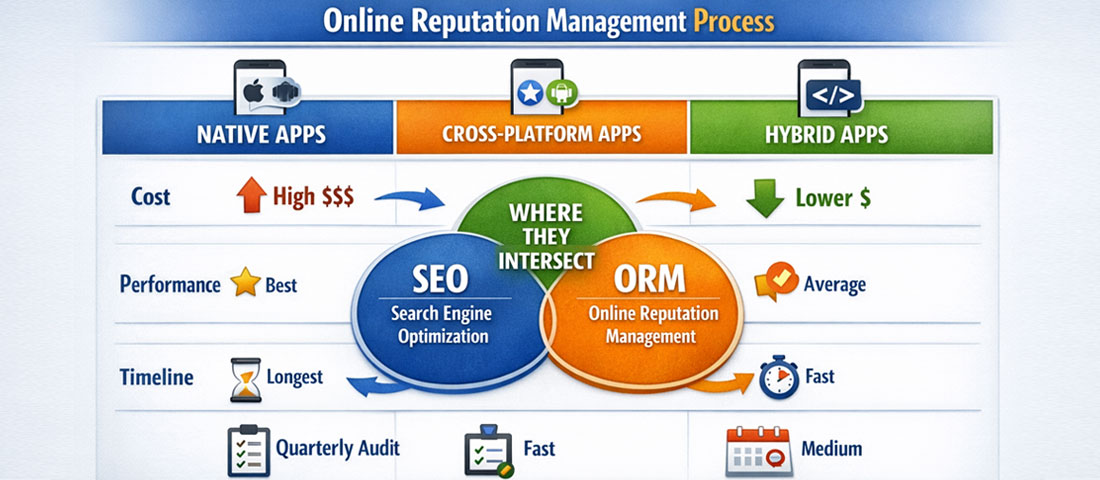
Platform Comparison: Key Factors at a Glance
| Factor | Native (iOS + Android) | React Native | Flutter | Hybrid / PWA |
|---|---|---|---|---|
| Performance | Highest | Near-native | Near-native | Moderate |
| Development Cost | Highest | Medium | Medium | Lowest |
| Code Sharing | None | ~80% | ~85% | ~95% |
| UI Flexibility | Full platform-native | High | Very high (custom engine) | Web-constrained |
| Hardware Access | Complete | Good (via bridge) | Good (via channels) | Limited |
| Best For | High-performance, premium apps | JS teams, rapid iteration | Consistent UI, animation-heavy | Simple tools, content apps |
UX Principles That Separate High-Retention Apps From Abandoned Ones
The average app loses over 70% of its users within the first 24 hours of installation. By 30 days, retention rates for most consumer apps are below 10%. These are not failures of marketing — they are failures of UX. Users install an app when the value proposition seems compelling. They abandon it when the first experience does not deliver on that promise, or when the effort required to get value exceeds their patience.
Building for retention means designing the onboarding experience, the core interaction loops, and the moment of first value delivery with as much care as any other part of the product.
Onboarding: the make-or-break first experience
Onboarding is the single highest-leverage investment in mobile app UX. A new user who reaches their first meaningful positive outcome — a moment where they understand what the app does and why it is useful to them personally — is far more likely to return than one who is presented with a complex setup process before they have seen any value. Best practice in 2026 is to defer account creation and permission requests until after the user has experienced value, not before. Show people what the app does before asking them to commit to it.
Progressive onboarding — revealing features and options gradually as users become more engaged — outperforms comprehensive feature tours that overwhelm new users with everything the app can do before they have done anything. Aim for a “time to first value” of under 60 seconds for consumer applications. For B2B tools, the acceptable window is wider, but the principle holds: the faster a new user experiences the core benefit, the higher the retention.
Navigation and information architecture
Navigation design should reflect how users think about tasks, not how the engineering team organised the codebase. The most common navigation failures are: too many top-level options (decision paralysis), inconsistent navigation patterns between sections (cognitive load), and burying high-frequency actions behind multiple taps (friction). Every tap a user needs to make to reach a frequently used feature is a micro-friction event. Multiply that across hundreds of daily interactions, and the cumulative frustration is significant.
Platform conventions exist for good reasons — iOS and Android users have ingrained expectations about tab bars, back navigation, swipe gestures, and modal dialogs. Departing from these conventions requires strong justification; departing from them without justification creates confusion and erodes trust in the product’s quality.
Performance as a UX factor
App performance is not a backend engineering concern that UX designers can ignore — it is a fundamental component of the user experience. A one-second delay in loading a screen is noticeable. A two-second delay is frustrating. A three-second delay causes a significant percentage of users to abandon the action they were attempting. In 2026, users benchmark their expectations against apps like Google Maps, Instagram, and WhatsApp — all of which are engineered to respond within milliseconds. The standard is set by the best experiences people have, not by industry averages.
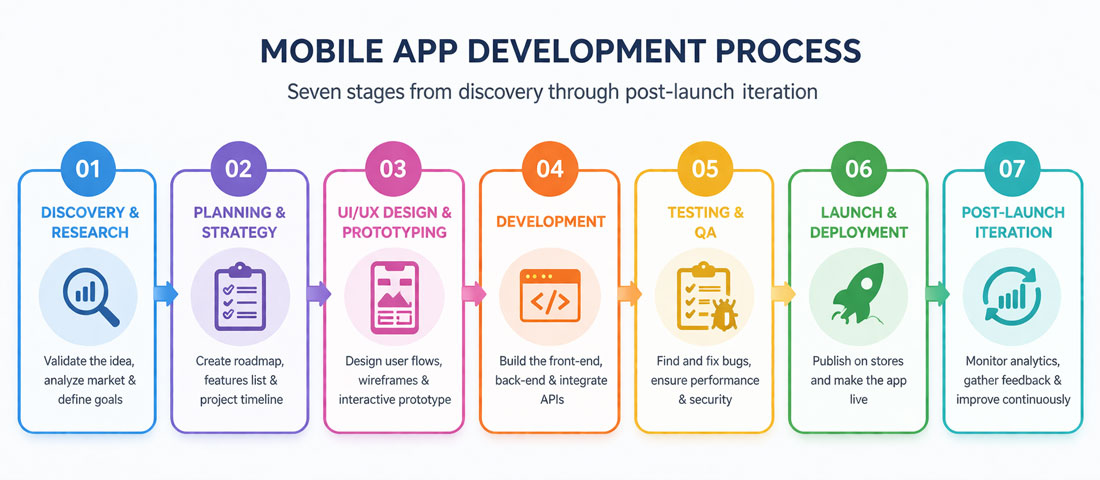
The Development Process: From Idea to App Store
-
Discovery and requirements definition
Before any design or development begins, define with precision: who the user is, what problem the app solves for them, what the minimum viable version includes, and what success looks like at 30, 90, and 365 days post-launch. A well-documented discovery phase prevents the most expensive category of mistake in app development — building the wrong thing with excellent execution. -
UX wireframing and information architecture
Wireframes map the structural layout of each screen and the navigation flows between them without committing to visual design. They are fast and cheap to create and iterate on. Time invested in wireframing almost always reduces development cost by identifying structural problems before a single line of code is written. Every screen should have a clear primary action, and every navigation flow should lead users toward value without dead ends. -
UI design and design system creation
High-fidelity UI design translates wireframes into the visual interface the user will actually see. In 2026, professional app design is done in Figma, which allows interactive prototypes that stakeholders can test on real devices before development begins. A design system — a library of reusable components, colour tokens, typography scales, and spacing rules — is not overhead; it is the foundation that makes development faster, more consistent, and significantly easier to maintain as the product grows. -
Development in two-week sprints
Agile sprint-based development breaks the build into fortnightly cycles, each producing working, tested functionality. This approach gives stakeholders regular checkpoints to provide feedback and adjust direction without accumulating months of misaligned work. Each sprint should end with a build available for internal testing on real devices — not simulator testing only, which misses a meaningful class of real-world performance and UX issues. -
Quality assurance and device testing
QA for mobile apps must cover functional testing (does every feature work as expected), performance testing (does the app perform adequately under load and on lower-end devices), usability testing (can real users complete core tasks without assistance), and compatibility testing (does the app function correctly across the range of devices and OS versions your audience uses). Testing only on flagship devices and current OS versions produces apps that fail for significant portions of the actual user base. -
App store submission and optimisation
App Store Optimisation (ASO) — the process of optimising your app’s store listing for discoverability — should begin before submission, not after. This includes keyword research for the app title and description, high-quality screenshots that communicate value at a glance, and a compelling short description that converts browsers into downloaders. Review Apple’s App Store Review Guidelines and Google’s Developer Policy Centre before submission to avoid rejection delays that can add weeks to your launch timeline. -
Post-launch monitoring and iteration
Launch is not the end of the development process — it is the beginning of the data-informed phase. Implement analytics from day one (Firebase Analytics is the standard for most apps) to track user flows, drop-off points, feature engagement, and retention curves. The first 90 days post-launch typically reveal the most actionable product insights, and teams that iterate rapidly based on real user data produce dramatically better outcomes at the six and twelve month marks than teams that treat launch as a destination rather than a milestone.
Backend Architecture: What Powers Your App Behind the Screen
A well-designed front-end experience is only as strong as the backend that serves it. Mobile app backends in 2026 are typically built on one of three models: a custom REST or GraphQL API built with Node.js, Laravel, or similar; a Backend-as-a-Service (BaaS) platform like Firebase or Supabase; or a microservices architecture for complex, high-scale applications.
For most new business apps, a custom API with Firebase for real-time data and authentication represents a strong default architecture. Firebase handles auth, push notifications, real-time database, and file storage out of the box — functionality that would require significant development time to build from scratch. The custom API layer handles business logic, integrations with external services (payment gateways, CRMs, ERPs), and any data processing that requires more control than Firebase provides.
Push notifications deserve particular attention in the backend architecture conversation. When implemented thoughtfully, push notifications are one of the highest-value retention tools available to mobile apps — delivering relevant, timely messages that bring users back to the app. When implemented poorly (too frequent, irrelevant, untargeted), they are the primary reason users disable notifications and, shortly after, uninstall the app entirely. Design your notification strategy before launch, not as an afterthought.
Security and Compliance Considerations
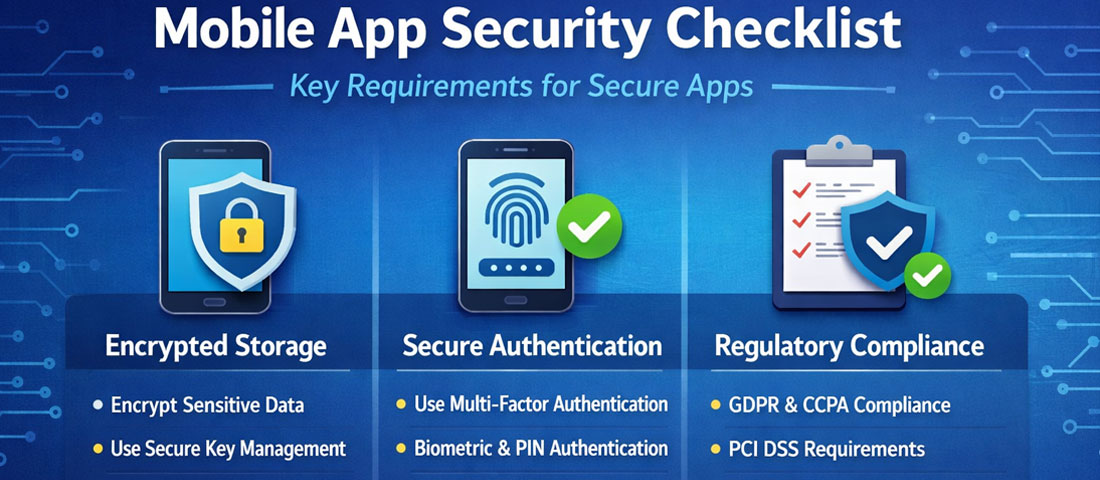
Mobile app security failures attract significant consequences in 2026: regulatory penalties under GDPR, India’s DPDP Act, Australia’s Privacy Act, and equivalent frameworks; App Store rejection or removal; and, most damagingly, user trust collapse if a data breach becomes public. Security must be designed in from the architecture stage, not bolted on after development.
Key security requirements for business apps include: encrypted data transmission (HTTPS/TLS for all API calls), secure local storage (sensitive data should never be stored in plaintext on the device), certificate pinning to prevent man-in-the-middle attacks, proper authentication and session management, and regular security testing as part of the QA process. For apps that process payments, PCI DSS compliance is non-negotiable — use a certified payment gateway rather than building custom payment handling.
App Store Optimisation (ASO): Getting Found After Launch
Building a great app and launching it with no ASO strategy is equivalent to building a great website with no SEO. The App Store and Google Play are search engines with their own ranking algorithms, and the same principles that apply to web SEO — keyword relevance, quality signals, engagement metrics, ratings — apply to app store rankings.
ASO fundamentals: conduct keyword research specific to each app store (tools like AppFollow, Sensor Tower, and AppTweak are built for this). Include your primary keywords naturally in the app title (the highest-weight ASO field), the subtitle (iOS) or short description (Android), and the long description. Visual assets — the icon, screenshots, and preview video — drive conversion rate from app store browser to downloader. High-quality screenshots that tell a visual story of the app’s value, rather than just showing UI screens out of context, consistently outperform generic screenshots in A/B tests.
Review volume and rating are critical ASO signals. Implement in-app review prompts at moments of positive engagement — after a user completes a task, achieves a goal, or reaches a milestone — not randomly or immediately after install. The timing of review requests directly impacts both the volume and the average rating of reviews received.
Frequently Asked Questions About Mobile App Development
| How much does it cost to build a mobile app in 2026? | Mobile app development costs vary widely based on complexity, platform approach, feature set, and the location and experience level of the development team. A simple single-platform app with basic features — user authentication, a few screens, and basic data display — might cost between ₹3–8 lakhs or $5,000–15,000 USD with an experienced Indian development team. A moderately complex cross-platform business app with custom backend integration, real-time features, and polished UX typically falls between ₹10–30 lakhs or $15,000–50,000 USD. Complex apps with advanced features (real-time communication, AI/ML capabilities, payment processing, complex custom logic) can range from ₹30 lakhs to several crores depending on scope. These figures represent initial build cost; budget separately for ongoing maintenance, updates, server costs, and App Store developer account fees. |
| How long does it take to build and launch a mobile app? | A simple app with a clear scope and experienced team can go from discovery to App Store submission in 8–12 weeks. A moderate-complexity business app with custom backend typically takes 16–24 weeks. Complex applications with multiple integrations, advanced features, and extensive testing requirements often require 6–12 months. The most common causes of timeline overruns are scope creep (adding features mid-development without adjusting the timeline), unclear requirements that lead to rework, and delayed feedback cycles where stakeholders are unavailable for regular review. Thorough discovery and requirements documentation before development begins is the most reliable way to maintain timeline accuracy. App Store review times should also be factored in — Apple’s review process typically takes 1–3 days but can occasionally take longer for first submissions or apps in regulated categories. |
| Should I build for iOS, Android, or both? | The decision depends on your target audience and business goals. Globally, Android holds approximately 72% of the smartphone market, making it the larger platform by user volume. However, iOS users in key markets like the USA, UK, Australia, and Canada tend to show higher average revenue per user (ARPU) and higher app engagement rates. In India, Android dominates at over 95% market share, making Android-first a strong default for India-focused apps. For businesses targeting a global audience, a cross-platform approach using React Native or Flutter is typically the most practical choice — it delivers both platforms simultaneously at roughly 60% of the cost of building two separate native apps. If budget genuinely constrains you to one platform, build for the platform where your specific target audience is most concentrated, with a plan to expand to the second platform based on early traction. |
| What is the difference between MVP and full product development? | An MVP (Minimum Viable Product) is the smallest version of an app that delivers its core value proposition to users and is sufficient to test the key assumptions behind the business model. It includes only the features essential for users to get meaningful value — everything else is intentionally deferred. An MVP approach is strongly recommended for new app concepts where user behaviour and market reception are uncertain, because it allows real data to inform product decisions before significant investment is committed. A full product build, by contrast, attempts to deliver a complete feature set from launch. For well-validated concepts with established user needs — such as a mobile app for an existing service business with known requirements — a more comprehensive initial build may be appropriate. The risk of building too much before testing market response generally outweighs the efficiency argument for complete builds in most new app contexts. |
| How do I choose the right mobile app development partner? | Selecting a development partner is one of the most consequential decisions in any app project. Look for demonstrated experience in your chosen platform and technology stack — ask to see live apps in the relevant stores that the team has built. Evaluate the quality of their UX design work, not just the engineering; many technically competent teams produce poor user experiences because design is treated as secondary. Assess their project management process — agile with regular sprint reviews gives you visibility and control; a fixed-price-fixed-scope approach with no interim checkpoints gives you a much higher risk of receiving something that does not meet your needs at the end of a long development period. Check references from previous clients, particularly for projects of similar complexity to yours. And be cautious of unusually low quotes — they typically reflect either simplified scope assumptions or plans to charge for scope additions aggressively during development. |
| What ongoing costs should I budget for after an app launches? | Post-launch costs are frequently underestimated by businesses planning their first app. Annual App Store developer account fees are $99 USD for Apple and approximately $25 USD one-time for Google Play. Server and cloud infrastructure costs (AWS, Google Cloud, Firebase) vary by usage but typically range from a few hundred to several thousand dollars per month depending on user volume and data requirements. Maintenance and updates are essential — mobile operating systems update regularly, and apps that are not maintained become incompatible with new OS versions or fail to pass App Store review within 12–24 months of launch. Budget for at least 15–20% of your initial build cost annually for maintenance, security updates, and compatibility fixes. Feature development and improvements based on user feedback are additional investment on top of maintenance. Many businesses find a retained development arrangement with their original agency more cost-effective than ad-hoc project work for ongoing development needs. |
| Can I build a mobile app without a large upfront budget? | Yes, with appropriate scope management. The most effective approach for budget-constrained projects is a focused MVP that delivers one core function exceptionally well rather than multiple functions adequately. Define the single most important thing your app needs to do, strip everything else out of the initial build, and launch that focused version. Tools like Firebase reduce backend development cost significantly. Cross-platform development with React Native or Flutter reduces front-end cost versus native. No-code and low-code platforms (Bubble, FlutterFlow, Adalo) can build surprisingly capable apps for content-heavy or form-heavy use cases at a fraction of custom development cost, with the trade-off of limited scalability and customisation for complex logic. The key is matching your scope to your budget, not underestimating what a given scope actually costs. |
Conclusion: Build for the User, Ship for the Market, Iterate for Growth
The mobile apps that succeed in 2026 are not the most feature-complete at launch. They are the ones built on a clear understanding of a specific user problem, designed with obsessive attention to the first experience, engineered to perform reliably across the devices and network conditions real users actually have, and iterated rapidly based on real usage data after launch.
Platform choice, technology stack, and backend architecture are important decisions — but they are secondary to getting the user experience right. The best technical choices in the world cannot rescue an app that users find confusing, slow, or insufficiently valuable to return to.
At Neel Networks, our mobile app development team has built consumer and business apps across multiple categories using React Native and Flutter. We approach every project through discovery and UX design before writing a line of code, because we have seen too many technically well-executed apps fail because the user experience was not thought through early enough. If you have an app concept you want to explore, we would enjoy the conversation.
Ready to Build Your Mobile App?
Neel Networks provides end-to-end mobile app development — from UX design and cross-platform development through App Store submission and ongoing support. We work with businesses across India, the UK, USA, Canada, and Australia to build apps that users actually use. Get in touch to discuss your project.