AI Code Generators for Web Developers: GitHub Copilot, Cursor & What’s Next
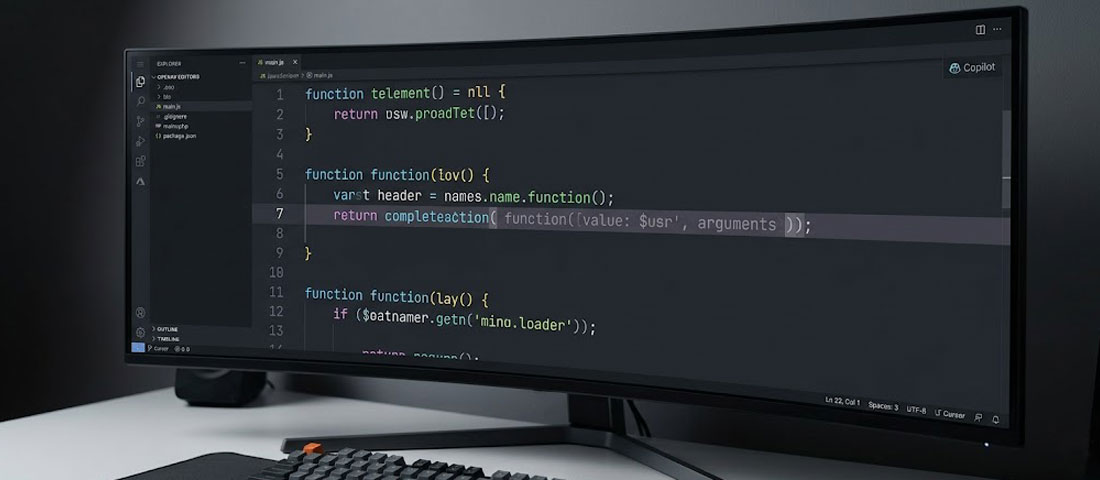
In 2024, a survey found that 82% of web developers were already using AI tools to write code. That number was striking at the time. In 2026, the more striking question is: what is the remaining 18% still waiting for?
What this guide covers
- 1. What AI Code Generators Actually Do — and How They Work
- 2. GitHub Copilot — The Pioneer, Still the Benchmark
- 3. Cursor — The AI-Native Editor Changing How Developers Think
- 4. Windsurf — The Fast-Rising Alternative
- 5. Other Serious Contenders
- 6. Head-to-Head Comparison: Which Tool for Which Developer?
- 7. How AI Code Generation Changes Web Development Workflows
- 8. The Limitations You Must Know Before Trusting AI Code
- 9. What’s Next: Where AI Code Generation Is Heading in 2027
- 10. Frequently Asked Questions About AI Code Generators
AI code generation has moved from a novelty — impressive but unreliable, useful for autocompleting lines but not for real work — to a genuine productivity multiplier that the best development teams have fully integrated into their daily workflow. Developers using AI coding tools are not doing the same work slightly faster. They are doing substantially different work: spending far less time on boilerplate and syntax, far more time on architecture and problem-solving, and shipping projects in timelines that would have been impossible without AI assistance.
This guide is a practical comparison of the leading AI code generators for web developers in 2026 — what each tool does, where it excels, where it falls short, how much it costs, and which is right for which type of developer and workflow. It also looks ahead at where this technology is going — because the tools that exist today will look limited compared to what is coming in the next 18 months.
What AI Code Generators Actually Do — and How They Work
AI code generators use large language models (LLMs) trained on vast amounts of code — public repositories, documentation, technical books, and other code sources — to predict and generate code based on context. When you start typing a function, the AI analyses what you have written, understands your intent from context (variable names, comments, surrounding code, file structure), and suggests the most likely completion. When you describe what you want in plain English, the AI translates that intent into working code.
The underlying models powering these tools are similar to (and sometimes identical to) the models behind ChatGPT and Claude — but fine-tuned on code-specific training data and integrated into development environments in ways that make them immediately useful rather than requiring you to switch to a chat interface.
The quality of AI code generation has improved dramatically with each model generation. Early tools (2021-2022) were useful for single-line completions and simple functions. Mid-generation tools (2023-2024) could generate complete functions and explain code. Current-generation tools (2025-2026) can understand entire codebase context, implement features across multiple files simultaneously, identify bugs through reasoning rather than pattern-matching, and generate code that requires minimal correction for common use cases.
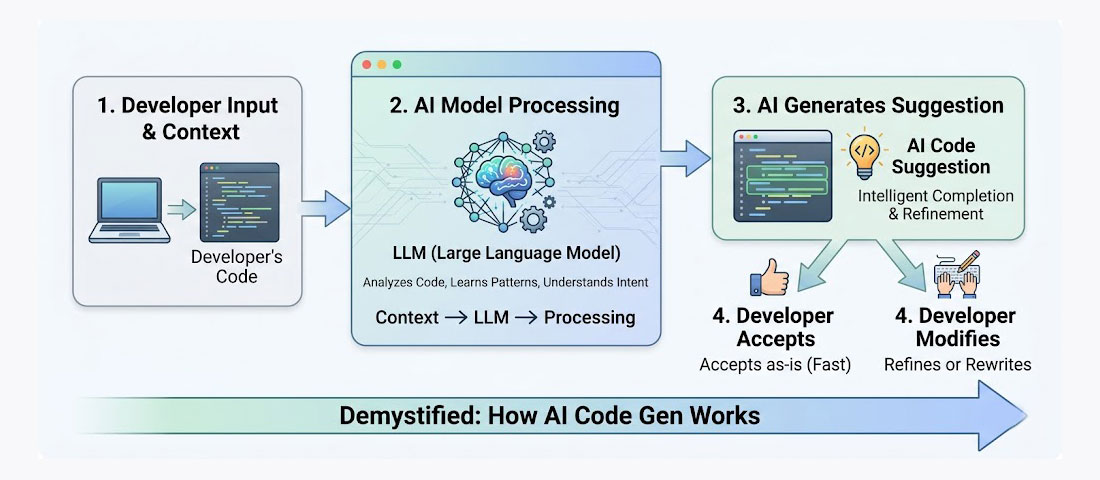
AI code generators work by processing the full context of your existing code — variable names, function signatures, comments, imported libraries — to predict and generate the most likely useful continuation.
GitHub Copilot — The Pioneer, Still the Benchmark
GitHub Copilot, launched in 2021 as a collaboration between GitHub and OpenAI, was the tool that established AI code generation as a serious development category rather than a curiosity. In 2026, having gone through multiple major model upgrades, Copilot remains the most widely used AI coding tool globally — primarily because of its distribution advantage (it is available directly inside VS Code, JetBrains IDEs, and Visual Studio, meaning developers encounter it without specifically seeking it out) and its enterprise features.
What Copilot Does Best
Inline code completion: Copilot’s ghost text suggestions as you type remain among the most natural and unobtrusive completion experiences available. It reads the surrounding code context and generates multi-line completions that often require minimal correction — particularly for common patterns like CRUD operations, API endpoint setup, form validation, and utility functions.
Copilot Chat: The Chat panel inside VS Code allows you to ask questions about your codebase, explain selected code, ask for refactoring suggestions, and generate new code from natural language descriptions — without leaving the editor. In 2026, Copilot Chat includes workspace context awareness, meaning it can answer questions that reference files across the entire project rather than just the open file.
GitHub integration: Copilot’s native integration with GitHub extends beyond the code editor. Copilot Autofix can suggest security vulnerability fixes directly in pull requests. Copilot for CLI helps with command line operations. Copilot in GitHub Mobile allows asking code questions from a phone. For teams already on GitHub, the platform integration is genuinely useful beyond just the autocomplete.
Enterprise security and compliance: GitHub Copilot Enterprise offers features critical for large organisations: the ability to exclude specific files or repositories from training, compliance with specific data residency requirements, and organisation-level policy controls over what Copilot can and cannot suggest.
Copilot’s Limitations
Copilot generates code that looks plausible and often works, but it does not always understand the broader architectural context of what you are building. It can suggest code that is technically functional but stylistically inconsistent with your codebase, uses patterns you have explicitly decided to avoid, or introduces dependencies you do not want. It works best as an accelerator of human intent, not a replacement for architectural understanding.
The suggestion quality drops noticeably for less common languages, frameworks, and use cases — it is excellent for JavaScript, TypeScript, Python, and PHP, and progressively weaker for niche languages and highly specialised frameworks.
Cost: $10/month for individual developers, $19/month for Business (team features), $39/month for Enterprise. Free tier available for verified students and open-source maintainers.
Cursor — The AI-Native Editor Changing How Developers Think
Cursor is not a plugin for an existing editor. It is a complete code editor — built on VS Code’s foundation, compatible with VS Code extensions and settings — reimagined from the ground up with AI as a first-class citizen rather than a bolt-on feature. In 2026, Cursor has become the preferred tool of a significant and growing segment of professional web developers, particularly those working on complex codebases where context across multiple files matters.
What Makes Cursor Different
Codebase awareness: Cursor’s most distinctive capability is its ability to reference and reason about entire codebases rather than just the open file. Ask Cursor to “add authentication to this route using the same pattern we use in the other authenticated routes” and it will read those other routes, understand the pattern, and implement it consistently. This cross-file context understanding is what separates Cursor from tools that generate plausible but contextually inconsistent code.
Composer (multi-file editing): Cursor’s Composer feature can implement a feature or fix across multiple files simultaneously — creating new files, modifying existing ones, and maintaining consistency across the changes. This is the closest thing currently available to delegating a feature implementation to an AI collaborator rather than asking for suggestions on individual lines.
Agent mode: Cursor’s Agent mode takes multi-file editing further — the AI can run terminal commands, read error messages, diagnose the problem, and attempt a fix, all in an autonomous loop until either the problem is resolved or it needs human input. For debugging complex build errors or integration problems, this dramatically reduces the back-and-forth between the developer and the AI.
Choice of model: Unlike Copilot’s tied-to-OpenAI approach, Cursor allows you to choose which underlying model powers your suggestions — GPT-4o, Claude 3.5/3.7 Sonnet, Gemini, and others. For developers who have found that different models excel at different tasks (Claude often preferred for code quality and reasoning, GPT-4o for speed), this flexibility is meaningful.
Cursor’s Limitations
Cursor’s more opinionated approach to AI integration means it is a heavier commitment than installing a plugin. Developers who have invested significantly in a specific IDE’s workflow and extensions may find the transition cost meaningful. Agent mode, while impressive when it works, can also go off in wrong directions on complex problems and require course correction that takes more time than doing the task manually from the start. The subscription cost is also higher than Copilot for comparable usage.
Cost: Free tier (limited completions), $20/month Pro (most developers’ needs), $40/month Business (team features and privacy controls).
Windsurf — The Fast-Rising Alternative
Windsurf (formerly Codeium’s editor product) has emerged as a serious Cursor alternative in 2026 — offering similar multi-file AI capabilities in a VS Code-based editor, with a free tier that is significantly more generous than Cursor’s and a pricing model that makes it accessible for individual developers who find Cursor’s $20/month difficult to justify for occasional use.
Windsurf’s Cascade feature — its equivalent of Cursor’s Composer/Agent — can plan and execute multi-step code changes with similar cross-file context awareness. The model quality is competitive for common web development tasks, and its free tier makes it the go-to starting point for developers trying AI-native editors for the first time.
Cost: Free tier (generous monthly limits), $15/month Pro, $35/month Teams.
Other Serious Contenders
Amazon Q Developer
Amazon’s AI coding assistant — formerly CodeWhisperer. Strong for AWS-related development (Lambda, CloudFormation, CDK), good for Python and Java. Includes security scanning that identifies potential vulnerabilities as you code. Free tier for individuals; $19/month for Pro. The natural choice for developers working primarily in the AWS ecosystem.
Tabnine
The privacy-focused AI code assistant — trained only on permissively licensed code, with an option to run models locally rather than in the cloud. Preferred by enterprises with strict data sovereignty requirements or developers who do not want their code sent to external servers. Quality is slightly behind Copilot for general use but the privacy model is genuinely differentiated. From $12/month.
Replit AI
Replit’s browser-based development environment with deeply integrated AI. The right tool for rapid prototyping, learning, and projects that benefit from Replit’s built-in hosting and deployment. Not a replacement for a professional local development environment but excellent for quick builds, demos, and educational use. AI features included in Replit Core ($25/month).
Claude Code
Anthropic’s terminal-based agentic coding tool. Runs in the command line with deep filesystem access — reads your codebase, makes changes across files, runs tests, and iterates. Particularly strong for larger refactoring tasks and complex debugging across a full project. Usage-based pricing through Anthropic’s API. Preferred by developers who prefer terminal-first workflows.
Head-to-Head Comparison: Which Tool for Which Developer?
| Developer Profile | Best Tool | Why |
|---|---|---|
| VS Code user, primarily JS/TS/PHP, wants the simplest entry point | GitHub Copilot | Native VS Code integration, lowest friction, strong for common web languages |
| Professional developer on complex multi-file projects | Cursor Pro | Cross-file context, Composer, Agent mode — the most powerful multi-file AI workflow |
| Developer wanting AI-native editor without Cursor’s cost | Windsurf | Similar capabilities to Cursor, more generous free tier, slightly lower Pro price |
| AWS-focused backend developer | Amazon Q Developer | Deep AWS service knowledge, security scanning, native AWS Console integration |
| Enterprise developer with strict data privacy requirements | Tabnine | Local model option, trained only on permissively licensed code, enterprise governance |
| JetBrains IDE user (PhpStorm, WebStorm, IntelliJ) | GitHub Copilot or JetBrains AI Assistant | Both have native JetBrains integration; Cursor and Windsurf are VS Code-based |
| Prototyping quickly, demos, learning | Replit AI | Browser-based, zero setup, instant hosting — ideal for fast throwaway builds |
| Developer who prefers terminal and large refactoring tasks | Claude Code | Terminal-native, deep filesystem access, excellent for large-scale code changes |
How AI Code Generation Changes Web Development Workflows
The most significant impact of AI code generation is not that it makes individual tasks faster — it is that it changes which tasks developers choose to do and how they approach problems. Here is what has actually shifted in professional development workflows in 2026.
Boilerplate Becomes Instant
Setting up a new project — initialising the framework, configuring routing, setting up middleware, creating the database schema, establishing authentication patterns — is largely boilerplate. Developers who know what they want to build but are slowed down by the typing and configuration of setting it up now delegate that entire setup to AI. What took 2 to 4 hours now takes 20 to 40 minutes — not because the developer is skipping understanding, but because the AI is doing the typing for work the developer already knows how to do.
The Documentation Loop Shortens Dramatically
Before AI code generation, implementing an unfamiliar library or API required reading documentation, finding examples, and translating those examples to your specific use case. AI tools dramatically compress this loop — “implement a Stripe webhook handler for subscription lifecycle events using our existing Node.js middleware pattern” produces working code that the developer validates against the documentation rather than writing from scratch after reading the documentation. The developer still needs to understand the code — but the AI reduces the gap between understanding and implementation.
Debugging Has a New First Step
Before describing a bug to a colleague or searching Stack Overflow, professional developers in 2026 increasingly describe the bug to their AI tool first. The AI can often identify the problem from the error message and surrounding code context, suggest a fix, and explain why the fix works — in seconds. This does not replace the need for human debugging skill, but it has moved AI to the first step in the debugging workflow for a large proportion of common bugs.
Code Review Has a New Layer
AI tools are increasingly used for a first-pass code review — asking the AI to review a pull request for security issues, performance anti-patterns, missing error handling, and consistency with codebase conventions — before human review. This does not replace human code review; it makes human review more focused on the higher-order questions (architecture, business logic correctness, long-term maintainability) rather than catching missing null checks and inconsistent error handling.
The Limitations You Must Know Before Trusting AI Code
This section is not optional reading. The productivity gains from AI code generation are real. So are the risks of using it without understanding its failure modes. Developers who trust AI code without review are introducing bugs, security vulnerabilities, and architectural problems into production systems.
AI Code Can Be Subtly Wrong
The most dangerous failure mode is not obvious errors — those are easy to catch. It is the subtly wrong code that looks correct, passes basic testing, and works in most circumstances but fails in edge cases or under specific conditions. AI models trained on code that includes bugs will sometimes generate code that includes similar bugs. The model does not know what your code is supposed to do — it predicts what code is likely to follow from the context you have provided.
Every line of AI-generated code requires the same review it would receive if a junior developer had written it. Do not review AI code more charitably because it came from an AI.
Security Vulnerabilities Are a Documented Risk
Research from Stanford and other institutions has documented that AI-generated code introduces security vulnerabilities at a concerning rate — one study found that 40% of AI-generated code samples contained security flaws. The vulnerabilities are not different from those human developers introduce, but the scale at which AI generates code means the absolute number of vulnerabilities introduced can be higher if review is insufficiently rigorous. For any code handling authentication, authorisation, user data, payment processing, or file uploads — apply extra scrutiny to AI-generated suggestions.
AI Does Not Understand Your Business Logic
AI code generators understand code structure and common programming patterns. They do not understand your specific business requirements, your specific data model constraints, your specific security requirements, or the specific edge cases in your application domain. A function that looks correct in isolation may be architecturally wrong for your specific application. The developer must bring the business context that the AI cannot infer from code alone.
Licence Concerns Are Not Fully Resolved
AI code generators are trained on public code repositories, including code under various licences. There is ongoing legal ambiguity — in courts in multiple jurisdictions — about whether AI-generated code can inadvertently reproduce copyrighted code fragments in ways that create licence compliance issues. For enterprise or commercially distributed software where licence compliance is critical, this remains a consideration. GitHub Copilot’s filter for public code duplication helps; it does not eliminate the concern entirely.
What’s Next: Where AI Code Generation Is Heading in 2027

The direction of travel: AI coding tools are evolving from suggestion engines to genuine development collaborators — capable of planning, implementing, testing, and iterating on features across entire codebases with decreasing human supervision at the execution level.
Fully Agentic Development Workflows
The current state is that AI tools suggest and generate code that developers accept, modify, or reject. The direction of travel is toward AI agents that can be given a higher-level task — “implement the password reset flow with email verification, following our existing authentication patterns” — and complete it end-to-end: writing the code, running the tests, checking for type errors, iterating on failures, and presenting the completed implementation for human review. This is already partially available in Cursor Agent and Claude Code; in 2027 it will be significantly more reliable and applicable to a broader range of tasks.
Codebase Understanding at Unprecedented Depth
Current AI coding tools have limited context windows — they can read a certain amount of code before their context fills up. Model improvements are extending this dramatically. Tools that can hold an entire large codebase in context simultaneously — understanding not just the file you are working on but the full architecture, the data model, the API contracts, and the historical decisions captured in commit history and documentation — will generate substantially more relevant and architecturally coherent code than current tools.
AI-Driven Testing and Quality Assurance
AI tools are beginning to generate tests rather than just implementation code — but current test generation is limited. The next generation will generate more comprehensive test suites, identify edge cases that human developers miss, run those tests automatically as code changes, and flag when implementation changes break existing test coverage. The feedback loop between implementation and testing will tighten significantly.
Natural Language Specifications Becoming Primary
The most speculative but directionally consistent trend: as AI code generation becomes more reliable and its code review tools more capable, the primary input to the development process may shift further from writing code toward specifying what the code should do, reviewing AI-generated implementations, and making architectural decisions. The developer’s competitive advantage will increasingly be: understanding systems, making architectural decisions, specifying requirements precisely, and knowing when AI output is right versus subtly wrong — rather than the ability to write syntax rapidly.
Frequently Asked Questions About AI Code Generators
| What is the best AI code generator for web developers in 2026? | The best AI code generator depends on your specific workflow and priorities. GitHub Copilot is the best choice for developers who want the lowest-friction entry point — it installs as a plugin in VS Code, JetBrains, and Visual Studio, and provides excellent inline suggestions for common web languages including JavaScript, TypeScript, PHP, and Python. Cursor is the best choice for developers working on complex, multi-file projects who want the most powerful cross-file context and multi-file editing capabilities available. Windsurf is the best choice for developers who want Cursor-like multi-file AI capabilities with a more generous free tier and lower Pro pricing. Amazon Q Developer is best for developers primarily working in the AWS ecosystem. No single tool is universally best — the right choice depends on your IDE preference, project complexity, privacy requirements, and budget. |
| Is GitHub Copilot worth the cost for a solo developer? | For most professional web developers, GitHub Copilot at $10/month is worth the cost. The time saving in boilerplate generation, documentation lookup reduction, and debugging assistance typically pays for itself within the first few hours of use per month. Research from GitHub found that Copilot users complete tasks 55% faster on average — even conservative estimates of productivity improvement produce a strong ROI at $10/month for any developer billing by the hour or working on multiple projects. The more productive question is not whether Copilot is worth $10/month (for most developers it clearly is) but whether a more powerful tool like Cursor at $20/month would produce proportionally more value for the additional cost — which depends on the complexity of the projects you work on. |
| What is Cursor and how is it different from GitHub Copilot? | Cursor is a complete code editor — built on VS Code’s foundation — reimagined with AI as a core feature rather than a plugin. The key difference from GitHub Copilot is Cursor’s cross-file context awareness and multi-file editing capability: Cursor can reference and reason about your entire codebase rather than just the open file, and its Composer feature can implement changes across multiple files simultaneously. Copilot generates inline suggestions as you type; Cursor can implement an entire feature end-to-end across multiple files based on a natural language description. Cursor also allows choosing between different underlying AI models (Claude, GPT-4o, Gemini) where Copilot is tied to OpenAI’s models. For developers on complex, multi-file codebases, Cursor’s additional capabilities typically justify its higher price. |
| Can AI code generators introduce security vulnerabilities? | Yes — research has documented that AI-generated code introduces security vulnerabilities at a concerning rate. One Stanford study found security flaws in approximately 40% of AI-generated code samples. The vulnerabilities are not different in type from those human developers introduce, but AI code generation can introduce them at scale if output is not rigorously reviewed. Security-sensitive code — authentication, authorisation, payment processing, file handling, SQL queries, and any code processing user-supplied data — deserves particular scrutiny when AI-generated. The mitigation is treating AI-generated code with the same (or more careful) review you would apply to code from a junior developer: assume it may have mistakes and verify it against your specific security requirements rather than trusting its plausible appearance. |
| Will AI code generators replace web developers? | AI code generators will not replace web developers in any near-term timeframe — but they are changing what makes developers valuable. The tasks that AI excels at — generating boilerplate, completing known patterns, translating documentation examples, suggesting fixes for common errors — are tasks that required time and typing but not deep expertise. The tasks that AI cannot do — understanding complex business requirements, making architectural decisions, identifying when generated code is subtly wrong for a specific context, managing client relationships, and solving genuinely novel problems — are tasks requiring human judgement, expertise, and accountability. The most valuable developers in 2026 are not the fastest typists; they are the most effective thinkers who use AI to eliminate the typing overhead and spend their time on the decisions that AI cannot make. Developers who refuse to engage with AI tools are at a competitive disadvantage; developers who use AI tools without maintaining their ability to reason about code are a security and quality risk. |
| What programming languages do AI code generators support best? | AI code generators perform best on languages with the largest volume of publicly available training data. For web development, this means: JavaScript and TypeScript (the strongest performance across all tools), Python (excellent), PHP (very good, particularly for WordPress and Laravel), HTML and CSS (very good for structure and common patterns), SQL (good for common query patterns), and Ruby (good). Performance is weaker for: highly specialised frameworks with smaller code corpora, very new languages or framework versions that postdate the training data, domain-specific languages, and proprietary or internal frameworks that are not represented in public training data. For standard web development stacks — React, Next.js, Node.js, Laravel, WordPress — current AI code generators provide strong, reliable assistance. |
| Is the code generated by AI tools free to use commercially? | AI-generated code is generally considered usable commercially — it is code you generate through your use of the tool, using the tool’s output as raw material that you integrate, review, and take responsibility for. GitHub Copilot includes a “public code filter” option that attempts to block suggestions that closely match publicly available code, reducing the risk of inadvertently reproducing code that might carry licence restrictions. The legal landscape around AI-generated code and copyright is still evolving — cases are working through courts in multiple jurisdictions. For most commercial web development work, the practical risk is low; for enterprise software where licence compliance is subject to formal audit, consult legal counsel about your specific use and your tool’s documentation on intellectual property policy. |

The AI-augmented developer: faster on implementation, more focused on architecture and problem-solving, and producing more with the same time — provided the AI output is always reviewed with appropriate scepticism.
Working With a Development Team that Uses the Latest AI Tools — and Knows When not to Trust Them?
Neel Networks’ development team integrates AI code generation tools into our workflows to deliver projects faster without compromising quality — with every line of AI-generated code reviewed by experienced developers before it ships. Talk to us about your next web development project.