Complete Web Hosting Guide 2026: Types, How to Choose & Performance Impact

Web hosting is the foundation that every website is built on — and yet it is one of the most frequently under-invested decisions in web projects. Businesses spend thousands on design and development, then save money by choosing the cheapest shared hosting available, and wonder why their website is slow, unreliable, or vulnerable to security issues.
What this guide covers
- 1. Types of Web Hosting Explained
- 2. How Hosting Directly Affects SEO and Core Web Vitals
- 3. Key Factors to Evaluate When Choosing Hosting
- 4. Best Hosting Providers by Category in 2026
- 5. Managed WordPress Hosting — Why It Matters for Business Sites
- 6. Shared Hosting vs Managed WordPress: The Real Cost Comparison
- 7. How to Migrate to a New Host Without Losing Rankings
- 8. Frequently Asked Questions About Web Hosting
In 2026, hosting quality directly affects three commercially significant outcomes: your website’s speed and Core Web Vitals scores (which affect both Google rankings and visitor conversion rates), your website’s uptime and reliability (which affects every visitor’s experience and your business’s credibility), and your website’s security posture (which affects your risk of data breaches, malware infections, and Google blacklisting). Getting hosting right is not a technical nicety — it is a business investment.
This guide covers everything you need to make a well-informed hosting decision: the different types of hosting and when each is appropriate, the key factors to evaluate, the best hosting providers by category, and how hosting performance directly affects your SEO and conversions.
Types of Web Hosting Explained
Web hosting comes in several fundamentally different architectures, each with different performance profiles, cost structures, and appropriate use cases. Understanding these differences is the starting point for any hosting decision.
Shared Hosting
Shared hosting is the entry-level hosting type: multiple websites (often hundreds) share a single physical server and its resources — CPU, RAM, and disk I/O are divided between all hosted sites on the same machine. When any website on the server receives a traffic spike or runs a resource-heavy process, all other sites on the same server experience performance degradation. This is known as the “noisy neighbour” problem.
Cost: ₹100 to ₹500/month or $3 to $15/month. The cheapest option by significant margin.
Performance: Highly variable. Acceptable for very low-traffic, non-business-critical websites. Frequently insufficient for business websites with any meaningful traffic or conversion requirements.
Best for: Personal blogs, very early-stage side projects, simple informational websites with very low traffic where performance is not commercially critical.
Not suitable for: Any business website where speed, reliability, and security matter commercially. eCommerce stores. Websites with significant organic traffic. Any WordPress site where poor performance would lose customers or rankings.
VPS (Virtual Private Server) Hosting
A VPS is a virtual machine with dedicated, guaranteed resources — a specific allocation of CPU, RAM, and storage — running on a physical server that may also host other VPS instances. Unlike shared hosting, your allocated resources cannot be consumed by other users on the same machine. You get the performance predictability of a dedicated server at a significantly lower cost, though VPS management requires technical knowledge unless you choose a managed VPS option.
Cost: ₹800 to ₹5,000/month or $20 to $100/month depending on resource allocation.
Performance: Significantly better than shared hosting. Consistent, predictable performance. Can be optimised for specific workloads.
Best for: Growing business websites with moderate traffic, developers who want server-level control, businesses that need specific software configurations not available on shared hosting, and eCommerce sites that have outgrown shared hosting.
Requires: Technical capability to manage server configuration, security, and software updates — or a managed VPS option where the provider handles this.
Dedicated Server Hosting
A dedicated server gives you exclusive use of an entire physical server — all resources are yours, no other users share the hardware. Maximum performance, maximum control, maximum cost.
Cost: $100 to $500+/month.
Performance: The highest available in traditional hosting. No resource contention, maximum throughput.
Best for: Very high-traffic websites, resource-intensive applications, businesses with specific compliance requirements that mandate physical server isolation, or large eCommerce operations with tens of thousands of daily transactions.
Not suitable for: Most small to medium business websites — the cost and management overhead is disproportionate to the requirements.
Cloud Hosting
Cloud hosting runs websites across a distributed network of virtual servers rather than a single machine. Resources are dynamically allocated based on demand — traffic spikes are handled automatically by scaling resources up; quiet periods reduce resource allocation and cost. Major cloud providers (AWS, Google Cloud, Microsoft Azure) underpin most cloud hosting products.
Cost: Variable — pay for what you use. Can be very cost-efficient for variable traffic patterns; can also become unexpectedly expensive without proper resource limits configured.
Performance: Excellent and scalable. Near-instant scaling to handle traffic spikes without the provisioning delays of traditional dedicated infrastructure.
Best for: Applications with variable traffic, businesses experiencing rapid growth, SaaS products, and any workload where automatic scalability without manual intervention is a requirement.
Managed WordPress Hosting
Managed WordPress hosting is a specialised hosting category optimised specifically for WordPress — with server-level WordPress caching, automatic WordPress core updates, WordPress-specific security hardening, daily backups, staging environments, and expert WordPress support included as standard. The management overhead of WordPress maintenance is handled by the hosting provider.
Cost: $25 to $300/month depending on provider and plan tier.
Performance: Typically the best-performing WordPress hosting available — server infrastructure is optimised specifically for WordPress workloads, and server-level caching dramatically reduces PHP execution requirements.
Best for: Any business WordPress website where performance and reliability matter, and where the business owner does not want to manage server-level WordPress configuration, updates, and security themselves. The premium over standard hosting is almost universally justified by the performance, reliability, and time savings.
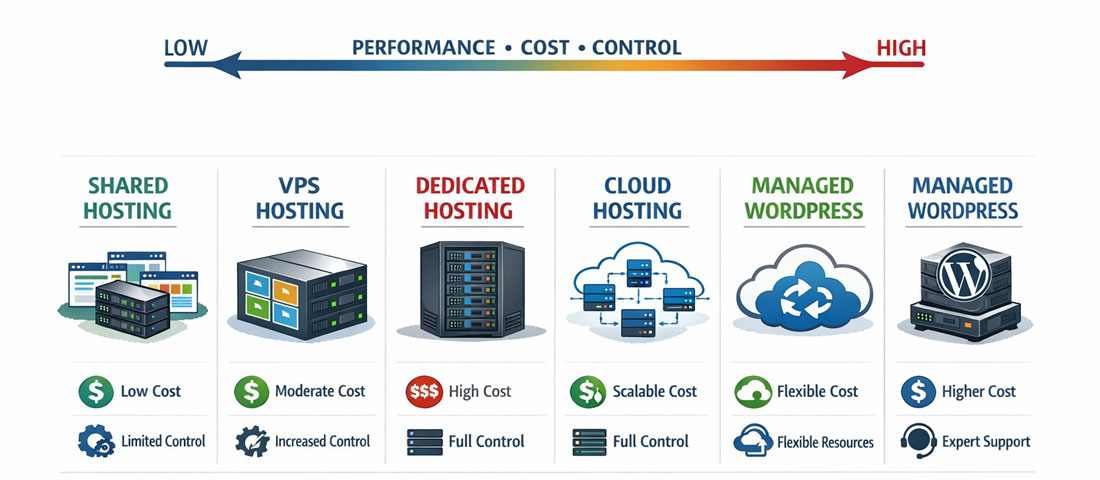
The five main hosting types sit on a spectrum of performance, control, and cost — the right choice matches your website’s requirements, technical capability, and budget.
How Hosting Directly Affects SEO and Core Web Vitals
The connection between hosting quality and SEO performance is direct and commercially significant — yet many businesses treat hosting as a cost to minimise rather than an investment in search visibility.
Time to First Byte (TTFB) and LCP
Time to First Byte — the time between a browser requesting a page and receiving the first byte of response from the server — is determined almost entirely by hosting quality. Poor hosting with slow server response times (TTFB above 800ms) is a direct drag on Largest Contentful Paint (LCP), one of Google’s three Core Web Vitals ranking factors. No amount of front-end optimisation (image compression, caching plugins, CDN) can fully compensate for a fundamentally slow server.
Quality managed WordPress hosts routinely deliver TTFB under 200ms. Cheap shared hosting frequently delivers TTFB of 1 to 3 seconds — putting a site in the “Poor” LCP range before a single image has loaded.
Uptime and Crawl Budget
Search engine crawlers (Googlebot) visit your website regularly to index new and updated content. When crawlers encounter server errors (500 errors, timeouts) due to unreliable hosting, they are unable to index your content — reducing your crawl budget efficiency and potentially removing previously indexed pages. Hosting that guarantees 99.9% uptime (maximum 8.7 hours downtime per year) provides the reliability that search engines expect from credible websites.
Server Location and Response Time
Hosting your website on a server physically located in the same region as the majority of your visitors reduces latency. A UK business hosting on a US server adds 100 to 200ms of latency for every UK visitor — latency that a CDN can mitigate but not entirely eliminate. Choose a hosting provider with data centres in your primary market, or use a CDN (like Cloudflare) to serve content from edge nodes close to visitors globally.
PHP Version and Software Stack
WordPress performance is directly affected by the PHP version running on the server. PHP 8.2 and 8.3 are significantly faster than PHP 7.4 — which is end-of-life but still running on many cheap hosting environments. A quality host runs current, actively maintained PHP versions. A cheap host may still be running outdated PHP because upgrading requires infrastructure investment that low-margin hosts avoid.
Key Factors to Evaluate When Choosing Hosting
-
Server response speed (TTFB)
Test prospective hosts using independent benchmarks (Hosting.Review, ReviewSignal’s WordPress hosting benchmarks) or ask for data centre location and server specifications. Managed WordPress hosts consistently publish their performance benchmarks. For WordPress specifically, look for providers that offer LiteSpeed or Nginx servers with object caching (Redis or Memcached) — these configurations deliver the fastest WordPress response times. -
Uptime guarantee and history
Look for a 99.9% or higher uptime guarantee backed by a Service Level Agreement (SLA) with financial remedies if uptime falls below the guarantee. More importantly, look for independent uptime monitoring data (UptimeRobot historical data published by hosting review sites) rather than the provider’s own claims. An honest host is transparent about historical uptime. -
Data centre location
Choose a host with data centres in or near your primary target market. For businesses serving the USA, a US-based server. For UK and European audiences, a UK or European server. For Australian audiences, an Australian or Singapore-based server. For Indian audiences, an Indian or Singapore-based server. If your audience is global, prioritise CDN integration over server location. -
WordPress-specific features (for WordPress sites)
For WordPress, look for: server-level caching (not just plugin-based caching), one-click staging environments, automatic daily backups with easy restore, automatic WordPress core updates with rollback capability, and WordPress-specific security hardening at the server level. These features are standard on managed WordPress hosts and absent or limited on generic shared hosting. -
Security infrastructure
Evaluate: DDoS protection, malware scanning and removal (ideally server-level, not just plugin-level), SSL certificate management, Web Application Firewall (WAF) options, and the host’s track record on security incidents and their response. A host that has experienced multiple serious security breaches without transparent communication is a risk signal. -
Support quality and availability
For business-critical websites, 24/7 support is not optional — websites go down at 2am and clients need resolution before business hours. Evaluate: support availability (24/7 vs business hours only), support channels (live chat, phone, ticket), average response times, and — most importantly — the technical depth of the support team. A host whose support team can troubleshoot WordPress database issues is more valuable than one that can only restart servers. -
Scalability path
Can you upgrade your hosting plan without migrating to a new host? A hosting provider with a clear upgrade path — from shared to VPS to dedicated or cloud — saves the cost and risk of platform migration as your website grows. Choose a provider whose plans can grow with your business.
Best Hosting Providers by Category in 2026
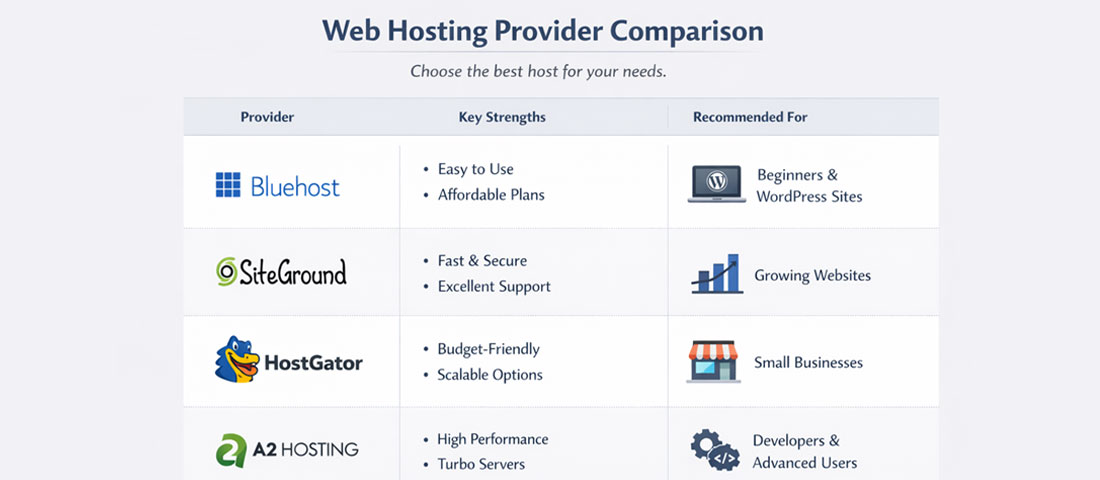
The right hosting provider for your business depends on your website type, traffic level, technical capability, and budget — there is no single universally correct answer.
| Provider | Type | Best For | Starting Price | Standout Feature |
|---|---|---|---|---|
| Kinsta | Managed WordPress | High-performance WordPress sites, agencies | $35/month | Google Cloud infrastructure, excellent TTFB |
| WP Engine | Managed WordPress | Business and enterprise WordPress | $25/month | Genesis Framework, robust staging, EverCache |
| Cloudways | Managed Cloud VPS | Developers and agencies wanting cloud flexibility | $14/month | Choice of cloud provider (AWS, GCP, DigitalOcean) |
| SiteGround | Managed Shared / Cloud | SMB WordPress sites, growing businesses | $2.99/month (promo) | SuperCacher, excellent support, daily backups |
| Hostinger | Shared / VPS | Budget-conscious sites, early-stage businesses | ₹99/month | LiteSpeed servers, good performance for price |
| DigitalOcean App Platform | Cloud | Developers, custom applications, Node/PHP apps | $5/month (droplets) | Developer-friendly, predictable pricing |
| AWS / Google Cloud | Enterprise Cloud | High-scale applications, enterprise workloads | Variable | Global infrastructure, unlimited scalability |
| Bluehost / HostGator | Shared | Personal websites, very early-stage projects | $3–5/month | Low cost, WordPress one-click install |
The Neel Networks recommendation for most business WordPress sites: SiteGround (StartUp or GrowBig plan) at the accessible end, or Kinsta or WP Engine for higher-traffic or business-critical sites. These three consistently top independent performance benchmarks, offer genuine WordPress expertise in their support teams, and provide the server-level caching, staging, and security features that business websites require. Avoid the very cheapest shared hosting for any website where performance, uptime, and security have commercial significance.
Managed WordPress Hosting — Why It Matters for Business Sites
The case for managed WordPress hosting over generic shared or VPS hosting for business WordPress websites is strong enough to address separately. The premium in monthly cost — typically $15 to $50 more per month than comparable generic hosting — is justified by several factors that generic hosting does not provide:
Server-Level Caching
Generic WordPress caching plugins (WP Rocket, LiteSpeed Cache) work at the PHP application level — they cache the rendered HTML output of WordPress pages and serve it instead of executing PHP on each request. Managed WordPress hosts implement caching at the server level, before PHP is even invoked — meaning cached pages are served by the web server itself (Nginx or LiteSpeed) rather than by WordPress. This is significantly faster: server-level cached pages can be served in under 50ms compared to 200 to 500ms for PHP-level cached pages.
Automatic WordPress Updates With Rollback
Managed WordPress hosts apply WordPress core updates automatically — often within hours of release for security patches. Critically, they do this on a staging environment first and only apply to production if the update does not break anything. And they maintain rollback capability, so a bad update can be reversed in minutes rather than requiring a manual restore from backup. This protection is not available with generic hosting.
WordPress-Specific Support
Generic hosting support teams handle thousands of different software configurations and typically have generalist knowledge. Managed WordPress host support teams know WordPress in depth — they can diagnose slow query issues in the database, troubleshoot plugin conflicts, advise on caching configuration, and resolve WordPress-specific security incidents. For non-technical business owners, this expertise eliminates the need for a developer for many common WordPress issues.
Staging Environments
Most managed WordPress hosts provide one-click staging environments — exact copies of your live website where you can test plugin updates, theme changes, or new features before pushing to production. On generic hosting, creating a staging environment requires technical setup. This capability prevents the common scenario of a plugin update breaking a live business website during business hours.
Shared Hosting vs Managed WordPress: The Real Cost Comparison
The apparent cost saving of cheap shared hosting compared to managed WordPress hosting frequently evaporates when the full cost picture is considered:
| Cost Factor | Cheap Shared Hosting (~$5/month) | Managed WordPress (~$35/month) |
|---|---|---|
| Monthly hosting fee (3 years) | ~$180 | ~$1,260 |
| Performance plugin (WP Rocket) | $59/year = $177 over 3 years | Included (server-level caching) |
| Backup plugin/service | $50–100/year = $150–300 over 3 years | Included (daily automated backups) |
| Security plugin (premium) | $99/year = $297 over 3 years | Largely included (server-level security) |
| Developer time for updates/issues | 3–5 hrs/year × $50/hr = $450–750 over 3 years | Largely eliminated by managed service |
| Lost conversions from slow performance | Unmeasured but real | Largely eliminated |
| Realistic 3-year total | ~$1,200–1,600+ | ~$1,260 |
How to Migrate to a New Host Without Losing Rankings
Migrating a website to a new host is a common source of anxiety — primarily because of the risk of downtime, broken functionality, or ranking impacts during the transition. With the right process, migration can be completed with zero downtime and no ranking impact:
-
Set up the new hosting account and migrate files before changing DNS
Most managed WordPress hosts provide migration plugins or migration services that copy your website to the new server without affecting the live site. Complete the full migration (files + database) on the new server and verify it works correctly using a temporary URL or by editing your local hosts file before touching DNS. -
Reduce DNS TTL before migration day
48 hours before you plan to change DNS, reduce your domain’s TTL (Time to Live) to 300 seconds (5 minutes). This ensures that once you change DNS, the update propagates globally within minutes rather than hours — minimising the window during which some visitors see the old server and others see the new one. -
Change DNS and monitor
Update your domain’s DNS records to point to the new hosting server. Monitor both the old and new server for traffic — most visitors should transition within 30 to 60 minutes with a short TTL. Keep the old hosting account active for at least 48 hours after DNS change as a fallback. -
Verify all functionality post-migration
After DNS propagation, test: all page loading correctly, forms submitting and delivering, SSL certificate working on the new server, redirects functioning, email (if hosted separately) unaffected. Check Google Search Console for any crawl errors that appear in the days following migration. -
Monitor Google Search Console for 2 to 4 weeks post-migration
Hosting migration done correctly has no negative impact on rankings — Google follows the same DNS as everyone else and continues indexing your pages on the new server seamlessly. If you see crawl errors or coverage issues in Search Console post-migration, investigate immediately.
Frequently Asked Questions About Web Hosting
| What type of web hosting is best for a small business website? | For most small business websites running WordPress, managed WordPress hosting is the best choice — it provides superior performance through server-level caching, automatic WordPress updates with rollback capability, daily automated backups, staging environments, and WordPress-expert support, all at a premium of $25 to $50/month over cheap shared hosting. When the true total cost of cheap shared hosting is calculated (adding plugin costs, developer time for issues, and the commercial cost of slower performance), managed WordPress hosting is often comparable or better value over a three-year period. For non-WordPress websites or custom applications, a managed cloud VPS (Cloudways) or entry-level cloud hosting (DigitalOcean) is typically the best balance of performance, control, and cost. |
| What is the difference between shared hosting and managed WordPress hosting? | Shared hosting places your website on a server alongside hundreds of other websites, sharing all server resources — performance is variable and can be degraded by other sites on the same machine. Managed WordPress hosting is purpose-built for WordPress: it provides dedicated or guaranteed resources, server-level WordPress caching (dramatically faster than plugin-based caching), automatic WordPress core and security updates, daily automated backups with point-in-time restore, staging environments for safe testing, WordPress-specific security hardening, and technical support from WordPress specialists. The monthly cost is higher, but the performance, reliability, and management overhead advantages typically make it the right choice for any business website where commercial outcomes depend on speed and uptime. |
| How does web hosting affect Google rankings? | Web hosting affects Google rankings in several direct ways. Server response time (TTFB) directly influences Largest Contentful Paint (LCP) — one of Google’s three Core Web Vitals ranking signals. Poor hosting with slow TTFB (above 800ms) puts a site in the “Poor” Core Web Vitals range regardless of front-end optimisation efforts. Hosting uptime affects crawl budget and index freshness — when Googlebot encounters server errors due to unreliable hosting, it reduces crawl frequency, slowing the indexing of new content. Server location affects response latency for visitors in your target market. And hosting security affects the risk of malware injection, which can trigger Google Safe Browsing blacklisting — removing the site from search results entirely until cleaned and cleared. |
| What is managed WordPress hosting? | Managed WordPress hosting is a specialised hosting service optimised specifically for WordPress websites. The hosting provider manages the server infrastructure, WordPress core updates, security hardening, caching configuration, and backups — allowing website owners to focus on their content and business rather than server administration. Key features typically included are: server-level caching for dramatically faster page load times, automatic WordPress and plugin update management with staging-first testing, daily automated backups with easy point-in-time restore, staging environments for safe testing of changes before going live, WordPress-specific malware scanning and removal, and technical support from WordPress specialists. Leading providers include Kinsta, WP Engine, SiteGround (GrowBig and above), and Cloudways. |
| How do I choose between VPS and shared hosting? | Choose VPS over shared hosting when: your website receives meaningful traffic (consistently above 1,000 to 2,000 monthly visitors), your website is commercially important enough that slow performance or downtime has real business cost, you need specific software configurations not available on shared hosting, or you are running resource-intensive applications (eCommerce stores, membership sites, complex web applications). Choose shared hosting only for: personal blogs and websites with very low traffic where performance is not commercially critical, side projects in their very earliest stages where budget is severely constrained, or non-business websites where occasional downtime or variable speed has no commercial consequence. For WordPress business websites, managed WordPress hosting is typically preferable to unmanaged VPS even at comparable cost — because the management overhead of VPS administration is handled by the provider. |
| What is website uptime and why does it matter? | Website uptime is the percentage of time a website is accessible and functioning correctly. 99.9% uptime means the website is unavailable for a maximum of 8.7 hours per year. 99% uptime means it could be unavailable for up to 87.6 hours per year — nearly four days. Uptime matters commercially because: every minute of downtime during business hours loses potential customers who cannot access your website; search engine crawlers that encounter your website down reduce crawl frequency and may deindex pages; downtime during marketing campaigns (paid ads, email sends) wastes advertising spend driving traffic to an unavailable site; and repeated downtime damages brand credibility and trust. Quality hosting providers guarantee 99.9% or higher uptime backed by SLA compensation. Very cheap hosting frequently fails to meet this standard. |
| Can I host my website in India for a UK or USA audience? | Yes — with the right CDN configuration. Hosting a website on a server based in India while serving a UK or USA audience will add 100 to 300ms of latency to every request due to physical distance — which is commercially significant for page speed and Core Web Vitals. The most effective solution is to use Cloudflare (free plan is sufficient for most business websites) as a CDN: Cloudflare caches your website’s static content (images, CSS, JavaScript) at edge nodes globally, serving content to UK or USA visitors from a server geographically close to them regardless of where your origin server is located. Dynamic content (personalised pages, checkout, login) still originates from the India server, but for a typical business website the majority of content is static and cacheable. A better long-term solution for businesses primarily targeting UK, USA, or Australian markets is to host on a server in those regions from the outset. |
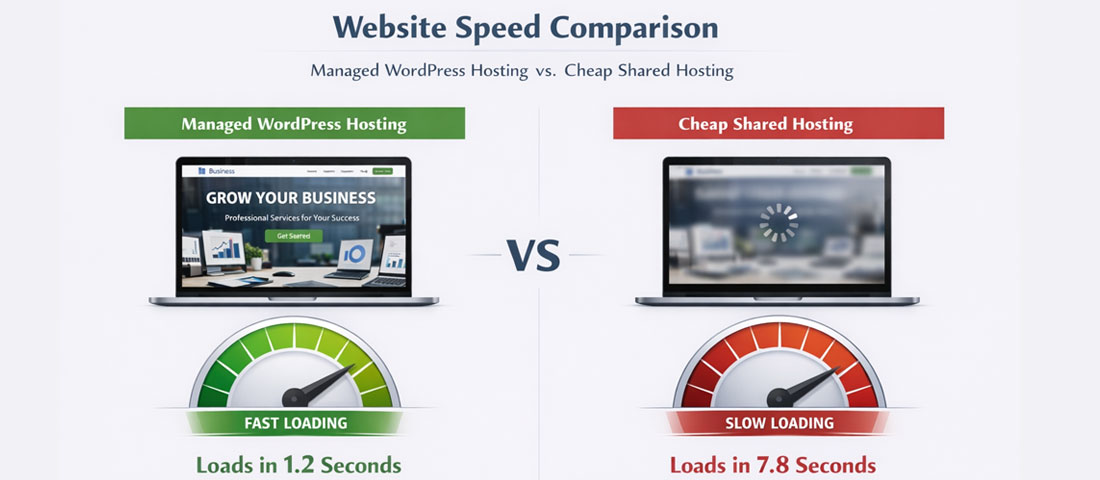
The performance difference between quality managed WordPress hosting and cheap shared hosting is immediately visible in real-world page load times — and directly measurable in Core Web Vitals scores and conversion rates.
Need help choosing or migrating to the right hosting for your website?
Neel Networks advises businesses on hosting selection and handles WordPress migrations to higher-performance servers — ensuring zero downtime, no ranking impacts, and a faster, more reliable website as the outcome. Based in Mumbai, serving clients across the USA, UK, Canada, Australia, and India.