React vs WordPress: When Each Actually Makes Sense
Every few months a business owner comes to us convinced they need to rebuild their WordPress site in React, usually because someone told them React is faster, more secure, and better for SEO. Two of those three claims are conditionally true and one of them is usually stated backwards. Meanwhile, other businesses stay on WordPress for years past the point where it stopped fitting what they were building, patching around limitations that a React application would have handled natively. Both mistakes come from the same place — treating React and WordPress as competitors on a single quality axis, where one is simply better, rather than as tools that solve genuinely different problems.
This is the honest comparison. We build in both — WordPress sites and React applications are both core parts of what we deliver — which means we have no particular incentive to push you toward either. If you want the wider view of how WordPress compares to the full CMS landscape, our complete WordPress and CMS platform comparison covers that ground. This article focuses tightly on the React-versus-WordPress question specifically: what each is actually good at, where the common arguments get the facts wrong, what each really costs, and how to tell which one your project needs.
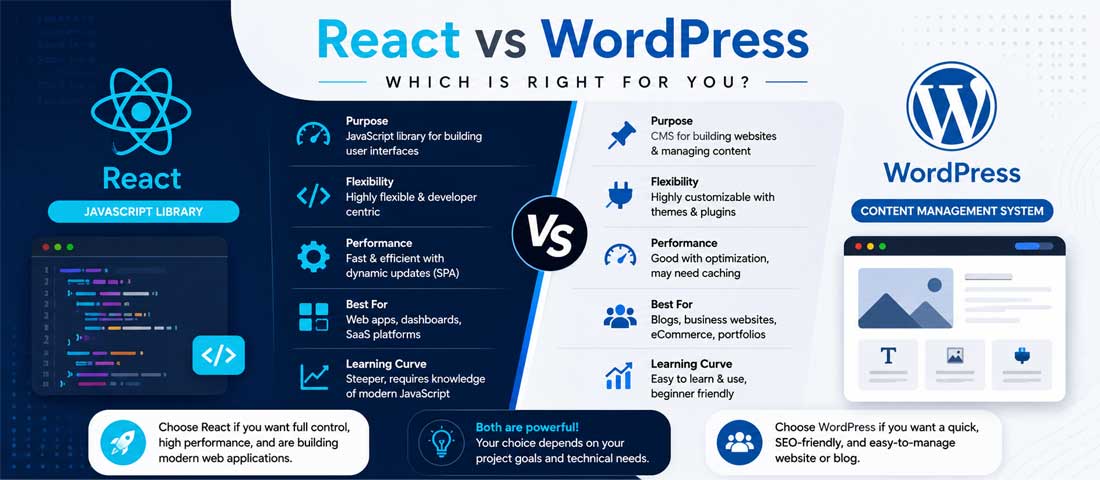
They are not actually the same category of thing
The first problem with most React-versus-WordPress comparisons is that they compare things that don’t sit at the same level of the stack. Getting this straight makes the rest of the decision much clearer.
WordPress is a content management system. It stores your content in a database, gives non-technical people an interface to create and edit that content, handles users and permissions, and renders public pages through a theme. It is a complete product — install it and you have a working website with an admin panel. Around 40% of the web runs on it, which means an enormous ecosystem of themes, plugins, hosting, and developers exists around it.
React is a JavaScript library for building user interfaces. It is not a website, not a CMS, and not a complete application. It renders components and manages interface state. It has no content editor, no database, no user management, no admin panel, and no opinion about where your content lives. Everything WordPress hands you by default, React expects you to build or source separately.
This asymmetry is why “should I use React or WordPress” is a slightly malformed question. The real question is closer to “should I build a content site on a CMS, or build a custom application with a JavaScript frontend?” And once phrased that way, the answer usually becomes obvious from what you’re actually building.
It also explains why React projects cost more. When you choose WordPress you inherit a solved content editing problem, a solved user management problem, and a solved publishing workflow. When you choose React, someone has to build or integrate all of that. That work is real and it shows up in the quote.
The SEO argument, and why it is usually stated backwards
The single most common claim in favour of React is that it’s better for SEO. As stated, this is false. With an important qualification, it becomes true. The qualification is the entire substance of the argument, and it’s the part that usually goes missing.
Everything depends on where your HTML is generated.
Client-side rendering (CSR) is what you get from a standard React setup — Create React App, Vite, a plain single-page application. The server sends a nearly empty HTML document containing a single empty div and a script tag. The browser downloads the JavaScript bundle, executes it, requests data from an API, and only then builds the visible page. A human with a modern browser sees a working site. A crawler that does not execute JavaScript sees an empty page.
Server-side rendering (SSR) means the server runs React, produces complete HTML with all the content in it, and sends that. React then attaches to the existing markup to make it interactive. Crawlers receive a full page — headline, body copy, links, meta tags — exactly as they would from WordPress. Next.js is the dominant framework for this.
Static site generation (SSG) generates the HTML once at build time and serves flat files from a CDN. It is the fastest option available and ideal for content that does not change per visitor — blog posts, service pages, documentation, case studies.
So the accurate version of the claim is this: a client-side rendered React site is worse for SEO than WordPress. A server-rendered or statically generated React site can be better than WordPress, mostly because of the speed advantage. Someone saying “React is better for SEO” without naming SSR or SSG either doesn’t understand the distinction or is glossing over it.
Why this matters more in 2026 than it did in 2022. Google renders JavaScript competently, so for Google alone, CSR is survivable if imperfect. But Google is no longer the only crawler that matters. The crawlers behind ChatGPT, Perplexity, Claude, and most AI retrieval systems fetch raw HTML and largely do not execute JavaScript. A CSR React site is close to invisible to them. If AI search visibility is part of your strategy — and for most businesses it should be by now — CSR is a genuine liability rather than a minor technical footnote. The broader technical foundations that determine crawlability are covered in our on-page and technical SEO guide, and the rendering decision sits upstream of nearly all of it.
The speed argument, honestly assessed
Speed is where React genuinely wins, but not for the reason people usually give, and not against a well-built WordPress site by as much as the marketing suggests.
What actually makes WordPress slow. A default WordPress page request runs PHP, queries MySQL several times, loads the theme and every active plugin, assembles the HTML, and returns it. On cheap shared hosting that produces a time to first byte of 400-800ms before the browser has received a single byte of content. Add a page builder like Elementor, fifteen plugins, and an unoptimised theme, and you get the four-second load times that give WordPress its reputation.
What a well-built WordPress site actually achieves. Quality hosting, server-level caching through Redis or Varnish, a lean theme, minimal plugins, and a CDN will get WordPress to a 100-200ms TTFB and a sub-2-second load. This is genuinely fast and entirely sufficient for the overwhelming majority of business websites. Most “WordPress is slow” complaints are really “my cheap hosting and thirty plugins are slow” complaints.
What statically generated React achieves. Pre-built HTML served from a CDN edge node has a TTFB around 50-100ms with no server computation at all. It is structurally faster because there is nothing to compute — the work happened at build time. On top of that, subsequent navigation within a React application does not reload the page, so moving between pages feels instant in a way that traditional page loads cannot match.
The honest summary: static React is faster than optimised WordPress, and dramatically faster than badly-hosted WordPress. But the gap between static React and well-built WordPress is smaller than the gap between well-built WordPress and badly-built WordPress. If your site is slow today, fixing hosting and plugin bloat will get you most of the available improvement at a fraction of a rebuild’s cost.
The security argument, honestly assessed
Security is the claim most often made carelessly in both directions, so it’s worth being precise about what is actually true.
WordPress’s real security problem is the plugin ecosystem. WordPress core is reasonably secure and well-maintained. The vulnerabilities that get sites compromised overwhelmingly come from plugins and themes — abandoned plugins that stop receiving patches, poorly-written plugins with injection flaws, nulled premium themes carrying backdoors. A site running twenty plugins has twenty codebases of varying quality in its trust boundary, and its security is set by the worst one.
WordPress’s other problem is that it is a target. Because it powers such a large share of the web, automated attack tooling specifically targets it. Every WordPress site on the public internet receives constant automated probing of wp-login.php, xmlrpc.php, and known plugin vulnerability paths. This is not a fault in the software so much as a consequence of its popularity, but the practical effect is real.
Where the “React is more secure” claim breaks down. React itself has no security posture — it’s a rendering library. A React application has a backend somewhere, and that backend has all the same categories of vulnerability any server-side code has: injection, broken authentication, exposed API keys, missing rate limiting, insecure direct object references. A badly-built React application with an unsecured API is considerably less safe than a well-maintained WordPress site behind Cloudflare with a hardened configuration.
Where React genuinely does have an advantage. A statically generated React site has no server-side code running on the public origin at all. There is no login form on the public site, no database reachable from the internet, no plugin code executing on request. The public attack surface is a file server delivering static assets. That is a genuinely smaller surface than any dynamic CMS presents, and it is the one form of the security argument that holds up under scrutiny.
So: React is not inherently more secure. Static React deployment is structurally more secure. Those are different claims, and only the second one is defensible.
The comparison, factor by factor
The table below covers the dimensions that actually drive the decision, with honest assessments rather than marketing positions on either side.
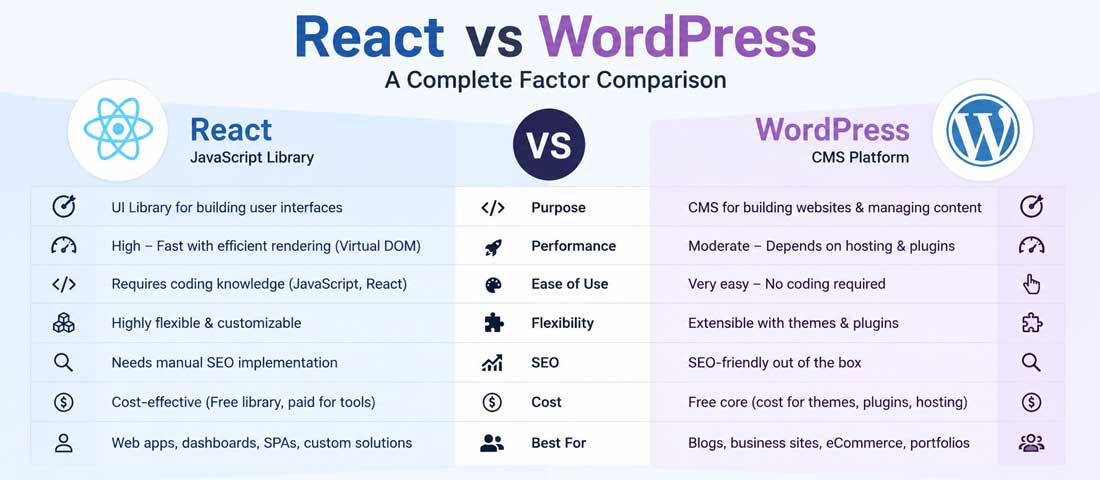
| Factor | WordPress | React (CSR) | React (SSR/SSG) |
|---|---|---|---|
| Content editing by non-developers | Excellent — built in | None without a separate CMS | None without a separate CMS |
| Crawlable HTML for search engines | Yes, by default | No — requires JS execution | Yes, by default |
| AI crawler visibility | Good | Poor | Good |
| Typical TTFB | 100–800ms (hosting-dependent) | 50–150ms (shell only) | 50–150ms |
| In-app navigation feel | Full page reloads | Instant | Instant after first load |
| Public attack surface | Larger — plugins, login, database | Depends on backend | Minimal for static output |
| Build cost (brochure/content site) | $1,500 – $15,000 | $8,000 – $40,000 | $10,000 – $50,000 |
| Ongoing maintenance | Updates, plugin patching | Dependency updates, dev time | Dependency updates, dev time |
| Talent availability | Very high | High but costlier | High but costlier |
| Best suited to | Content and marketing sites | Dashboards, internal tools | Content-heavy apps, hybrid products |
The row worth sitting with is the first one. Content editing by non-developers is where WordPress’s advantage is not close, and it is the factor most often underweighted in these decisions. A marketing team that can publish a landing page on Tuesday afternoon without filing a ticket is worth a great deal operationally, and rebuilding in React without replacing that capability is how businesses end up with beautiful sites nobody can update.
Where WordPress is genuinely the right answer
Being specific matters more than being balanced here. Six situations where WordPress is not a compromise but the correct technical choice.
Content-led marketing sites. Blogs, resource libraries, service pages, case studies — sites whose primary job is publishing and being found. WordPress was built for exactly this, and the entire publishing workflow around it is mature in a way that no React equivalent matches out of the box.
Any site where non-technical people need to publish. If your marketing team, your office manager, or you personally will be adding pages and posts, WordPress removes a dependency on developers that would otherwise be permanent. This single factor decides a large share of these projects on its own.
Projects with modest budgets. A well-built WordPress business site runs $1,500 to $15,000 depending on complexity and design ambition. The equivalent React build starts around $8,000 and rises quickly. If the budget cannot absorb that difference, the decision is already made.
Sites that depend on ecosystem functionality. Membership systems, LMS platforms, event booking, multilingual content, forms with complex logic, and eCommerce through WooCommerce all exist as mature WordPress plugins. Rebuilding any of them in React is months of work to reach parity with something you could install this afternoon.
Projects needing to launch quickly. WordPress gets to a live, working, editable site faster than any custom stack. When time to market matters more than architectural elegance, this is decisive.
Businesses without ongoing development capacity. A React application needs a developer available for changes indefinitely. WordPress can be maintained by a support arrangement and edited by the business itself. For companies that don’t want a standing technical dependency, this is the difference between a site they own and a site they rent access to. This is why the bulk of business sites we deliver are built as WordPress development engagements — for the majority of business use cases, it is the technically correct answer, not the budget one.
Where React is genuinely the right answer
Equally specific in the other direction. Six situations where WordPress is the wrong tool and React earns its cost.
Application-like interfaces with complex state. Dashboards, analytics tools, project management interfaces, anything where the screen changes constantly in response to user actions without full page reloads. This is what React was built for, and forcing it into WordPress produces a fragile mess of plugins and custom code.
Real-time and highly interactive features. Live collaboration, chat, notifications, streaming data, interactive visualisations, configurators with many interdependent options. React’s state model handles this natively; WordPress fights you the entire way.
SaaS products and customer portals. Anything where users log in and interact with their own data — account dashboards, subscription management, usage analytics, document workspaces. These are applications wearing a website’s clothing, and they should be built as applications.
Products sharing a codebase with a mobile app. If a React Native mobile app is part of the plan, building the web frontend in React lets you share logic, types, and often components. That shared surface is a genuine ongoing saving.
Interfaces consuming multiple APIs. Products that pull from several backend services, third-party integrations, and internal microservices are far cleaner in React than in a CMS whose data model assumes posts and pages.
Highly custom interactions that no plugin will ever cover. When the interface is the product — a design tool, a builder, a simulator, a bespoke workflow — plugin-based approaches will always be an approximation. This is where MERN stack development is the right starting point rather than a CMS you’ll spend the project fighting.
The seven-question decision framework
Work through these in order. The answer usually becomes clear within the first three or four.
-
Who will update the content, and how often?
If non-technical people need to publish regularly, WordPress wins decisively unless you’re prepared to pair React with a headless CMS and pay for both. If content is largely static and changes go through a developer anyway, this factor stops mattering and the decision moves to the questions below. -
Is this primarily content, or primarily functionality?
Count the screens. If most of what you’re building is pages that present information, that’s a content site. If most of it is interfaces where users manipulate data, that’s an application. Mixed projects should be honest about the ratio — a site with one interactive calculator is still a site. -
How much interactivity does the interface genuinely need?
Not “would interactivity be nice” but “does the product fail without it”. Accordions, sliders, and filtered lists are well within WordPress’s reach. Multi-step state that persists across views, real-time updates, and complex conditional interfaces are not. -
What is the realistic budget, including year two?
React’s cost difference is not only in the build. It continues through maintenance, since every change needs a developer. Budget the three-year cost rather than the launch cost — for a content site, WordPress usually wins that comparison by a wide margin, and for an application, React usually justifies it. -
How important is organic search and AI visibility?
If this is a primary acquisition channel, either choose WordPress or commit specifically to SSR/SSG React through Next.js. Do not build a client-side rendered site and expect search to work. This is the single most expensive mistake available in this decision. -
Will there be a mobile app sharing this codebase?
If yes, React’s shared-code advantage is real and worth weighting heavily. If no, this factor drops out entirely. -
Do you have ongoing development capacity, in-house or contracted?
A React application without a developer relationship becomes unmaintainable within a year — dependencies age, security patches go unapplied, and small changes become impossible. If you cannot commit to that relationship, choose the tool that doesn’t require it.
Not Sure Which one Your Project Actually Needs?
We build in both, which means we have no reason to push you toward either. Send us what you’re planning and we’ll tell you honestly which approach fits — including when the answer is the cheaper one. Most of these decisions become obvious once someone asks the right four or five questions about the project.
The middle path most people don’t know about
The framing of this decision as binary is itself part of the problem. Several architectures combine both tools, and for a meaningful share of projects one of them is the correct answer.
Headless WordPress with a React frontend. WordPress keeps the admin panel, editor, and database. It stops rendering pages and instead exposes content through its REST API or a GraphQL endpoint. Next.js pulls that content and renders static or server-rendered pages served from a CDN. Editors keep the interface they know; visitors get static-site speed; the WordPress install can sit behind authentication where automated attacks can’t reach it. The trade-off is two systems to maintain and the loss of most frontend-rendering plugins, including page builders.
React components inside a WordPress site. The site is a normal WordPress build, but specific interactive features — a configurator, a pricing calculator, a booking interface, a filtered product explorer — are React applications mounted into individual pages. You get WordPress’s publishing workflow everywhere it matters and React’s interactivity exactly where you need it, without rebuilding anything.
Separate systems on separate paths. The marketing site runs on WordPress at the root domain. The application runs in React at app.yourdomain.com. Each tool does the job it’s good at, neither compromises for the other, and the two can be built and maintained on different schedules. For businesses with both a content presence and a product, this is very often the cleanest answer, and it’s a common shape for the custom website development work we deliver for product companies.
What each actually costs, over three years
Launch price is the number people compare and the least useful one. The three-year picture is what determines whether a decision was sound.
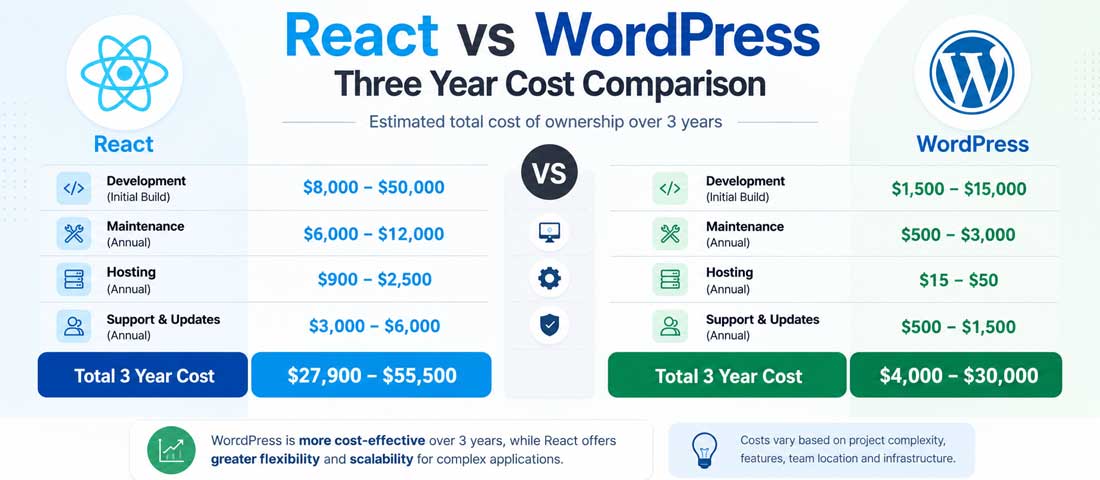
WordPress, typical business site. Build $1,500-15,000 depending on design ambition and functionality. Hosting $15-50 per month for quality infrastructure. Maintenance $50-300 per month for updates, backups, and security monitoring. Content updates: free, because the business does them. Small feature additions often achievable through existing plugins. Three-year total commonly lands between $4,000 and $30,000.
React, equivalent site. Build $8,000-50,000 depending on complexity and whether a headless CMS is included. Hosting $0-50 per month, since static output can run on generous free tiers at low volume. Maintenance is developer time rather than a support plan — dependency updates, security patches, framework version migrations. Content updates require either a headless CMS (adding $0-500 per month depending on the choice) or developer involvement for every change. Three-year total commonly lands between $15,000 and $80,000.
Where the difference actually comes from. Not hosting — that’s roughly a wash. The gap is initial build cost and the ongoing cost of needing a developer for changes that WordPress would have let the business make itself. For a site updated weekly by a marketing team, that ongoing difference compounds substantially over three years. For a site that changes rarely, it barely registers.
This is why the honest answer for content-led business sites is usually WordPress, and why the honest answer for products is usually React. The cost structures match the usage patterns.
The mistakes that make this decision expensive
Most bad outcomes here come from a handful of repeated errors rather than from genuinely close calls going the wrong way.
- Building a content site as a client-side rendered React app. The single most expensive error available. Search and AI crawlers see an empty page, organic traffic never materialises, and the fix is a rebuild with SSR.
- Rebuilding in React to fix a speed problem caused by hosting. Diagnose before you rebuild. Cheap hosting and plugin bloat cause most WordPress slowness, and both are far cheaper to fix than a new build.
- Removing the client’s ability to edit their own content. Migrating from WordPress to React without replacing the editing layer turns every copy change into a support ticket. Businesses notice this within weeks and resent it for years.
- Choosing React because it sounds more modern. Framework fashion is not a business requirement. The stack should follow from what you’re building, not from what reads well in a board deck.
- Choosing WordPress for something that is clearly an application. The mirror error. Building a complex interactive product on WordPress produces a plugin-dependent system that gets more fragile with every feature.
- Ignoring the maintenance relationship a React build requires. Dependencies age fast in the JavaScript ecosystem. A React site with no developer attached is technical debt accumulating quietly until something breaks.
- Assuming React is automatically more secure. Static deployment is more secure. An application with a poorly-built API is not. Know which one you’re actually getting.
- Treating it as binary when a hybrid fits better. Headless WordPress, embedded React components, and separate systems on separate subdomains all exist and often fit better than either pure approach.
- Comparing launch cost instead of three-year cost. The ongoing cost of developer-dependent content changes is where the real difference lives, and it’s invisible in a build quote.
- Not asking who will maintain this in two years. The answer determines more about the right choice than any technical factor on the list. Related decisions about build partners are covered in our comparison of AI website builders versus web design agencies, which deals with the same underlying question of who owns the thing after launch.
How this compares to the other options on the table
React and WordPress are rarely the only two candidates in a real decision. Placing them against the wider field helps.

Webflow sits between the two — visual design control beyond what most WordPress themes allow, hosted infrastructure, decent editing for non-developers, but a ceiling on custom functionality and ongoing platform fees. Good for design-led marketing sites, limiting for anything with unusual logic.
Shopify is not really in this comparison unless you’re selling products, in which case it usually beats both for pure commerce. The comparison becomes relevant when a content presence needs to sit alongside the store.
Squarespace and Wix occupy the tier below WordPress — faster to launch, less flexible, fine for small brochure sites and constraining for anything that grows. They rarely compete with React for the same project.
Astro and other modern static frameworks deserve a mention as a genuine alternative to React for content sites. They ship far less JavaScript, render to static HTML by default, and are often the better technical answer when the requirement is “fast content site” rather than “interactive application”. The fuller platform comparison including these options is in our piece on WordPress versus Webflow versus a custom build.
When to bring in help with this decision
Most of the time the framework above resolves it. A few situations genuinely warrant outside input before committing.
Get a second opinion when the project sits genuinely on the boundary — a marketing site with substantial interactive functionality, or a product with a significant content requirement. These are the cases where the wrong call is expensive and the right call is not obvious from the outside. Get help when you’re being told to migrate and the reasoning is vague — “React is more modern” is not a technical argument, and someone should be able to name the specific constraint you’re hitting. Get help when the budget is tight enough that a wrong choice can’t be corrected, since a $30,000 mistake is survivable for some businesses and fatal for others. And get help when nobody involved has built in both, because architecture decisions made by people with experience in only one option tend to land on that option regardless of fit.
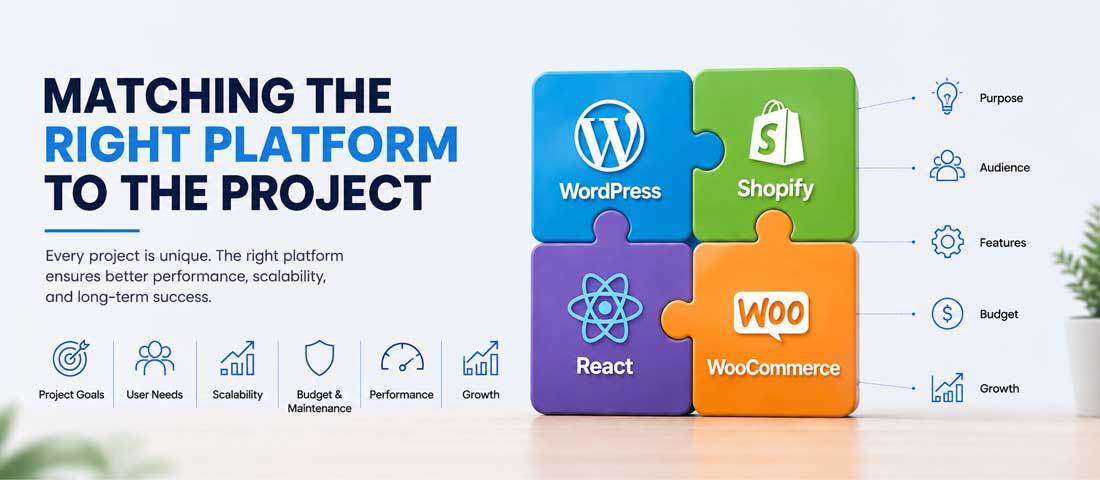
The honest summary is that React and WordPress are not competing for the same job, and most of the confusion in this decision comes from treating them as though they are. WordPress is the better answer for content-led business websites, for anything a non-technical team needs to update, for projects with constrained budgets, and for functionality that mature plugins already solve. React is the better answer for applications, for interfaces with genuine state complexity, for products sharing a codebase with a mobile app, and for anything where the interface is the product rather than a wrapper around content. The SEO argument that so often drives these conversations is only valid for server-rendered or statically generated React, and is actively false for the client-side rendering that a default React setup produces — a distinction that matters more every year as AI crawlers that don’t execute JavaScript become a larger share of how businesses get discovered. The speed argument is real but smaller than claimed against well-built WordPress, and most slow WordPress sites are suffering from hosting and plugin problems that cost a fraction of a rebuild to fix. The security argument holds only for static deployment, not for React as such. And for a meaningful share of projects the right answer is neither pure option but a hybrid — headless WordPress feeding a React frontend, React components embedded in WordPress pages, or two systems running side by side on separate paths. The businesses that get this decision right are the ones asking what they are actually building and who will maintain it, rather than which technology sounds more current.
Frequently asked questions
| Is React better for SEO than WordPress? | Only when it is server-rendered or statically generated. A standard client-side rendered React application sends crawlers a nearly empty HTML document and relies on JavaScript execution to build the page — which Google handles adequately but Bing, ChatGPT’s crawler, Perplexity, and most AI retrieval systems largely do not. For those, a CSR React site is close to invisible. With Next.js using SSR or SSG, React sends complete HTML like any traditional site does, and its speed advantage can then make it modestly better than WordPress for search. So the accurate statement is that SSR/SSG React can beat WordPress for SEO, and CSR React reliably loses to it. Anyone making the claim without naming the rendering strategy is skipping the part that determines the answer. |
| Should I migrate my WordPress site to React? | Usually not, and particularly not if the motivation is speed. Slow WordPress is nearly always caused by cheap hosting, plugin bloat, or a heavy page builder — all of which cost a fraction of a rebuild to fix and deliver most of the available improvement. Diagnose first: move to quality hosting, cut plugins to what you actually need, replace a page builder with a lean theme, add a CDN, then measure again. Migration makes genuine sense when your requirements have changed rather than degraded — when you now need application-like interactivity, a customer portal, real-time features, or a shared codebase with a mobile app. It also usually means giving up self-service content editing unless you pair React with a headless CMS, which is a significant operational loss that businesses tend to underestimate until they’re living with it. |
| Can you use React and WordPress together? | Yes, in three established patterns. Headless WordPress keeps the admin and database but exposes content through the REST API or GraphQL, with Next.js rendering the public site — editors keep their familiar interface while visitors get static-site speed. Embedded React components leave the site as normal WordPress but mount React applications into specific pages for genuinely interactive features like configurators, calculators, or booking interfaces. Separate systems run a WordPress marketing site at the root domain and a React application at a subdomain, each doing what it does well without compromise. For projects that are genuinely both a content site and a product, one of these hybrids is very often a better answer than choosing either tool exclusively. |
| Is React more secure than WordPress? | Not as a framework — React is a rendering library with no security posture of its own. A React application still has a backend, and that backend can have injection flaws, weak authentication, exposed API keys, or missing rate limiting exactly as any server-side code can. What is genuinely true is that a statically generated React site has no server-side code running on the public origin: no login form, no reachable database, no plugin code executing on request. That is a structurally smaller attack surface than any dynamic CMS presents. WordPress’s real weakness is the plugin ecosystem, where a single abandoned or poorly-written plugin sets your security ceiling. A hardened WordPress site behind Cloudflare with a minimal plugin count is considerably safer than a carelessly-built React application with an unsecured API. |
| How much more does a React site cost than WordPress? | Typically two to four times more at build, and the gap widens over three years. A well-built WordPress business site runs $1,500-15,000; an equivalent React build runs $8,000-50,000 depending on complexity and whether a headless CMS is included. Hosting is roughly a wash. The larger ongoing difference is that WordPress lets the business make its own content changes for free, while a React site without a headless CMS requires developer time for every update. For a site a marketing team updates weekly, that compounds significantly. Three-year totals commonly land around $4,000-30,000 for WordPress and $15,000-80,000 for React. The cost is justified when you’re building an application; it is hard to justify for a content site that WordPress would serve equally well. |
| What is the difference between CSR, SSR and SSG? | They describe where your HTML gets generated. Client-side rendering sends a nearly empty page and builds it in the browser after JavaScript loads — fast for navigation between pages, poor for crawlers that don’t execute JavaScript. Server-side rendering runs React on the server for each request and sends complete HTML, which React then makes interactive; crawlers get a full page and content can be personalised per request. Static site generation builds the HTML once at deploy time and serves flat files from a CDN, which is the fastest option available and ideal for content that doesn’t vary by visitor — blog posts, service pages, documentation. Next.js supports all three and lets you choose per route, which is why it dominates serious React web projects. For content sites, SSG is nearly always the right default. |
| Which one is better for a business website? | WordPress, for most business websites, most of the time. The typical business site is content-led — service pages, a blog, case studies, contact forms — and its success is measured in search visibility and conversions rather than in-app interactivity. WordPress handles that natively, lets non-technical staff publish without developer involvement, costs meaningfully less to build and maintain, and has mature solutions for nearly every common requirement. React becomes the better answer when the site is really an application in disguise: a customer portal, a dashboard, a configurator, a SaaS product. The useful test is whether people primarily read your site or primarily do things on it. Reading means WordPress. Doing means React. If it’s genuinely both, run both rather than compromising either. |
Want an Honest Recommendation for Your Specific Project?
We build WordPress sites and React applications both, which means our recommendation follows your requirements rather than our capabilities. With 12+ years of experience and over 2,500 websites delivered, we’ve made this call across enough projects to know where each one genuinely fits — and to tell you when the cheaper option is the right one. Send us your project details and we’ll respond within one business day with a straight answer on which approach fits and why.